
What Is Production Scheduling? Definition, Steps and a Worked Example
 User Solutions Team
Production scheduling is the process of deciding which job runs on which machine or work center, when each operation starts and finishes, and in what order, so that orders ship on time without loading any resource beyond the hours it really has. It is where a plan turns into work the shop floor can execute, and it is the job production scheduling software exists to do.
Whether you run a five-machine job shop or a 200-station plant, the questions are the same every day: what should run where, when, and in what order? This guide explains the definition, how scheduling differs from planning, the steps, the main methods, and a worked example that shows why the order you run jobs in matters as much as the capacity you have.
The four questions a production schedule answers
- What needs to be produced, and for which order?
- Where does each operation run: which machine, work center or operator?
- When does each operation start and finish?
- In what order do jobs run on each resource?
A schedule that answers all four has to respect the constraints of a real shop:
- Routings: the sequence of operations each part follows, where one operation cannot start before the previous one finishes
- Finite capacity: a machine can run one job at a time, for the hours it is actually staffed
- Setup and changeover times: time lost switching a machine from one job to the next
- Material availability: a job cannot start before its material arrives
- Labor and skills: not every operator can run every machine
- Tooling and fixtures: secondary resources that limit what can run at the same time
The output is usually a Gantt chart or a dispatch list per work center that tells each operator what to run next.
Production scheduling vs production planning
The two are often confused, but they work at different levels of detail:
| Production planning | Production scheduling | |
|---|---|---|
| Question | What, how much, by when? | Which machine, what order, what time? |
| Time buckets | Weeks or months | Hours, shifts or days |
| Capacity view | Total hours per period | Each operation placed in sequence |
| Typical outputs | Master production schedule, MRP orders | Gantt chart, dispatch lists, promise dates |
Planning comes first; scheduling makes the plan executable. For the full comparison, see production scheduling vs production planning.
How production scheduling works, step by step
Step 1: Gather demand
Open sales orders, work orders and forecast come in, usually from an ERP or MRP system, each with a quantity, a routing and a due date.
Step 2: Define resources and calendars
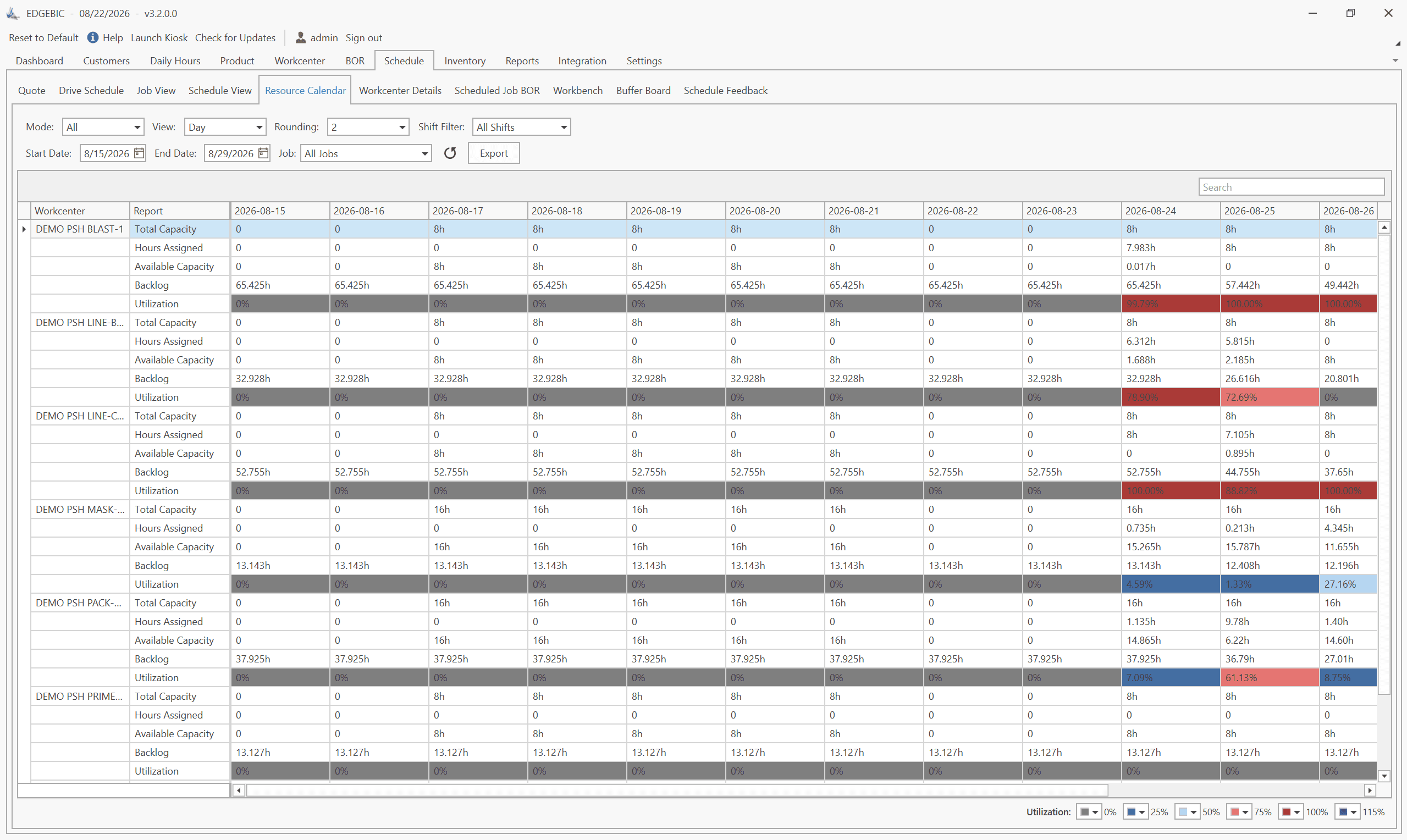
Every machine, work center and labor pool gets a capacity profile: hours per shift, shift pattern, planned downtime and holidays.
Step 3: Load operations against capacity
Each operation is placed on its resource with its run time and setup time. Finite capacity scheduling respects that a resource can only do one thing at a time; infinite capacity loading simply stacks the hours and shows the overload. See finite vs infinite capacity planning.
Step 4: Sequence the work
A sequencing rule or an optimizer decides the order jobs run in on each resource. Common rules are in the table below.
Step 5: Review, adjust and publish
The scheduler checks late jobs and overloaded resources, moves jobs where it makes sense, and publishes the schedule to the floor.
Step 6: Monitor and reschedule
Breakdowns, late material, quality holds and rush orders change the picture. Actual progress is fed back and the schedule is refreshed, usually once a day and whenever something significant changes.
A worked example: five jobs, one machine, three rules
Five jobs are waiting for the same machine, all ready to start now. Hours are counted from now.
| Job | Run time (hours) | Due (hours from now) |
|---|---|---|
| A | 6 | 8 |
| B | 2 | 6 |
| C | 8 | 18 |
| D | 3 | 15 |
| E | 5 | 10 |
The machine has exactly 24 hours of work in front of it whatever order the jobs run in. What changes is when each job finishes:
| Rule | Sequence | Late jobs | Total lateness | Worst job | Average completion |
|---|---|---|---|---|---|
| FIFO (first in, first out) | A, B, C, D, E | 3 | 20 hours | E, 14 hours late | 14.6 hours |
| EDD (earliest due date) | B, A, E, D, C | 3 | 10 hours | C, 6 hours late | 12.6 hours |
| SPT (shortest processing time) | B, D, E, A, C | 2 | 14 hours | A, 8 hours late | 11.4 hours |
Three lessons come out of this small example:
- Sequence matters as much as capacity. Same machine, same 24 hours, yet total lateness ranges from 10 to 20 hours.
- No rule wins everything. EDD keeps the worst job least late; SPT gets the most jobs out on time and the lowest average completion time; FIFO is the worst on every measure here.
- The right rule depends on what you value. A shop with contractual penalties for lateness looks at EDD; a shop drowning in work-in-process looks at SPT. Real schedulers blend rules, and optimizers search for sequences no single rule would find.
On a real shop floor the problem gets harder fast: jobs have several operations on different machines, setups depend on what ran before, and operators and material add constraints. That is why most manufacturers move from rules applied by hand to finite capacity scheduling.
Production scheduling methods at a glance
| Method | How it works | Best for |
|---|---|---|
| Forward scheduling | Schedules from today forward to find the earliest finish | Make-to-order shops quoting delivery dates |
| Backward scheduling | Schedules back from the due date to find the latest start | Keeping work-in-process and inventory low |
| Finite capacity scheduling | Places each operation in sequence within real capacity | Job shops and complex routings |
| Infinite capacity loading | Totals hours per period without sequencing | Rough-cut capacity checks |
| EDD, SPT, FIFO dispatch rules | Sorts the queue at each machine by a single rule | Simple queues and daily dispatching |
| Critical ratio | Ranks jobs by time left divided by work left | Balancing due dates against remaining work |
| Drum-buffer-rope | Schedules the bottleneck first and paces release to it | Shops limited by one constraint |
For more depth on each approach, see our production scheduling methods guide.
Types of production scheduling by manufacturing environment
| Environment | What makes scheduling hard | Typical approach |
|---|---|---|
| Job shop | Every order has a different routing | Finite capacity scheduling with dispatch rules |
| Flow shop or line | Same sequence of stations, changeovers between products | Sequencing to minimize changeovers |
| Batch and process | Tanks, campaigns, cleaning between batches | Campaign scheduling |
| Engineer-to-order and project | Long, one-off jobs with dependencies | Critical path plus resource leveling |
Spreadsheet, ERP module or scheduling software?
Spreadsheets are where most manufacturers start. They work for a small number of single-operation jobs, as long as the sheet calculates dates from capacity rather than being coloured in by hand. Our free production schedule Excel template does exactly that. The warning signs that you have outgrown a spreadsheet are covered in why production scheduling in Excel fails.
ERP scheduling modules usually plan with fixed lead times and infinite capacity. They tell you when work should happen, not whether the machines and people are free to do it.
Dedicated finite capacity scheduling software sequences every operation against real calendars, setups, operators and material, and recalculates when anything changes. EDGEBIC, from User Solutions, is the current generation of RMDB, the scheduler manufacturers have relied on for 35 years, and is built for small and mid-size manufacturers: it imports orders and routings from any ERP, schedules them on a drag-and-drop Gantt chart, compares what-if scenarios, and includes a mathematical optimizer. It is sold as a one-time license with published pricing: $25,000 for EDGEBIC APS and $35,000 for EDGEBIC Complete, which adds MRP, inventory and purchasing. The RMDB scheduling engine took GE Railcar Services' on-time shipping from 30% to over 90%, and cut scheduling effort at Homestead Furniture from 40 hours a week to 2 (see success stories).
Getting started
- Write down what hurts. Late deliveries, overtime, no visibility of the floor, or promise dates nobody believes.
- Find your constraint. Identify the 3 to 5 machines or work centers that limit throughput; see how to identify production bottlenecks.
- Clean the data. Schedules are only as good as routings, run times and setup times.
- Start with the bottleneck. Schedule the constraint first, then expand.
- Measure it. Track schedule adherence and on-time delivery with the production scheduling KPIs that matter.
- Choose a tool that fits. Use our buyer's checklist for production scheduling software.
Want to see your own jobs scheduled? Contact us for a demo and we will show you how RMDB and EDGEBIC work with your data.
Production scheduling is deciding which job runs on which machine or work center, when it starts and finishes, and in what order, so orders ship on time without loading any resource beyond the hours it actually has.
The main purpose of production scheduling is to turn open orders into a sequence of work that the shop floor can actually execute: meeting delivery dates, keeping the bottleneck busy, and making problems such as overloads and late jobs visible before they happen rather than after.
Production planning decides what to make, how much and by when, usually in weekly or monthly buckets. Production scheduling decides the detailed sequence: which machine runs which job, in which order, with start and finish times. Planning comes first; scheduling turns the plan into work the floor can execute.
Five jobs need 24 hours on one machine. Run in arrival order (FIFO), three finish late with 20 hours of total lateness. In earliest-due-date order (EDD), three are still late but total lateness halves to 10 hours and no job is more than 6 hours late. Shortest job first (SPT) leaves only two late jobs and the lowest average completion time, 11.4 hours. Same machine, same work, different sequence, different result.
Whiteboards and spreadsheets in small shops, the scheduling module inside an ERP, and dedicated finite capacity scheduling or APS (advanced planning and scheduling) software. RMDB from User Solutions, now sold as EDGEBIC, is dedicated finite capacity scheduling software with drag-and-drop Gantt charts, what-if scenarios and ERP import; EDGEBIC is a one-time license from $25,000.
Most shops re-publish the schedule daily, at the start of the first shift, and re-schedule during the day only when something material changes: a machine breaks down, a material delivery slips, or a rush order arrives. The schedule should also be refreshed whenever actual progress drifts far enough from plan that operators stop trusting it.
Expert Q&A: Deep Dive
Q: We currently use a whiteboard to track jobs. Is production scheduling software really necessary for a 15-person shop?
A: Not always. A whiteboard works while one person can hold the whole shop in their head. The breaking point usually arrives when jobs route through several machines, setups start to matter, or a rush order means someone has to work out by hand which other jobs slip. A sensible middle step is a spreadsheet that calculates start and finish dates from sequence and hours per day, such as our free production schedule Excel template. If that becomes a daily maintenance job, or you still find late jobs only after they are late, it is time for finite capacity scheduling software. Shops that size have moved from whiteboards to RMDB, now EDGEBIC, and immediately gained visibility into problems they did not know they had.
Q: How does production scheduling handle rush orders that come in mid-week?
A: With a manual schedule, inserting a rush order means re-working everything behind it by hand. With finite capacity scheduling software such as RMDB, now EDGEBIC, you drop the rush job into the sequence and immediately see which orders slip, which due dates are now at risk and whether overtime would recover them. You can also test the change as a what-if scenario and only publish it once you are happy with the trade-off.
Frequently Asked Questions
Ready to Transform Your Production Scheduling?
User Solutions has been helping manufacturers optimize their production schedules for over 35 years. One-time license, 5-day implementation.

User Solutions Team
Manufacturing Software Experts
User Solutions has been developing production planning and scheduling software for manufacturers since 1991. Our team combines 35+ years of manufacturing software expertise with deep industry knowledge to help factories optimize their operations.
Share this article
Related Articles
How to Create a Production Schedule in 7 Steps (Free Template)
How to create a production schedule step by step: horizon, real capacity, work orders, load check, sequence, dates, then publish. Worked example included.
Production Planning and Control (PPC): Functions and Examples
Production planning and control explained: routing, loading, scheduling, sequencing, dispatching and expediting, the types of scheduling, and worked examples.
Sequence-Dependent Setup Times: The Scheduling Problem That Costs You Capacity
When changeover time depends on what ran before, standard scheduling fails. Learn how setup matrices, sequence optimization, and APS software recover 10-25% of hidden capacity in paint lines, food, and coating operations.