
Production Scheduling Software
Production scheduling software decides which job runs on which machine, when, and in what order, within the capacity you actually have. It schedules to finite capacity, which means it knows a machine runs one job at a time for the hours it is staffed, and it re-plans the whole schedule when an order, a machine or a material delivery changes.
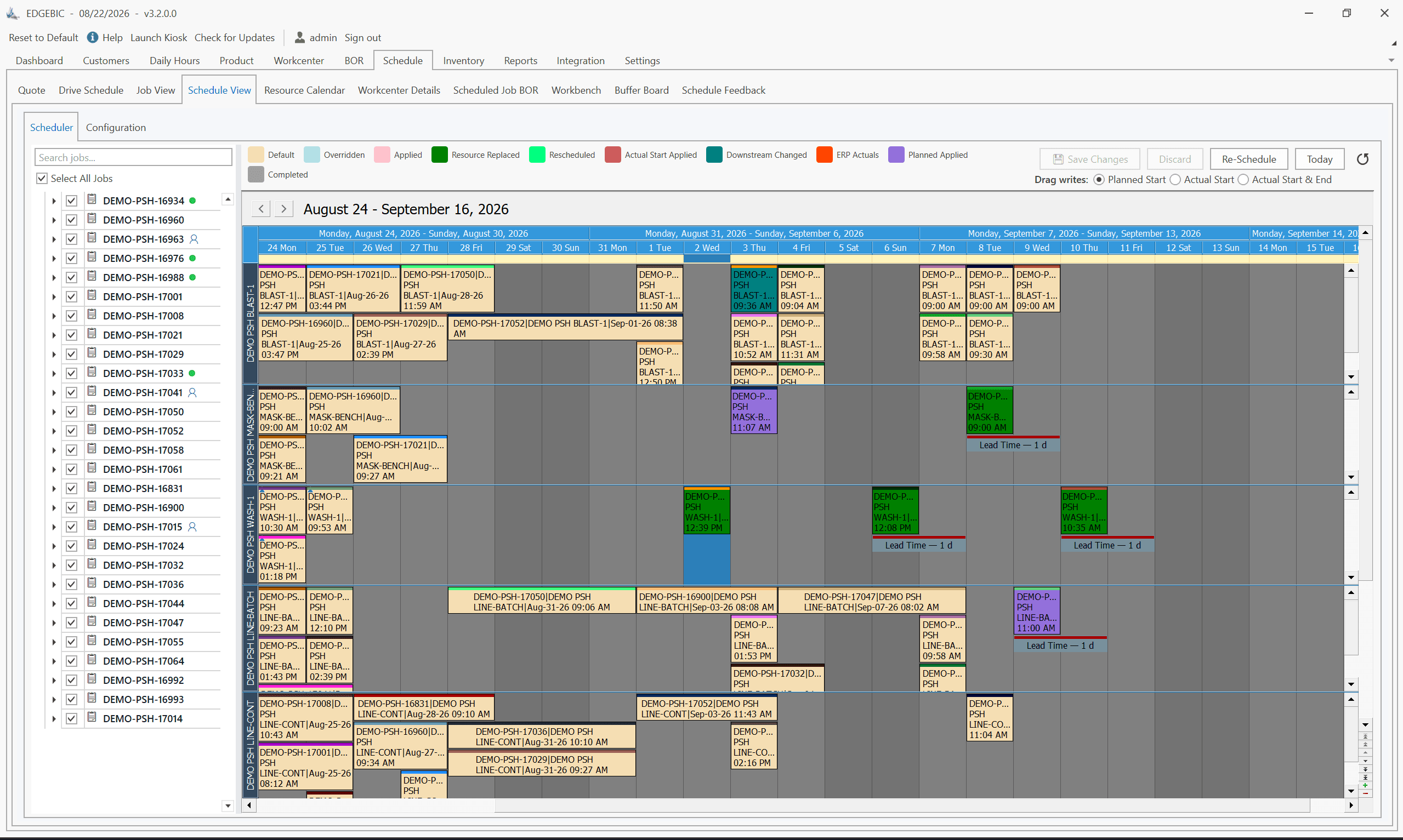
EDGEBIC (RMDB 2.0) by User Solutions does it for small and mid-size manufacturers: machines, labor, materials and tooling scheduled together, working with your data and your ERP, at a published one-time price of $25,000. The same engine took GE Railcar Services from 30% to over 90% on-time shipping and level loads 26,000 tasks on the USS Nimitz.
Last updated
- 30 to 90%
- On-time shipping, GE Railcar Services
- 35+
- Years scheduling real plants
- 33
- Locations scheduled together, Cummins
- 26,000+
- Tasks level loaded, USS Nimitz
What Production Scheduling Software Actually Decides
Four questions, answered for every operation of every open order, and re-answered whenever something changes:
- 01Which resource runs it. The machine or work center, the operator with the right skill or certification, and the tooling. A machine free on paper is not free if the only certified operator is on another job.
- 02When it starts and finishes. Against the shift calendar and the load already booked, not a fixed lead time per part. This is the difference between a date you can keep and a date you guessed.
- 03In what order. Sequence decides how much of the week you lose to setup. With sequence-dependent setups, running similar jobs together can give back hours a day without buying anything.
- 04What happens when it changes. A rush order arrives, a machine goes down, a delivery slips. The schedule has to re-plan in seconds and show you what moved, or people go back to the spreadsheet.
Going deeper on the method itself: what finite capacity planning means, scheduling forwards from today or backwards from the due date and how scheduling differs from planning.
Why Most Production Scheduling Falls Short
Most manufacturers struggle with production scheduling because their tools were not built for the complexity of real manufacturing. ERP scheduling modules lack finite capacity awareness. Spreadsheets break under volume. The result is unrealistic promises, late deliveries and wasted capacity.
- ERP systems that schedule to infinite capacity, ignoring real constraints
- Spreadsheet-based scheduling that cannot scale beyond a few dozen jobs
- No visibility into actual labor, machine, and material availability
- Unrealistic customer promise dates leading to chronic late deliveries
- Scheduling disconnected from purchasing, inventory, and costing
- Inability to run what-if scenarios before committing to delivery dates
What to Check Before You Buy Any of It
Most scheduling demos look identical. These are the questions that separate the tools that survive contact with a shop floor from the ones that go unused after month three. Ask them of us too.
- Does it schedule labor and tooling as constraints, or only machines?
- What happens on screen when you drag one operation: does everything downstream re-plan?
- Can you model a rush order without disturbing the live schedule?
- Are sequence-dependent setups charged at their real length, or averaged?
- How does data get in and out, and does it need middleware or a developer?
- Is the price published, and is it a licence or a per-seat annual subscription?
- How long until a scheduler is using it unaided, in weeks?
- Which named manufacturers run it, and will they talk to you?
On the last one: the customers named on this page are real, the figures come from their own write-ups, and each links to the full story. Several have been running the RMDB scheduling engine that sits inside EDGEBIC for more than a decade, which is a longer answer to the reference question than most vendors in this market can give.
RMDB, Now EDGEBIC: Production Scheduling Built for Real Manufacturing
EDGEBIC is production scheduling software that handles the full complexity of manufacturing: finite capacity across machines, labor, materials, and tooling, simultaneously. It is the current generation of Resource Manager DB (RMDB), works standalone or as a scheduling add-on to any ERP, and uses your existing data with no migration required.
- True finite capacity scheduling across all resource types
- What-if scenarios compared side by side before committing to dates
- Schedule optimizer (Google OR-Tools CP-SAT) in the base edition
- Labor, machine, and material scheduling simultaneously
- ERP integration through Excel, CSV and database tables
- Forward and backward scheduling with priority management
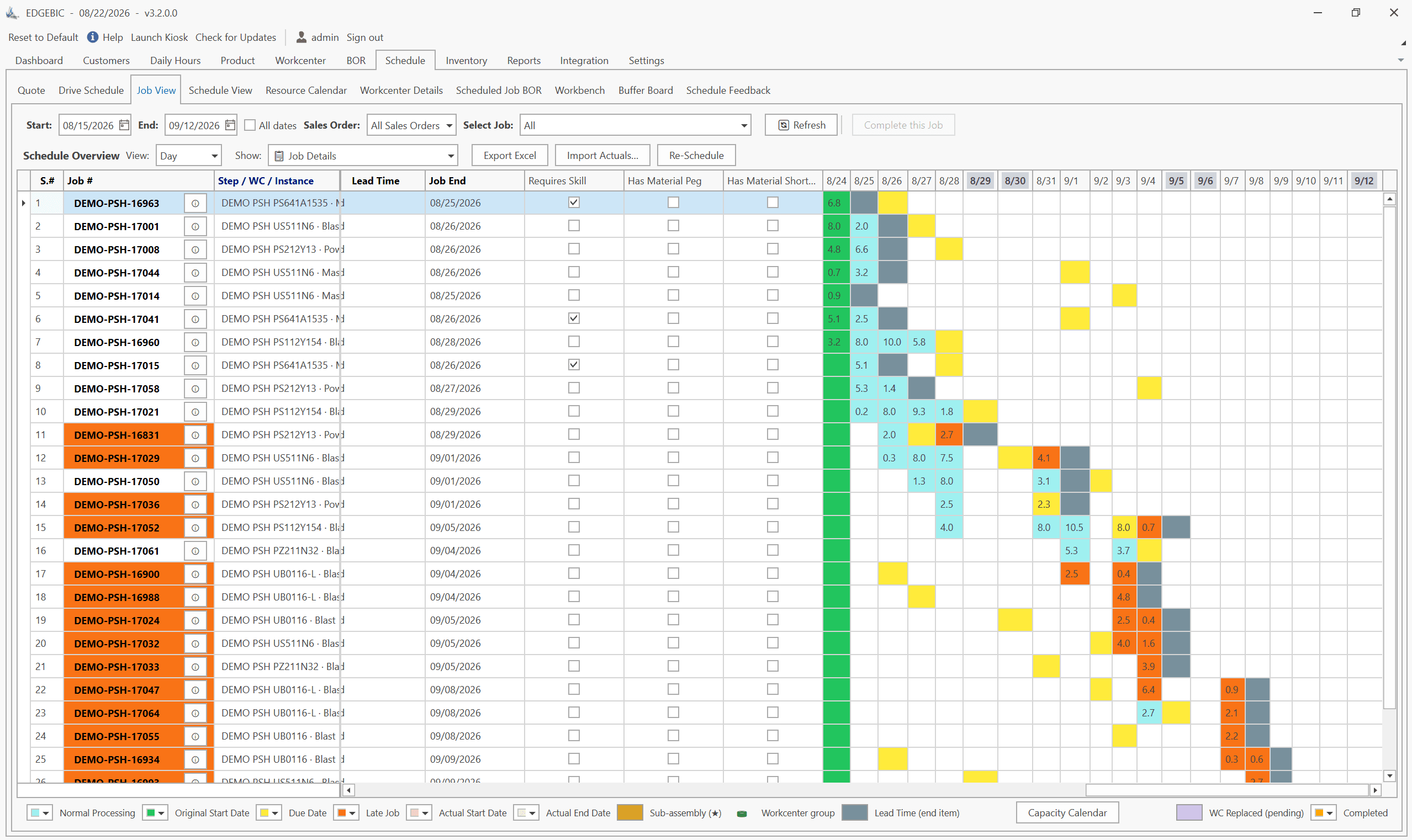
- Drag-and-drop Gantt chart and graphical routing designer
- Multi-shift and multi-location scheduling
- MRP, inventory and purchasing in EDGEBIC Complete
- Sub-assembly scheduling up to 10 levels deep
On-time shipping went from 30% to over 90% across the repair network
GE Railcar Services
A railcar repair network cannot know the work content until a car is opened up. Promise dates built from fixed lead times were guesses, and roughly seven shipments in ten missed them.
Scheduling each shop to its real capacity, with labor and bays as constraints rather than assumptions, tripled on-time shipping and took several days out of overall shop cycle time, without adding resources.
“Over the past several years, RMDB has successfully helped our repair network to improve the Shipping On-Time accuracy from 30% to over 90%. Additionally, we have improved our overall shop cycle time by several days.” Dan Barich, Manager of Process Engineering.
Production Scheduling Results from Real Manufacturers
- On-time shipping tripled across all U.S. and Canada repair shopsGE Railcar Services
- 30 to 90%
- Basic weekly schedule moved from a scheduler task to a clerk taskHomestead Furniture
- 40 to 2 hrs
- Maintenance tasks level loaded concurrently on a 2-year horizonUSS Nimitz
- 26,000+
- From start to a complete optimized schedule with full ERP integrationPlastilite Corporation
- 5 days
EDGEBIC vs Spreadsheets, ERP Scheduling Modules and Enterprise APS
Most manufacturers weigh four options. The difference that decides whether a schedule can be executed is the capacity model: a schedule that ignores real capacity looks fine on paper and breaks on the shop floor.
| Spreadsheet | ERP scheduling module | Enterprise APS | EDGEBIC | |
|---|---|---|---|---|
| Capacity model | Whatever you build by hand | Usually infinite capacity with fixed lead times | Finite, deep constraint modelling | Finite capacity across machines, labor, materials and tooling |
| What-if scenarios | Copy the file | Rarely | Yes | Yes, compared side by side before you commit |
| Works with your ERP | Manual re-keying | It is the ERP | Pre-built connectors to major ERPs | Any ERP that exports Excel, CSV or database tables |
| Implementation | Hours | Part of the ERP project | Months, usually consultant-led | Days to weeks (Plastilite: 5 days with ERP integration) |
| Pricing | Free | Included or an add-on module | Annual per-seat subscription or a $50K+ project | $25,000 or $35,000, one time |
EDGEBIC Pricing: Published, One-Time
Two editions of EDGEBIC by User Solutions, both perpetual licenses with updates included and no per-seat annual fee. EDGEBIC is an installed Windows application, not a subscription service. See EDGEBIC pricing and editions or how this compares with the market.
| Edition | What it includes | One-time license |
|---|---|---|
| EDGEBIC APS | Finite capacity scheduling and optimization: graphical routing designer, forward and backward scheduling, Theory of Constraints anchoring, parallel work centers, sequence-dependent setup, lot streaming, operator skills, and a two-layer schedule optimizer. | $25,000 |
| EDGEBIC Complete | Everything in EDGEBIC APS plus MRP, inventory, purchasing and material pegging, so material availability constrains the schedule alongside machines and labor. | $35,000 |
Works Alongside Your ERP
Keep your ERP as the system of record. Orders, routings, work centers and actuals come into EDGEBIC from Excel, CSV or database tables, and finite capacity schedules and realistic dates go back out. No middleware and no custom API project. Step-by-step integration guides:
- EDGEBIC with SAP
- EDGEBIC with Epicor
- EDGEBIC with NetSuite
- EDGEBIC with Microsoft Dynamics
- EDGEBIC with QuickBooks
- EDGEBIC with Sage
- EDGEBIC with JobBOSS
- EDGEBIC with Infor
- EDGEBIC with Acumatica
- EDGEBIC with Odoo
- EDGEBIC with Fourth Shift
- EDGEBIC with SYSPRO
- EDGEBIC with Global Shop Solutions
- EDGEBIC with Plex
- EDGEBIC with IQMS / DELMIAworks
- EDGEBIC with Made2Manage
Using a different system? Any ERP that exports Excel, CSV or database tables works. See EDGEBIC ERP integration and the ERP scheduling add-on.
How RMDB and EDGEBIC Production Scheduling Works
01
Import your data
RMDB and EDGEBIC work with your existing data: Excel, CSV, or direct database connections. No reformatting, no data migration. Import BOMs, routings, work centers, and open orders from your ERP.
02
Schedule to finite capacity
The RMDB scheduling engine in EDGEBIC schedules against real constraints: machine capacity, labor availability, material on hand, and tooling. Forward or backward scheduling with priority management gives you realistic dates.
03
Optimize and deliver
Run what-if scenarios, let the optimizer search for a better sequence, and adjust jobs on the drag-and-drop Gantt chart. Export updated dates back to your ERP.
Implementation in Days to Weeks, Not Months
Unlike ERP implementations that take 6 to 18 months, RMDB and EDGEBIC are designed for rapid deployment. Plastilite Corporation achieved a complete optimized schedule with full ERP integration in just 5 days. A typical rollout looks like this:
01
Week 1: data import
Connect your existing Excel, CSV, or ERP data. No migration or reformatting required.
02
Week 2: configuration
Set up work centers, shift patterns, and priority rules to match your operation.
03
Week 3: training
Your schedulers learn the system with your own data. No IT department required.
04
Go live
Start scheduling with real production data. Support included through go-live.
Frequently Asked Questions
Production Scheduling Success Stories
How manufacturers across industries changed their production scheduling with the EDGEBIC scheduling engine (RMDB).
Transportation
Repair Shops Triple On-Time Shipping from 30% to 90%
GE Railcar Services
Read storyDefense
Finite Capacity Scheduling of USS Nimitz Aircraft Carrier
US Navy
Read storyElectronics
Li-Ion Battery Production Scheduling for Enevate
Enevate Corporation
Read storyConsumer Products
Affordable MRP for Smaller Manufacturer
Sleepmaster Ltd
Read storyWoodworking
Amish Manufacturer Rapidly Amortizes Scheduling System
Homestead Furniture
Read storyGlass Manufacturing
Job Shop Increases Throughput and On-Time Shipping
Technical Glass Products
Read storyExplore Related Solutions
Discover how these capabilities work together to transform your manufacturing operations.
Finite Capacity Scheduling
Schedule to real machine, labor, and material limits
Learn moreOn-Time Delivery
Improve OTD with realistic capacity-based dates
Learn moreERP Scheduling Add-On
Add finite capacity scheduling to any ERP system
Learn moreJob Shop Scheduling
High-mix, low-volume finite capacity planning
Learn moreHeavy Equipment
Multi-location industrial production planning
Learn moreProduction Scheduling Software by State
EDGEBIC (formerly RMDB) serves manufacturers in all 50 states. Find local manufacturing insights for your state.
See your own week scheduled to real capacity
Book a free live demo and bring your own data. Open orders, routings and work center hours are enough to build a realistic schedule in the session.
Or see pricing and editions, what this market charges or RMDB features.