
ERP Scheduling Add-On
An ERP scheduling add-on is a finite capacity scheduler that runs beside your ERP instead of replacing it. The ERP stays the system of record; the add-on takes the open orders and routings, schedules them against the capacity you really have, and writes achievable dates back. You keep the system you have paid for and gain the one thing it cannot do.
EDGEBIC (RMDB 2.0) by User Solutions is that add-on. It works alongside SAP, Epicor, NetSuite, QuickBooks, Fourth Shift or any ERP that exports Excel, CSV or database tables, and costs $25,000 one time. BAE Systems bought an ERP with MRP and CRP, was not satisfied with its capacity constraint recognition, and discontinued the ERP scheduling module in favour of RMDB.
Last updated
Why ERP Scheduling Produces Dates the Floor Cannot Hit
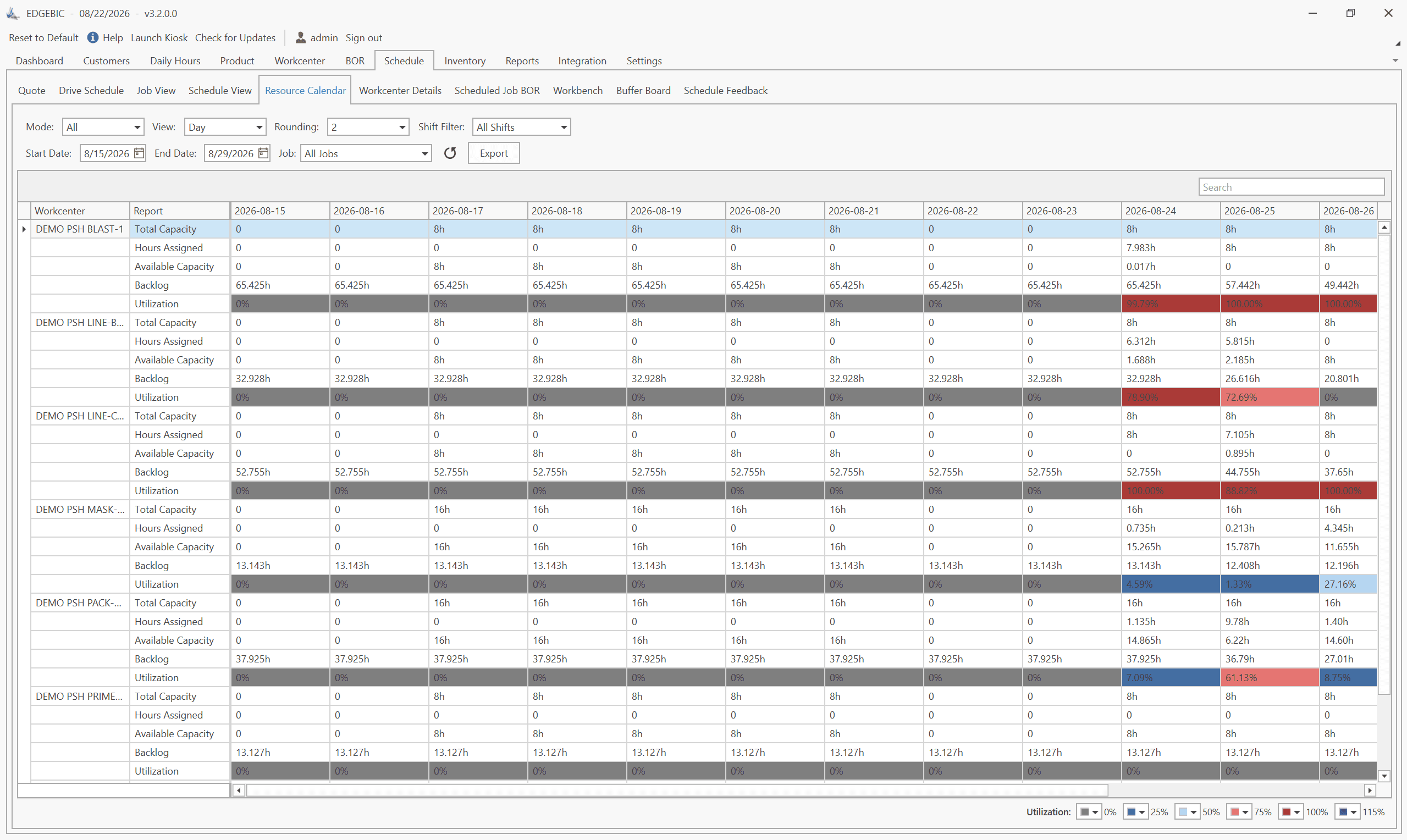
ERP systems were built to process transactions, and their scheduling modules plan with infinite capacity. The module assumes the work center is free, applies a fixed lead time per item and prints a date. Nothing in that calculation asks how much work is already booked on the machine, whether a certified operator is available, or whether the tooling is on site. The arithmetic is sound and the answer is unachievable, which is why the real schedule so often ends up in a spreadsheet beside the ERP. The symptoms are consistent:
- Work center load regularly exceeds the hours the shift actually has
- Promise dates come from a lead time, not from what is booked
- The bottleneck is named only after it has made jobs late
- A machine is scheduled while its certified operator is committed elsewhere
- The planner rebuilds the ERP schedule by hand every morning
- Nobody can say what a rush order would push out
ERP Scheduling Module or a Standalone Scheduler?
The module is already connected to your data, which is a real advantage. A dedicated finite capacity scheduler is better at the job itself and far faster to re-plan. The add-on pattern takes both: the ERP keeps the data, the scheduler does the scheduling. For the longer version, see how an ERP module compares with a dedicated scheduler.
What moves between the two systems
| Direction | What | How |
|---|---|---|
| ERP to EDGEBIC | Open orders with due dates and quantities, items, bills of material, routings with setup and run times, work centers and shift calendars, actuals from the floor | Excel, CSV or a database table, via a saved import mask |
| EDGEBIC to ERP | Operation-level start and finish dates, achievable promise dates, work center load and free capacity, the named bottleneck, what-if variants held outside the live plan | Excel, CSV or a database write, on the schedule you approve |
No middleware, no custom API project, and no second master for your item data. If your ERP can produce a spreadsheet, it can feed a schedule.
RMDB and EDGEBIC: The Scheduling Layer Your ERP Is Missing
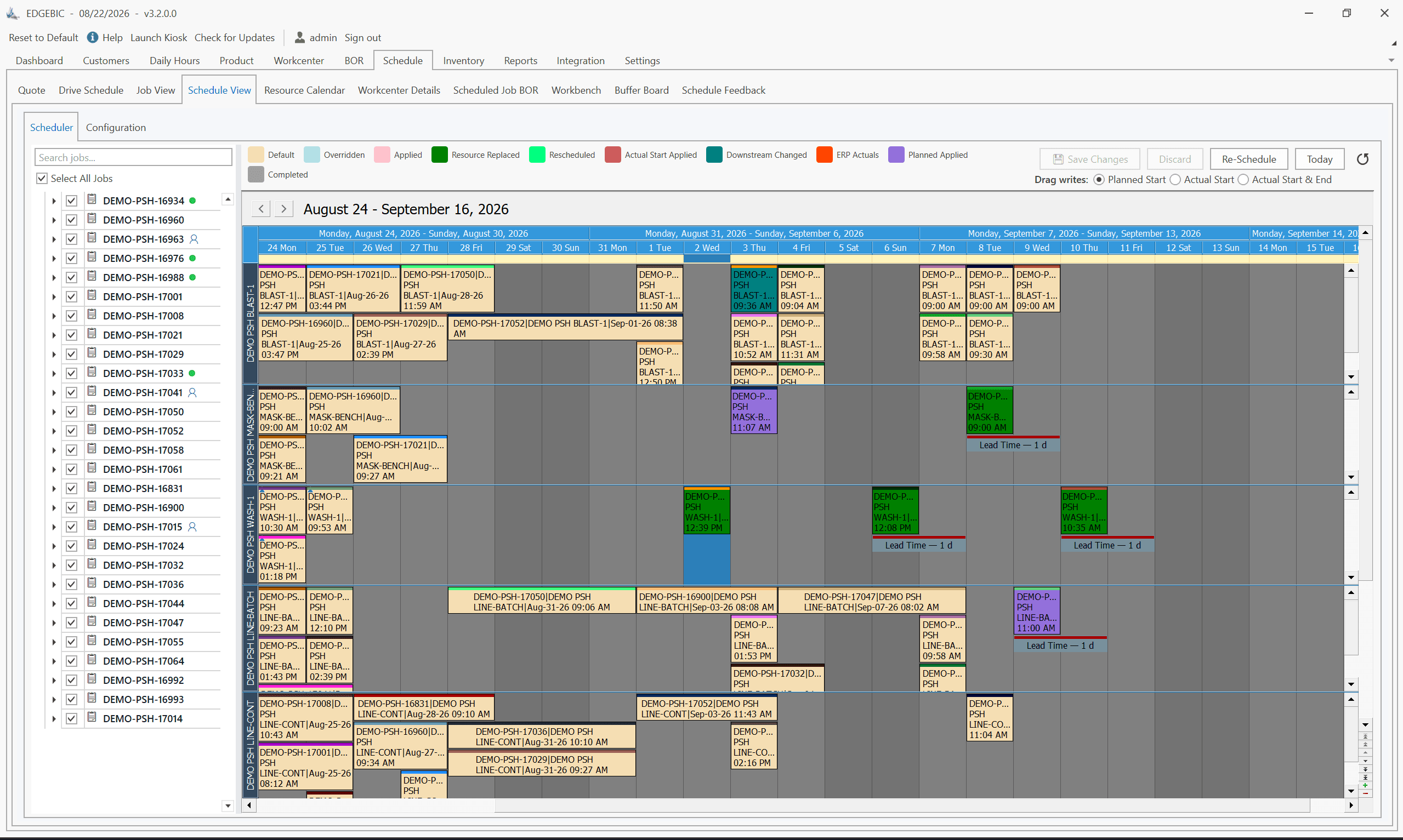
RMDB adds finite capacity scheduling to any ERP by evaluating every constraint before it commits an operation: machine capacity, labor availability, material on hand and tooling. An operation is only placed when all of them line up, so the dates the ERP ends up holding are dates the plant can hit. EDGEBIC keeps that engine and adds the planning board, the optimizer and the what-if workbench on top of it.
- Finite capacity scheduling across machines, labor, materials and tooling
- Import masks for Excel, CSV and database tables, saved and repeatable
- Achievable promise dates written back to the ERP
- What-if scenarios held in memory, so the live plan is never disturbed
- Work center load and free capacity by shift
- The bottleneck named before the week starts
- Operator skills and certifications as a real constraint
- Sequence-dependent setups charged at their true length
- Sub-assembly scheduling up to 10 levels deep
- Your purchasing, inventory and accounting processes left untouched
Four Ways to Schedule Around an ERP
The question is not which system is better software. It is which one knows your real capacity, and how quickly the plan can be rebuilt when the floor changes.
| Your ERP scheduling module | A spreadsheet beside the ERP | Enterprise APS | EDGEBIC as the add-on | |
|---|---|---|---|---|
| Capacity model | Usually infinite, with a fixed lead time per item | Whatever you built by hand | Finite, deep constraint modelling | Finite across machines, labor, materials and tooling |
| Where the data lives | In the ERP | Re-keyed from the ERP | In the APS, often a second master | Stays in the ERP; the schedule reads and writes back |
| Replaces the ERP | It is the ERP | No | Sometimes, in part | No, by design |
| Time to live | Part of the ERP project | Hours, then forever | Months, usually consultant-led | Days to weeks (Plastilite: 5 days with Fourth Shift) |
| When the floor changes | Rerun the regen, often overnight | Rebuild the sheet | Replans | Drag one operation and everything downstream re-plans |
| Pricing | Included or quoted as a module | Free, and it costs you the week | Annual per-seat subscription or a $50K+ project | $25,000 or $35,000, one time |
An ERP scheduling module bought, evaluated and discontinued in favour of RMDB
BAE Systems
BAE Systems had already purchased an ERP with MRP and capacity requirements planning. On use, it was not satisfied with the system's capacity constraint recognition: the plans it produced did not reflect what the operation could actually do.
Rather than replace the ERP, BAE discontinued its scheduling module and ran capacity and production planning on RMDB beside it. That is the add-on pattern in one sentence, from an organisation with no shortage of software options.
ERP Add-On Results
- Raw ERP data to a complete optimized schedule, with full Fourth Shift integrationPlastilite Corporation
- 5 days
- ERP scheduling discontinued in favour of RMDB finite capacity planningBAE Systems
- Module retired
- Scheduled alongside an AS400 ERP with a 6-month labor horizonCummins Engine
- 33 sites
- Accurate labor scheduling added beside an existing MRP systemINCON Incorporated
- Labor accuracy
How an ERP Scheduling Integration Actually Runs
Nothing is migrated, so this is a week of work rather than a project. Plastilite did it Monday to Friday.
- 01Export. Pull open orders, items, bills of material, routings and work centers out of the ERP as Excel, CSV or a table. Existing formats are fine.
- 02Map once. Build the import mask in EDGEBIC so the columns line up. Saved, so every later refresh is one click.
- 03Schedule. Run the finite capacity schedule, see the load per work center and shift, and find out which resource is really setting the pace.
- 04Write back. Approve the plan and send the operation dates and promise dates to the ERP, so quoting and customer service work from the same numbers.
- 05Keep it current. Refresh on your cadence, usually daily or per shift, and re-plan against actuals from the floor.
EDGEBIC Pricing: Published, One-Time
Two editions of EDGEBIC by User Solutions, both perpetual licenses with updates included and no per-seat annual fee. EDGEBIC is an installed Windows application, not a subscription service. See EDGEBIC pricing and editions or how this compares with the market.
| Edition | What it includes | One-time license |
|---|---|---|
| EDGEBIC APS | Finite capacity scheduling and optimization: graphical routing designer, forward and backward scheduling, Theory of Constraints anchoring, parallel work centers, sequence-dependent setup, lot streaming, operator skills, and a two-layer schedule optimizer. | $25,000 |
| EDGEBIC Complete | Everything in EDGEBIC APS plus MRP, inventory, purchasing and material pegging, so material availability constrains the schedule alongside machines and labor. | $35,000 |
Works Alongside Your ERP
Your ERP stays the system of record. Orders, routings, work centers and actuals come into EDGEBIC from Excel, CSV or database tables, and finite capacity schedules and realistic dates go back out. No middleware and no custom API project. Step-by-step integration guides, one per system:
- EDGEBIC with SAP
- EDGEBIC with Epicor
- EDGEBIC with NetSuite
- EDGEBIC with Microsoft Dynamics
- EDGEBIC with QuickBooks
- EDGEBIC with Sage
- EDGEBIC with JobBOSS
- EDGEBIC with Infor
- EDGEBIC with Acumatica
- EDGEBIC with Odoo
- EDGEBIC with Fourth Shift
- EDGEBIC with SYSPRO
- EDGEBIC with Global Shop Solutions
- EDGEBIC with Plex
- EDGEBIC with IQMS / DELMIAworks
- EDGEBIC with Made2Manage
Using a different system? Any ERP that exports Excel, CSV or database tables works. See EDGEBIC ERP integration and the ERP scheduling add-on.
Frequently Asked Questions
ERP Scheduling Add-On Success Stories
How manufacturers added finite capacity scheduling to the ERP they already run, with RMDB.
Transportation
Repair Shops Triple On-Time Shipping from 30% to 90%
GE Railcar Services
Read storyDefense
Finite Capacity Scheduling of USS Nimitz Aircraft Carrier
US Navy
Read storyElectronics
Li-Ion Battery Production Scheduling for Enevate
Enevate Corporation
Read storyConsumer Products
Affordable MRP for Smaller Manufacturer
Sleepmaster Ltd
Read storySoftware / Manufacturing
ERP Vendor and Manufacturer Turn to RMDB
ERP Partners
Read storyDefense
Capacity and Production Planning Add-On for ERP
BAE Systems
Read storyExplore Related Solutions
Discover how these capabilities work together to transform your manufacturing operations.
ERP Integration
Bi-directional data sync with SAP, Oracle, Epicor, and more
Learn moreProduction Scheduling
Finite capacity planning, MRP, and ERP integration
Learn moreFinite Capacity Scheduling
Schedule to real machine, labor, and material limits
Learn moreOn-Time Delivery
Improve OTD with realistic capacity-based dates
Learn moreHeavy Equipment
Multi-location industrial production planning
Learn moreSee it scheduling your own ERP data
Book a free live demo. Export a week of open orders and routings from your ERP, and watch a finite capacity schedule get built from them in the session.
Or see EDGEBIC ERP integration, RMDB features or pricing and editions.