
Why Production Scheduling in Excel Fails (And What to Use Instead)
 User Solutions Team
Production scheduling in Excel is one of the most common - and most costly - practices in small to mid-size manufacturing. Nearly every manufacturer starts with a spreadsheet. Many never leave it, even after the spreadsheet becomes a source of missed deliveries, scheduling conflicts, and wasted hours. Understanding why Excel fails as a scheduling tool is the first step toward a solution that actually works.
At User Solutions, we have helped hundreds of manufacturers transition from Excel to dedicated production scheduling software over the past 35+ years. The patterns are remarkably consistent: the same failure modes, the same breaking points, and the same dramatic improvements once the switch is made. This article documents those patterns.
Why Excel Seems Like a Good Idea
Excel is not an unreasonable starting point. It offers:
- Familiarity - everyone knows how to use a spreadsheet
- Flexibility - you can structure it however you want
- Zero additional cost - it comes with your existing software
- Quick setup - you can build a basic schedule in an afternoon
For very simple environments - three machines, a dozen jobs, weekly schedule changes - Excel can work. The problems begin when complexity increases, which happens sooner than most manufacturers expect.
The Seven Reasons Excel Scheduling Fails
1. No Finite Capacity Checking
Excel does not know that a machine can only run one job at a time. You can (and will) schedule 16 hours of work on an 8-hour machine without any warning. The spreadsheet accepts whatever you type.
This is the fundamental flaw. Without finite capacity scheduling, every schedule you create in Excel is a wish list, not a plan. Someone - usually a shop floor supervisor - must manually identify and resolve the overloading. That manual resolution is where deliveries get missed.
2. No Automatic Cascade
When a job runs late, every downstream job on that machine shifts. In dedicated scheduling software, this cascade happens automatically in seconds. In Excel, you must manually update every affected cell - sometimes dozens or hundreds of them.
Manufacturers tell us they spend 4-8 hours per week on this maintenance alone. That is a week of scheduler time per month spent updating a spreadsheet instead of optimizing the schedule.
3. No Constraint Checking
Real production scheduling involves multiple simultaneous constraints: the machine must be available AND the operator must be qualified AND the tooling must be on hand AND the material must have arrived. Excel checks none of these. The scheduler must mentally track all constraints, and inevitably some slip through.
The result is schedules that look complete but fail in execution. A job gets to the machine only to discover the material is not there, or the required fixture is being used on another machine, or the only operator who can run that program is on the night shift. See our guide on multi-constraint scheduling.
4. No What-If Analysis
A customer calls with a rush order. Can you fit it in? With Excel, answering this question requires manually moving jobs around and checking for conflicts - a process that can take 30 minutes or more. By then, the customer has called your competitor.
With scheduling software, the same what-if analysis takes seconds. You insert the rush job, the system shows the impact on every other order, and you have an answer while the customer is still on the phone.
5. Version Control Problems
The scheduler has a copy. The production manager has a copy. The shop floor supervisor printed a copy this morning. Which one is current? In Excel-based scheduling environments, multiple versions of the schedule float around the organization, each slightly different, each claiming to be the "real" schedule.
This version confusion creates conflicting priorities. One supervisor runs jobs in one order based on their copy; another follows a different sequence. The result is chaos that no amount of communication meetings can fix.
6. No Visual Scheduling
Excel can display data in grids, but it cannot produce a real-time, interactive Gantt chart. Some manufacturers create Gantt-like charts using conditional formatting, but these are static and fragile. They break when jobs are added or removed, and they do not support drag-and-drop rescheduling.
Visual scheduling is not a luxury. It is how experienced schedulers identify problems - a gap that could be filled, an overloaded day that needs relief, a job sequence that could be optimized. Without visual feedback, these opportunities are invisible.
7. Single Point of Failure
The most dangerous aspect of Excel scheduling is the dependency on one person. The scheduler who built the spreadsheet is often the only person who understands its formulas, macros, and hidden assumptions. If that person is unavailable, the entire scheduling process grinds to a halt.
We have seen manufacturers lose weeks of scheduling capability when a key person leaves. The replacement cannot interpret the spreadsheet, reverts to basic methods, and on-time delivery suffers until a new system is in place.
The Hidden Costs of Excel Scheduling
The direct cost of Excel scheduling (it is "free") masks significant hidden costs:
| Hidden Cost | Typical Impact |
|---|---|
| Scheduler labor for maintenance | 4-8 hours/week ($10K-$20K/year) |
| Missed delivery penalties | Variable - often $5K-$50K/year |
| Lost customers from late deliveries | Difficult to measure but significant |
| Excessive overtime from poor visibility | 10-20% more overtime than necessary |
| Excess WIP from poor sequencing | Ties up $50K-$200K in working capital |
| Opportunity cost of scheduler's time | Hours spent maintaining Excel instead of optimizing |
When these costs are totaled, even a small manufacturer is typically spending $50K-$100K per year on the consequences of Excel scheduling. A dedicated scheduling tool that costs $25K one-time (RMDB, now EDGEBIC APS by User Solutions) pays for itself within the first year, often within six months.
When to Make the Switch
If any of these statements describe your situation, it is time to move beyond Excel:
- Your scheduler spends more than 2 hours per day maintaining the spreadsheet
- You miss more than 5% of delivery dates
- Rush orders create multi-hour rescheduling exercises
- You have experienced scheduling problems when your primary scheduler was absent
- Your shop floor supervisors maintain their own priority lists because they do not trust the spreadsheet
- You have more than 10 machines and multiple overlapping jobs
What to Use Instead
The natural progression from Excel is dedicated production scheduling software. The best tools for Excel refugees offer:
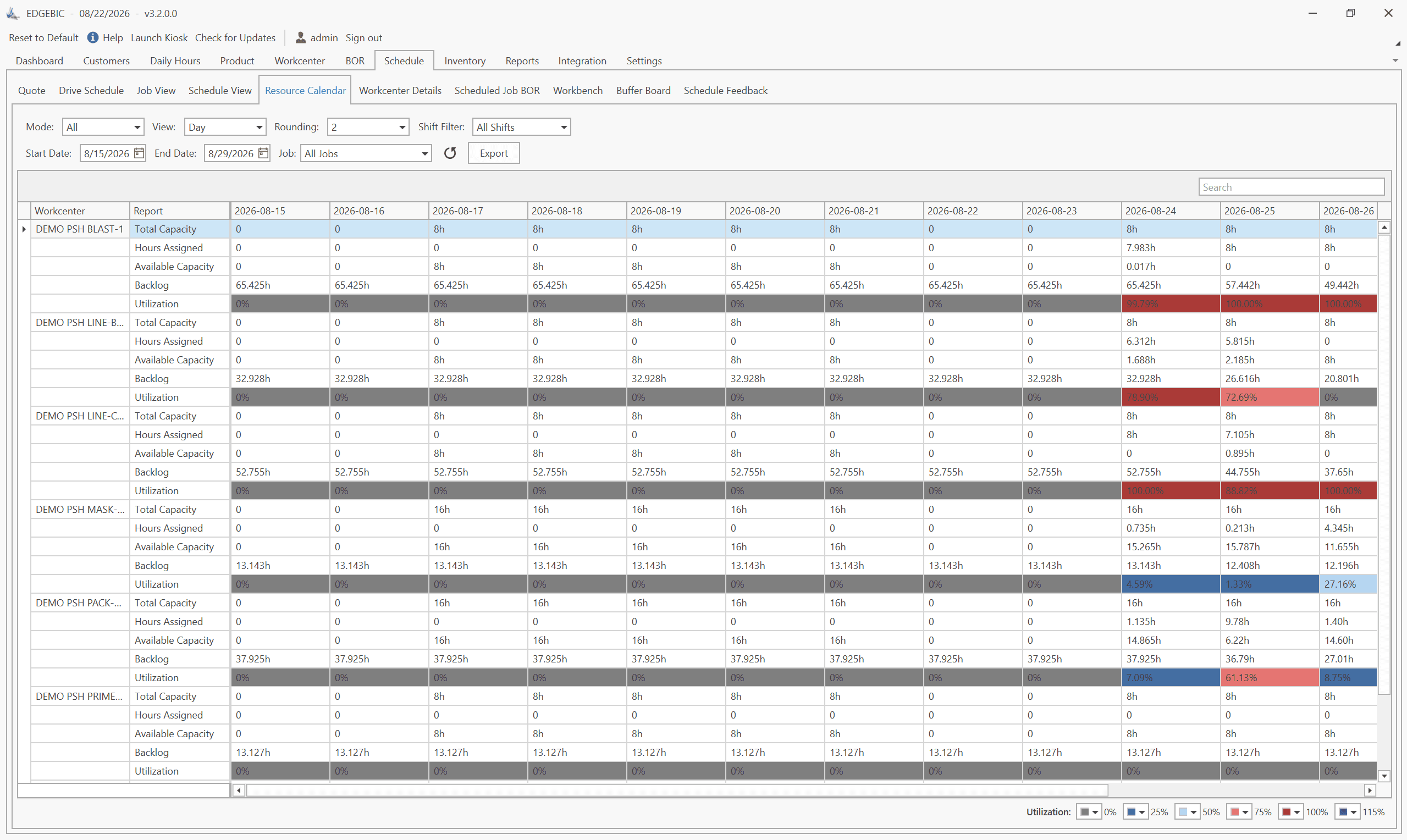
- Finite capacity scheduling - automatic constraint checking that Excel cannot do
- Automatic cascade - one change ripples through the entire schedule in seconds
- Visual Gantt charts - see the schedule on a timeline with drag-and-drop control
- ERP integration - import orders and routings instead of typing them
- What-if analysis - test changes before committing
- Multi-user access - one version of truth accessible to everyone
RMDB from User Solutions is designed specifically for manufacturers transitioning from manual methods. It integrates with your existing ERP, provides true finite capacity scheduling, and can be implemented in as little as 5 days. Paired with EDGEBI for visual Gantt chart scheduling, it replaces every function of the spreadsheet and adds capabilities that Excel cannot match.
For a step-by-step guide on making the transition, see our Excel to APS migration guide.
Ready to retire the spreadsheet? Contact us for a demo and we will show you what your schedule looks like in RMDB - using your actual data.
Excel is familiar, already available, and free to use. Most manufacturers start with Excel because it is the path of least resistance. It works adequately for very simple environments - a few machines, a handful of jobs, and infrequent changes. Problems emerge as complexity grows.
The tipping point typically comes when you have more than 5-10 machines, multiple overlapping jobs, frequent schedule changes, or when missed deliveries become a recurring problem. If your scheduler spends more than 2 hours per day maintaining the spreadsheet, dedicated software will pay for itself quickly.
Manufacturers using Excel for scheduling typically spend 4-8 hours per week maintaining the spreadsheet - updating job status, rescheduling after disruptions, and manually checking for conflicts. Dedicated scheduling software reduces this to under 1 hour per week for the same level of schedule management.
Dedicated production scheduling software like RMDB from User Solutions provides finite capacity scheduling, automatic constraint checking, Gantt chart visualization, and what-if analysis that Excel cannot match. RMDB integrates with your existing ERP and can be implemented in as little as 5 days.
Expert Q&A: Deep Dive
Q: We have a very customized Excel template that our scheduler built over years. Won't we lose all that institutional knowledge by switching?
A: This is a common concern, and it reveals an important risk: all that institutional knowledge is trapped in one person's spreadsheet. If your scheduler leaves, retires, or is out sick for a week, nobody else can run that schedule. When you move to dedicated scheduling software, you are actually preserving institutional knowledge in a more durable, shareable form. Routings, run times, setup rules, and priority logic get encoded in the system where anyone can access them. At User Solutions, our 5-day implementation includes knowledge transfer - we work with your scheduler to capture the rules and logic embedded in their spreadsheet and configure RMDB accordingly.
Frequently Asked Questions
Ready to Transform Your Production Scheduling?
User Solutions has been helping manufacturers optimize their production schedules for over 35 years. One-time license, 5-day implementation.

User Solutions Team
Manufacturing Software Experts
User Solutions has been developing production planning and scheduling software for manufacturers since 1991. Our team combines 35+ years of manufacturing software expertise with deep industry knowledge to help factories optimize their operations.
Share this article
Related Articles
How to Create a Production Schedule in 7 Steps (Free Template)
How to create a production schedule step by step: horizon, real capacity, work orders, load check, sequence, dates, then publish. Worked example included.
Production Planning and Control (PPC): Functions and Examples
Production planning and control explained: routing, loading, scheduling, sequencing, dispatching and expediting, the types of scheduling, and worked examples.

Sequence-Dependent Setup Times: The Scheduling Problem That Costs You Capacity
When changeover time depends on what ran before, standard scheduling fails. Learn how setup matrices, sequence optimization, and APS software recover 10-25% of hidden capacity in paint lines, food, and coating operations.