

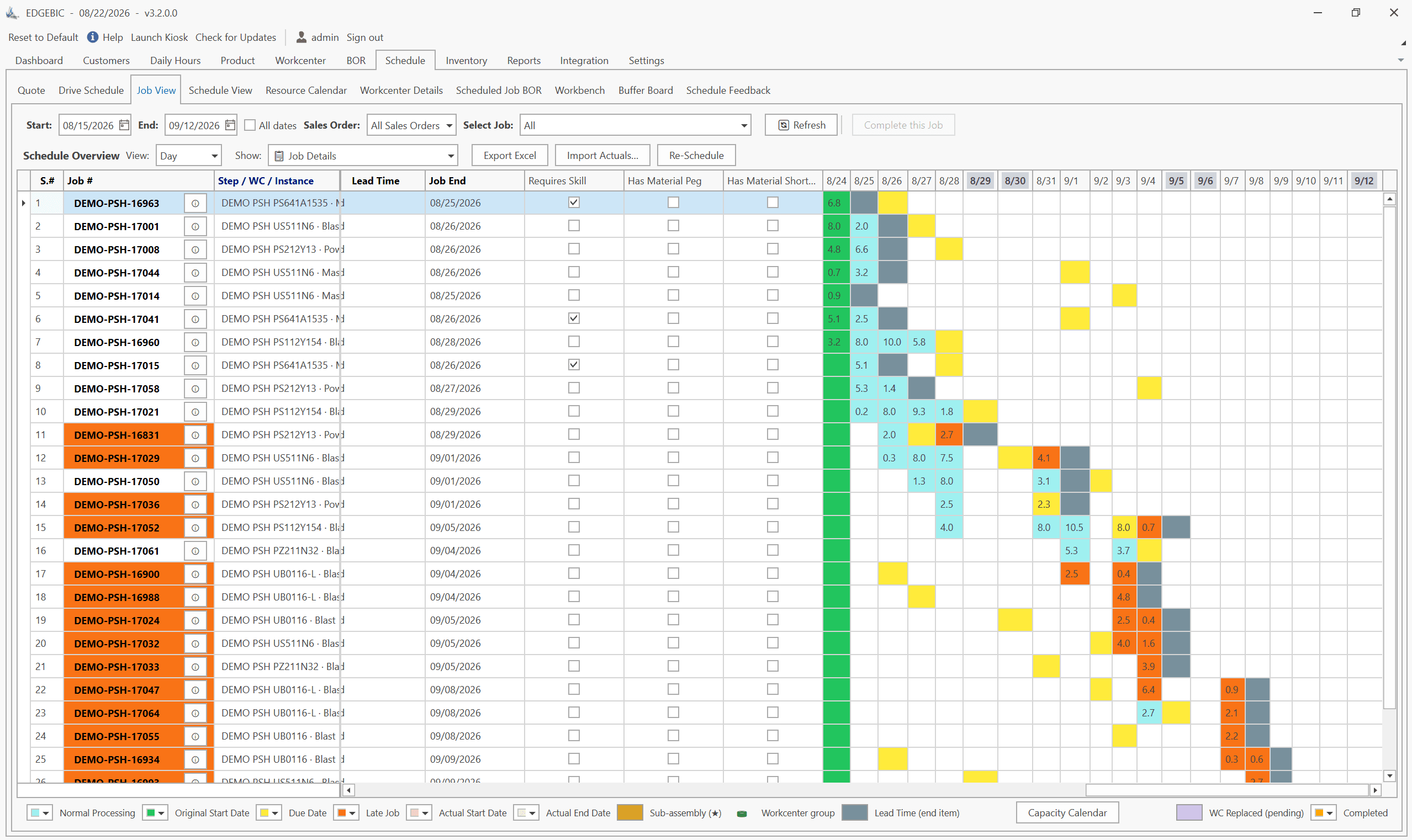
MRP and APS answer different questions. MRP (material requirements planning) works out what materials to buy or make, how many, and when, assuming unlimited capacity and fixed lead times. APS (advanced planning and scheduling) schedules each operation on a real machine inside its real hours. MRP gets the parts; APS gets the dates right. Most plants need both.
Written by User Solutions, Inc., makers of RMDB and EDGEBIC (RMDB 2.0) by User Solutions, finite capacity scheduling software for manufacturers since 1991. Reviewed by the User Solutions planning team. Updated September 2026.
This page shows exactly where MRP's dates come from, what they leave out, and what a finite capacity schedule changes, using one job planned both ways. If you need a refresher on MRP itself first, read what is MRP.
What MRP assumes
MRP's arithmetic is sound. Its dates rest on two assumptions:
- Infinite capacity. MRP places an order on a date without checking whether the machine or the people are free. Ten orders due the same week at the same mill all look fine.
- Fixed lead times. A made part's lead time is a single number in the item master, for example "3 days", whether the shop is empty or buried. In reality most of a job's lead time is queue time, and queue time grows with load.
Those assumptions are reasonable for purchased parts, where the supplier manages its own capacity. They are weakest exactly where the plant makes its money: its own machines, especially the one or two bottlenecks.
Capacity requirements planning (CRP) was added to MRP to report overloads. It helps, but it only reports: it sums the hours per work center per week and shows a bar over 100 percent. It does not move a single job or change a single date. See capacity requirements planning for how CRP works.
What finite scheduling fixes
A finite capacity schedule, the core of any APS, does the opposite. It takes each job's routing and places every operation on a work center in sequence, inside that work center's shift hours, after the jobs already ahead of it. The finish date is an output of the load, not a number typed into the item master.
That changes three things:
- Dates become believable. A job that cannot finish on time shows as late before it is released, not after the customer calls.
- Sequence becomes a decision. You can see which job to run first on the bottleneck and what that does to every other job.
- Material timing becomes real. Parts can be bought for when the operation will actually start, not for when MRP's fixed lead time said it would.
For the capacity concepts in more depth, read finite vs infinite capacity planning.
One job, planned both ways
A machine shop has one CNC mill that runs one 8-hour shift, Monday to Friday. Deburring is a separate bench with spare capacity. Three jobs need the mill this week:
| Job | CNC hours | Deburr hours | Due |
|---|---|---|---|
| J-301 | 20 | 0 | Wednesday (day 3) |
| J-305 | 14 | 0 | Next Wednesday (day 8) |
| J-310 | 12 | 4 | Friday (day 5) |
J-301 and J-305 were released last week in that order. J-310, a 100-piece housing order, is new.
The MRP view
The item master says J-310's housing has a 3-day manufacturing lead time. MRP counts back 3 working days from the Friday due date and plans:
- Planned order release: Tuesday (day 2).
- Bar stock to arrive: Tuesday, so the buyer places the steel order for Tuesday delivery.
- Planned completion: Friday. Status: on time.
MRP never looks at the mill. It does not know 34 hours of other work are already booked on it.
The finite capacity view, first come first served
A finite scheduler loads the mill in the order jobs were released: J-301, then J-305, then J-310. The mill has 8 hours a day, so hour 0 to 8 is Monday, 8 to 16 Tuesday, and so on.
| Job | Mill hours booked | Mill start | Mill finish | Then | Finish | Due | Result |
|---|---|---|---|---|---|---|---|
| J-301 | 0 to 20 | Mon, start of day | Wed, 4 h into the day | none | Wed | Wed | On time |
| J-305 | 20 to 34 | Wed, 4 h in | Fri, 2 h in | none | Fri | Next Wed | On time |
| J-310 | 34 to 46 | Fri, 2 h in | Next Mon, 6 h in | Deburr 4 h | Next Tue, 2 h in | Fri | 2 working days late |
J-310 cannot start milling until Friday, finishes milling on Monday, and after 4 hours of deburring (2 hours left on Monday, 2 more on Tuesday) completes next Tuesday. MRP said Friday. The steel that arrived on Tuesday sat on the floor for three days.
The finite capacity view, resequenced by due date
The scheduler, now seeing the problem, moves J-310 ahead of J-305, whose due date is a week away:
| Job | Mill hours booked | Mill finish | Then | Finish | Due | Result |
|---|---|---|---|---|---|---|
| J-301 | 0 to 20 | Wed, 4 h in | none | Wed | Wed | On time |
| J-310 | 20 to 32 | End of Thu | Deburr 4 h | Fri, 4 h in | Fri | On time |
| J-305 | 32 to 46 | Next Mon, 6 h in | none | Next Mon | Next Wed | On time |
All three jobs are now on time, with no overtime and no new machine. And J-310's bar stock is needed on Wednesday, when milling really starts, not Tuesday.
Check the arithmetic. The mill carries 20 + 14 + 12 = 46 hours against 40 available this week, so one job must spill into next week whatever the sequence. The question is which one. First come first served spills the job due Friday; due-date sequence spills the job due next Wednesday, which still has two days of slack. MRP could not see either outcome because it never added up the 46 hours.
What the example shows
- MRP's date for J-310 was not wrong because of bad data. It was wrong because of the infinite capacity assumption.
- A CRP report would have shown the mill at 115 percent (46 / 40). It would not have said which job would be late or how to fix it.
- The finite schedule found the late job and the fix, and moved the material date to match.
MRP vs APS comparison table
| MRP | APS (finite capacity scheduling) | |
|---|---|---|
| Main question | What to buy or make, how many, when | Which operation runs on which resource, in what order, at what time |
| Plans | Items and quantities | Operations on work centers, operators, tools |
| Capacity | Infinite (CRP only reports overloads) | Finite: real shift hours, calendars, holidays |
| Lead time | Fixed number per item | Calculated from load, sequence and setups |
| Time unit | Day or week bucket | Hour or minute |
| Sequencing | None | Priority rules, due dates, setups, optimization |
| Output | Planned purchase and work orders, action messages | Start and finish per operation, Gantt chart, dispatch list, promise dates |
| Rescheduling | Nightly or weekly regeneration | Minutes, often with drag and drop |
| What-if | Limited | Copy the schedule, change it, compare |
| Typical owner | Material planner, buyer | Production scheduler |
| Usually lives in | The ERP | A scheduling layer beside the ERP |
| Best at | Getting the right parts on hand | Getting the right dates and sequence |
The use-both architecture
The practical answer to "MRP or APS?" is almost always "both, in the right order". Material and capacity are two different constraints, and each tool is good at one.
  +---------------------------+
  |  ERP / MRP                |   customer orders, forecast
  |  master schedule, BOMs,   |   inventory, purchasing
  |  planned work orders      |
  +-------------+-------------+
                |  orders, routings, work centers, on-hand
                v
  +---------------------------+
  |  APS / finite scheduler   |   sequence every operation
  |  shifts, setups, skills,  |   against real capacity
  |  alternates, what-if      |
  +-------------+-------------+
                |  realistic start and finish dates,
                |  promise dates, material need dates
                v
  +---------------------------+
  |  Back to ERP / MRP        |   buy for when jobs will really run;
  |  and to the shop floor    |   dispatch lists to each work center
  +---------------------------+
The loop matters. When the scheduled dates flow back, MRP re-times purchase orders to when operations really start, so material arrives neither three days early (J-310's steel) nor too late for a job that was pulled forward.
Arnold Quesenberry, Senior Consultant at A.G. Raymond & Co. and a User Solutions customer, described the Resource Manager tools in exactly these terms: a complement to traditional MRP and shop control systems that lets planners generate what-if plans for feasible master scheduling without disrupting the current system. The full story is on the complements traditional MRP page.
Signs your MRP needs a finite scheduler beside it
- MRP says orders are on time, but the shipping dock says otherwise.
- Planners rebuild the schedule in Excel every morning from MRP output.
- Material arrives on time for jobs that cannot start because the machine is booked.
- You cannot answer "if we take this rush order, what else slips?" in a few minutes.
- One or two work centers decide your delivery performance, and MRP treats them like any other.
- Lead times in the item master are padded "to be safe", which inflates inventory everywhere.
If three or more are true, capacity, not material, is your constraint.
How EDGEBIC fits: keep your MRP, add finite scheduling
EDGEBIC (RMDB 2.0) by User Solutions is built for exactly this architecture. It is the continuation of RMDB, the scheduling engine behind 35 years of customer results, including GE Railcar Services, which raised on-time shipping from 30% to over 90%.
- Keep your ERP's MRP. EDGEBIC APS ($25,000 one-time) imports orders, routings, work centers and on-hand from any ERP through Excel, CSV or database masks, schedules every operation against finite capacity, and exports realistic dates back. See ERP scheduling add-on.
- Or run MRP inside the scheduler. EDGEBIC Complete ($35,000 one-time) adds MRP, BOM explosion, inventory, purchasing and pegging, so material availability constrains the schedule alongside machines and labor. See MRP software for small manufacturers.
Both are one-time licenses with no per-seat annual fee; see pricing. For the product, see finite capacity scheduling software and EDGEBIC. If you already run RMDB, it remains supported and EDGEBIC is the upgrade path.
Related reading
- MRP formula: gross-to-net requirements: the arithmetic MRP gets right
- What is a master production schedule: the plan both tools start from
- What is advanced planning and scheduling: APS in full
- APS vs ERP scheduling: the same question one level up
- Best APS software: how the APS tools compare
- How to create a production schedule: the finite schedule built step by step
Frequently Asked Questions
Ready to Transform Your Production Scheduling?
User Solutions has been helping manufacturers optimize their production schedules for over 35 years. One-time license, 5-day implementation.

User Solutions Team
Manufacturing Software Experts
User Solutions has been developing production planning and scheduling software for manufacturers since 1991. Our team combines 35+ years of manufacturing software expertise with deep industry knowledge to help factories optimize their operations.
Share this article
Related Articles

Lean-MRP Hybrid: How to Combine Pull Scheduling with MRP for Long-Lead Materials
Lean and MRP appear to conflict - but most lean shops still need MRP for long-lead purchased materials. Here's how to combine pull scheduling and MRP at the right decoupling points.

MRP Data Accuracy: The #1 Reason MRP Implementations Fail (And How to Fix It)
Poor data quality kills MRP before it starts. Learn the three data pillars, how to hit the 98% inventory accuracy target, and a practical implementation checklist.

MRP Time Fences: Frozen, Slushy, and Open Planning Zones Explained
Time fences stop MRP nervousness by protecting your near-term schedule. Learn how to set frozen, slushy, and open zones - with real examples for job shops and flow shops.