
See Which Work Center Is Overloaded, Before It Makes You Late
We never know which work center is overloaded until jobs are already late. How do we see it coming?
Schedule to finite capacity and look at load against capacity per work center. EDGEBIC by User Solutions shows booked hours next to available hours for every work center and shift, flags anything over 100 percent, names the bottleneck on the dashboard, and lets you test overtime, alternates or resequencing before the overload turns into late orders.
Last updated
Why Overloads Stay Hidden
Most ERP capacity reports and spreadsheets load work at infinite capacity. They will happily book 140 hours onto a machine that has 80, and the report only tells you after the fact, if at all. By the time the queue in front of the machine is visible on the floor, the orders behind it are already late.
Seeing an overload early needs two things: a schedule that places each operation on a real machine in a real shift, and a view that puts booked hours next to available hours for every work center, week by week.
- The ERP capacity report shows totals, not which week or shift is over
- The bottleneck moves with the product mix and nobody notices until it bites
- Overtime goes to the loudest department, not the constrained one
- An idle machine sits next to an overloaded one that could share the work
- Due dates are promised without checking the constraint work center
- The first sign of an overload is a late shipment
How EDGEBIC Shows and Fixes an Overload
EDGEBIC by User Solutions schedules every operation to finite capacity across machines, labor, tooling and shifts, so its load views reflect the plan the floor will actually run, not a wish list.
Resource Load view
A bar per work center compares booked hours with real available hours from its shift calendar. A bar over 100 percent is an overload you can see weeks ahead, not on ship day.
Resource Calendar by shift
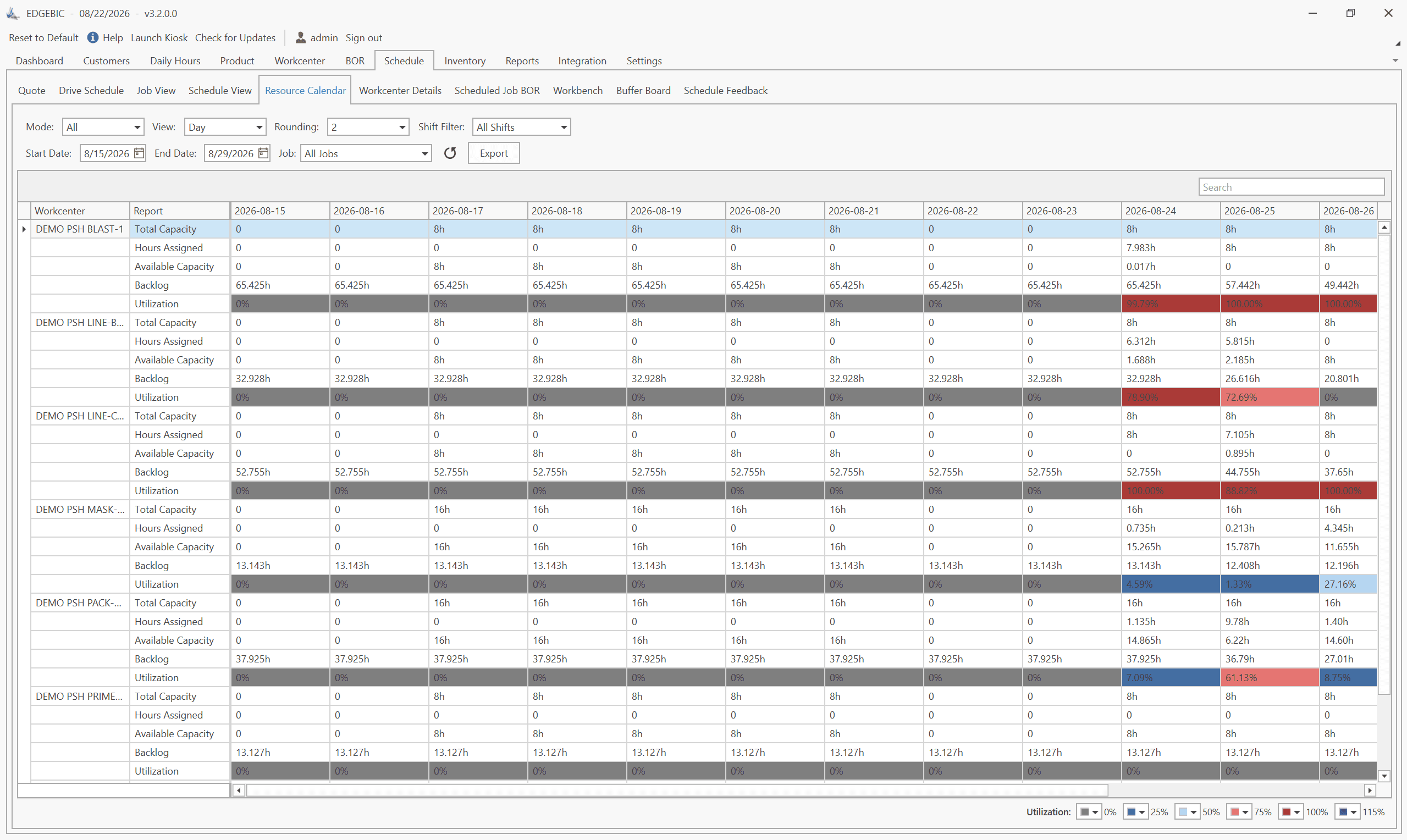
Utilization, backlog and free capacity for every work center and shift in one grid, so you can see that the second shift on the grinder is the problem, not the whole department.
The bottleneck named on the dashboard
The Bottleneck tile names the constraint work center. The utilization report scopes load to any list of jobs, so you can see which orders are feeding the overload.
Schedule around the constraint
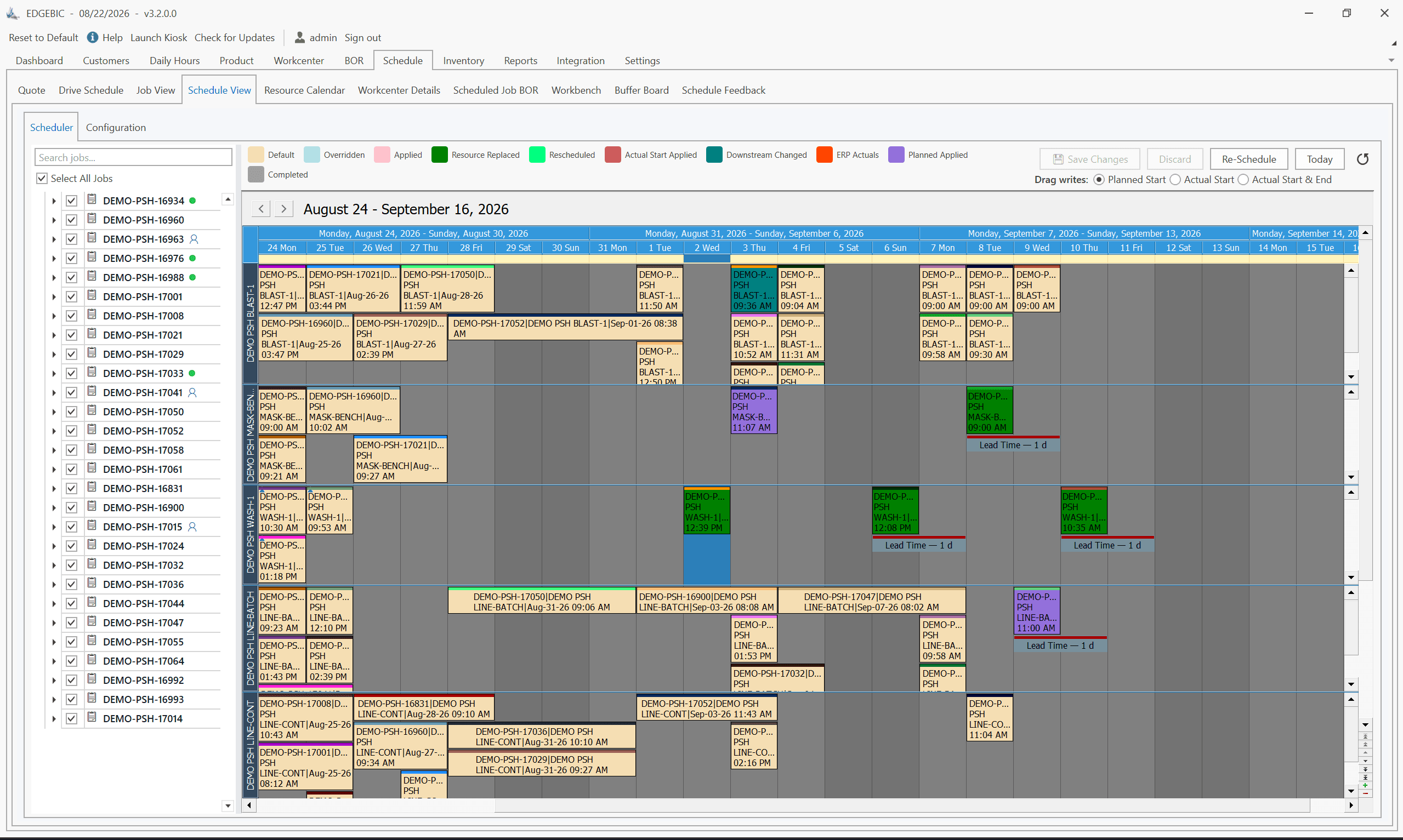
Theory of Constraints anchoring schedules the bottleneck first and protects it with a buffer, then times upstream and downstream work to it. The constraint sets the pace instead of being surprised by it.
Move work to where capacity is
Alternate and parallel work centers and machine pools let the scheduler offload an overloaded machine to an idle one that can run the job, within the rules you set.
Test the fix before you pay for it
Run a what-if with a second shift, overtime on one work center, or an added machine, and compare lateness against the current plan before committing money or people.
Workcenter loading made visible, and on-time delivery improved
ACE Controls
ACE Controls, an industrial damping and motion control manufacturer in Farmington, Michigan, lacked visibility into workcenter loading and production capacity in its machine shop, so it struggled to give accurate promise dates.
With Resource Manager by User Solutions, the lineage that EDGEBIC continues, the team could visualize workcenter loading and see the impact of schedule changes before committing to them. In the words of the company: "We have improved our on-time delivery by being able to view the impact of different production schedules and workcenter loading."
Who Makes EDGEBIC
EDGEBIC is made by User Solutions, Inc. of South Lyon, Michigan, which has built manufacturing scheduling software since 1991. EDGEBIC is RMDB 2.0: the current generation of RMDB (Resource Manager DB), the scheduling engine behind results at the US Navy, GE, Cummins and BAE Systems. RMDB customers remain supported. EDGEBIC is an installed Windows application (.NET 8, SQLite or SQL Server) that works alongside any ERP through Excel, CSV and database import and export. See the EDGEBIC product overview.
EDGEBIC Pricing: Published, One-Time
Two editions of EDGEBIC by User Solutions, both perpetual licenses with updates included and no per-seat annual fee. EDGEBIC is an installed Windows application, not a subscription service. See EDGEBIC pricing and editions or how this compares with the market.
| Edition | What it includes | One-time license |
|---|---|---|
| EDGEBIC APS | Finite capacity scheduling and optimization: graphical routing designer, forward and backward scheduling, Theory of Constraints anchoring, parallel work centers, sequence-dependent setup, lot streaming, operator skills, and a two-layer schedule optimizer. | $25,000 |
| EDGEBIC Complete | Everything in EDGEBIC APS plus MRP, inventory, purchasing and material pegging, so material availability constrains the schedule alongside machines and labor. | $35,000 |
Read More on This Problem
- Reading the Resource Load view to spot an overload
- The EDGEBIC Resource Load view explained
- Work center showing overload: causes and fixes
- How to read the Bottleneck tile in EDGEBIC
- How capacity visibility prevents missed ship dates
- The return on catching an overload early
- Production bottleneck identification
- TOC bottleneck anchor scheduling: a worked example
Work Center Overload and Bottleneck FAQs
Customer Stories
Manufacturers scheduling with EDGEBIC and RMDB, the User Solutions engine behind it.
Find your real bottleneck in a demo
Send an export of your open orders, routings and shifts. We will schedule it to finite capacity in EDGEBIC and show you which work centers are overloaded and when.
Or see EDGEBIC pricing or the EDGEBIC product overview.