
Finite vs Infinite Capacity Planning and Scheduling: Key Differences
 User Solutions Team
Finite capacity planning never books more hours on a machine than it has; infinite capacity planning books every job on its due-date timing and ignores the limit. Infinite tells you whether a period is overloaded. Finite tells you when each job will actually finish. Use infinite for rough-cut and material planning, and finite for the schedule you run and the dates you promise.
If you have ever watched your MRP system promise delivery dates that the shop floor cannot possibly hit, you have experienced the gap between infinite and finite capacity planning. These two approaches represent fundamentally different philosophies about how to schedule manufacturing work, and choosing the wrong one for the wrong job shows up as missed deliveries, excess inventory, and a daily expediting meeting.
This guide is the complete comparison: the definitions, a 12-row side-by-side table, a load versus sequence diagram, and one job scheduled both ways with real hours. For the single-term definitions, read what is finite capacity planning and what is infinite capacity planning. If you are evaluating tools, see finite capacity scheduling software.
Infinite Capacity Planning: The Default Approach
Infinite capacity planning assumes that every resource in your factory has unlimited availability. When your MRP system calculates a production schedule, it works backward from the customer due date, assigns each operation a start and finish time based on standard lead times, and never once checks whether the machine or operator is actually available.
How Infinite Planning Works
- A sales order is entered with a due date of May 15.
- MRP explodes the bill of materials and determines the operations required.
- The system backward-schedules each operation using fixed lead time offsets.
- Operation 3 (CNC milling) is scheduled for May 8-9. Operation 2 (turning) is scheduled for May 5-7.
- At no point does the system check whether the CNC mill already has 20 hours of work booked on May 8.
The result? On paper, every order meets its due date. On the shop floor, three jobs are scheduled on the same machine at the same time, and someone has to decide what actually runs first. A single machine can end up with 40 hours of work assigned to an 8-hour day.
Where You Meet Infinite Capacity
- MRP modules in ERP systems. Virtually all of them net material with lead time offsets, not machine availability.
- Rough-cut capacity planning. Aggregate load per week or month, useful for spotting overloaded periods.
- Spreadsheets. An Excel schedule is infinite by nature, because nothing stops two jobs from being typed into the same machine on the same day.
Where Infinite Planning Falls Short
The limitations of infinite capacity planning are predictable and well-documented:
- Overloaded work centers: Multiple jobs assigned to the same resource simultaneously.
- Unrealistic due dates: Delivery promises based on theoretical capacity, not actual availability.
- Chronic expediting: Supervisors spend hours every morning re-prioritizing because the schedule is not executable.
- WIP accumulation: Work orders are released based on due dates even when resources are not ready, creating queues.
- Hidden bottlenecks: Since the system does not track actual load, bottleneck resources are invisible until they cause delivery failures.
- A schedule nobody follows: Supervisors resolve the conflicts themselves, each shift differently, and the official schedule and the real one split on day one.
Finite Capacity Planning: The Realistic Alternative
Finite capacity planning takes the opposite approach. Every resource has a defined capacity - hours per shift, shifts per day, efficiency factors, planned downtime - and the scheduler never loads work beyond that limit.
How Finite Planning Works
- The same sales order arrives with a May 15 due date.
- The finite scheduler checks the CNC mill's calendar. May 8 is already loaded to 14.5 of 16 available hours.
- The 4-hour milling operation is scheduled for May 9 at 8:00 AM - the next available slot.
- This pushes downstream operations and the scheduler recalculates a realistic completion date of May 16.
- Sales is notified that May 15 is not achievable; May 16 is the earliest realistic date.
Under the hood, the engine looks at each operation's routing, finds the first time slot where the required machine is free, checks secondary constraints such as operators, tooling and material, places the operation there, and marks that time as consumed so no other job can use it. The schedule is realistic. The shop floor can execute it. The customer gets an honest date rather than a broken promise.
Side-by-Side Comparison
| Factor | Infinite Capacity | Finite Capacity |
|---|---|---|
| Resource limits | Ignored | Enforced |
| Resource conflicts | Double-books freely | One job per machine slot |
| Main output | Load report (hours per period) | Sequence (start and finish per operation) |
| Schedule realism | Theoretical, needs manual interpretation | Executable as published |
| Overloading | Common | Prevented |
| Due date accuracy | Optimistic | Realistic |
| WIP levels | High | Controlled |
| Bottleneck visibility | Aggregate overload only | Exactly when and where |
| Expediting required | Constant | Minimal |
| Planning speed | Fast, no constraint checks | Slower, checks every constraint |
| Common tools | ERP/MRP modules, spreadsheets | APS and dedicated scheduling software |
| Best use case | Rough-cut, material and long-range planning | Daily scheduling and delivery promises |
Load vs Sequence: What Each Method Actually Produces
The clearest way to see the difference is to look at what each method hands you. Infinite capacity produces a load: a bar of hours per period against a capacity line. Finite capacity produces a sequence: blocks of time on each machine, in order, with a start and a finish.
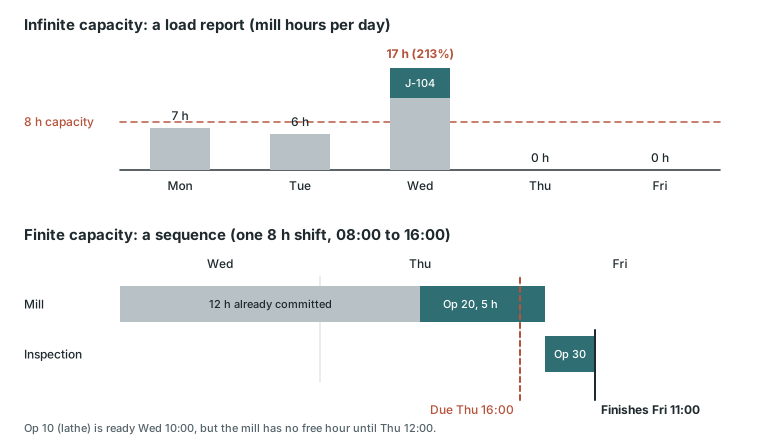
The load chart tells you Wednesday is at 213 percent. It does not tell you which job will be late, by how much, or what to do about it. The sequence tells you all three. That is why the two methods belong to different questions rather than competing for the same one.
One Job Scheduled Both Ways
Here is the job behind the diagram, with every number worked out.
The job. J-104, 20 brackets, due Thursday at 16:00. The routing has three operations: Op 10 turning on the lathe (6 hours), Op 20 milling on the mill (5 hours), and Op 30 inspection (2 hours). The plant runs one 8-hour shift, 08:00 to 16:00.
What is already on the floor. The lathe has 4 hours of work on Tuesday morning. The mill has 12 hours of committed work from earlier, higher-priority orders, all planned for Wednesday.
Scheduled at infinite capacity
MRP backward-schedules from the due date with a fixed one-day offset per operation:
| Operation | Planned day | Capacity check |
|---|---|---|
| Op 30 inspection | Thursday | None |
| Op 20 milling | Wednesday | None |
| Op 10 turning | Tuesday | None |
The report shows J-104 on time. The mill now has 12 + 5 = 17 hours planned on Wednesday against 8 available, a load of 17 / 8 = 213 percent. The plan does not say which 9 hours will slip, so the answer arrives on Wednesday afternoon, on the floor.
Scheduled at finite capacity
The finite engine places each operation only where hours are free:
| Operation | Starts | Finishes | Why |
|---|---|---|---|
| Op 10 turning (6 h) | Tue 12:00 | Wed 10:00 | Lathe busy Tue morning; 4 h Tue + 2 h Wed |
| Op 20 milling (5 h) | Thu 12:00 | Fri 09:00 | Mill busy with 12 committed hours until Thu 12:00; 4 h Thu + 1 h Fri |
| Op 30 inspection (2 h) | Fri 09:00 | Fri 11:00 | Starts when Op 20 finishes |
J-104 finishes Friday at 11:00, which is 3 working hours after its Thursday 16:00 due date (the shift ends at 16:00, so the late hours are Friday 08:00 to 11:00). The finite plan tells you this on Monday, not on Thursday afternoon.
What the planner does with that answer
Suppose 4 of the mill's 12 committed hours belong to an order that is not due until next week. Sequence J-104 ahead of that order and Op 20 runs Thursday 08:00 to 13:00, inspection runs 13:00 to 15:00, and J-104 ships one hour early. The displaced order still finishes Friday morning, days ahead of its own date. Other options are an hour or two of overtime on the mill or an honest Friday promise to the customer. Every one of those decisions needs the sequence; none of them can be made from the 213 percent bar.
Why Most ERP Systems Default to Infinite
This is not a design flaw - it is a design choice. MRP was invented in the 1960s and 1970s specifically for material planning. Its job is to answer: "What materials do I need, in what quantities, and by when?" It was never designed to answer: "Which machine should run this job at 2:00 PM on Tuesday?"
Material requirements planning uses fixed lead time offsets - if an operation takes 3 days, MRP allocates 3 days regardless of current shop floor conditions. This simplification is appropriate for material ordering (you need the steel by a certain date whether the mill is busy or not), but it is entirely inadequate for production scheduling.
The ERP vendors know this. That is why they position their scheduling modules as "planning" tools and partner with dedicated finite capacity scheduling systems like RMDB and EDGEBIC by User Solutions for detailed execution.
When to Use Each Approach
Use Infinite Capacity Planning For:
- Rough-cut capacity planning: Identifying which months or weeks have more demand than capacity at an aggregate level.
- Long-range demand planning: Evaluating whether you need to hire, add shifts, or purchase equipment 6-12 months out.
- Material requirements: Calculating what raw materials to order and when.
- Initial capacity gap analysis: Spotting major overloads before drilling into the detailed schedule.
Use Finite Capacity Planning For:
- Daily production scheduling: Determining exactly what runs on which machine in what order.
- Delivery date quoting: Giving customers realistic dates based on actual resource availability.
- Bottleneck management: Identifying and protecting constraint resources. See also how to identify a production bottleneck.
- What-if analysis: Evaluating the impact of a rush order, machine breakdown, or new order before committing.
- Shop floor execution: Generating dispatch lists that operators can follow without reinterpretation.
Finite Where It Matters, Not Everywhere
You do not have to model every resource at finite capacity. Hand tools, a staging area, or an administrative step do not constrain output, and forcing them through a capacity check adds nothing. The resources that do constrain output, usually 3 to 5 bottleneck machines, skilled operators and special tooling, are the ones that must be finite.
In RMDB you set each resource's capacity model independently. In EDGEBIC (RMDB 2.0) by User Solutions, each routing step carries a finite capacity flag that is on by default; turning it off makes that one step behave like infinite capacity. The other lever is the schedule-at-utilization setting: at 80 percent on an 8-hour shift, the engine plans 6.4 hours per machine per day. For the EDGEBIC specifics, see how EDGEBIC switches between finite and infinite capacity.
The Real-World Impact of the Switch
When manufacturers transition from infinite to finite capacity planning, the results follow a consistent pattern.
Lead Time Reduction
Queue time - jobs waiting for a busy resource - typically accounts for 60-85% of total manufacturing lead time. Infinite planning creates these queues by releasing work before resources are ready. Finite planning eliminates the root cause, and lead times compress by 20-40% without any change to processing speeds.
On-Time Delivery Improvement
Under infinite planning, on-time delivery rates typically hover around 60-75% because the promised dates were never realistic. Under finite planning, rates jump because the dates now reflect what the factory can actually do. GE Railcar Services, scheduling with the same User Solutions engine, moved on-time shipping from 30 percent to 90 percent.
WIP Inventory Reduction
Finite capacity planning holds work orders until resources are available rather than flooding the shop floor. This directly reduces WIP, typically by 25-40%. Less WIP means shorter queue times, less cash tied up on the floor, and fewer lost or damaged parts.
Expediting Reduction
The daily expediting meeting - that hour-long ritual where supervisors argue about what to run next - largely disappears. The finite schedule is executable as-is. Exceptions still occur, but they are truly exceptional rather than the daily norm.
Bridging the Gap: Using Both Together
The most effective approach is not choosing one over the other - it is layering them appropriately.
Your ERP system continues to run MRP for material planning using infinite capacity. This ensures raw materials and purchased components arrive on time. On top of that, a dedicated finite capacity tool like RMDB or EDGEBIC (RMDB 2.0) by User Solutions takes the work orders generated by MRP and schedules them against real resource availability, across machines, labor, tooling and materials at once (multi-constraint scheduling).
This two-layer approach gives you the best of both worlds:
- Materials planned correctly via MRP's infinite capacity logic
- Production scheduled realistically via finite capacity scheduling
- No ERP replacement required - the finite layer integrates as an add-on
How to Make the Transition
Moving from infinite to finite capacity planning does not require a multi-year project. With the right tool and preparation, manufacturers can transition in days rather than months.
Prerequisites
- Resource definitions: List every machine, work center, and labor pool with shift patterns and availability hours.
- Routing validation: Ensure setup times, run times, and operation sequences are reasonably accurate. They do not need to be perfect - 80-85% accuracy is a strong starting point.
- Capacity planning software: A tool like RMDB or EDGEBIC by User Solutions that supports true finite capacity scheduling with constraint-based logic.
Implementation Timeline
Using our 5-day implementation framework:
- Day 1: Import resources and define capacity profiles.
- Day 2: Load routings and validate against actual shop floor data.
- Day 3: Import open work orders and generate the first finite schedule.
- Day 4: Review with production supervisors, adjust priorities, refine data.
- Day 5: Go live with the finite schedule as the primary production plan.
The Bottom Line
Infinite capacity planning tells you what you wish you could do. Finite capacity planning tells you what you can actually do. The difference between those two statements is the difference between missed deliveries and met commitments, between bloated WIP and lean flow, between daily firefighting and proactive management.
If your current schedules are more fiction than fact, the fix is not more spreadsheets or more expediting meetings. It is switching from infinite to finite capacity planning.
See the difference for yourself. Schedule a demo of RMDB or EDGEBIC by User Solutions and compare your current infinite capacity plan against a realistic finite schedule built from your own data.
Frequently Asked Questions
Frequently Asked Questions
Ready to Transform Your Production Scheduling?
User Solutions has been helping manufacturers optimize their production schedules for over 35 years. One-time license, 5-day implementation.

User Solutions Team
Manufacturing Software Experts
User Solutions has been developing production planning and scheduling software for manufacturers since 1991. Our team combines 35+ years of manufacturing software expertise with deep industry knowledge to help factories optimize their operations.
Share this article
Related Articles

Capacity Buffers and Safety Capacity: Protecting Manufacturing Throughput
Learn how capacity buffers and safety capacity protect manufacturing throughput against variability. Includes formulas for sizing buffers, buffer management techniques, and practical implementation guidance.

Capacity Planning Formulas: The Complete Manufacturing Reference Guide
Every essential capacity planning formula for manufacturing - from basic utilization calculations to advanced throughput analysis, load ratios, OEE, and queue time estimation.

Capacity Planning Software for Manufacturing: Features, Selection Guide, and Top Tools
Compare manufacturing capacity planning software features, learn what to look for in a scheduling tool, and discover how finite capacity planning software eliminates overloaded schedules and missed deliveries.