
Production Scheduling Software Comparison Guide (2026)
 User Solutions Team
Choosing the right production scheduling software can mean the difference between on-time deliveries and chronic late orders. With dozens of scheduling solutions on the market in 2026, a structured scheduling software comparison is essential before committing budget, staff time, and operational trust to any single platform. This guide provides a comprehensive, honest evaluation of the leading production scheduling tools available today, including feature matrices, pricing breakdowns, implementation timelines, and a scoring framework you can use for your own evaluation.
Whether you run a 15-person job shop or a 2,000-employee multi-plant operation, this production scheduling software comparison 2026 guide will help you make a confident, data-driven decision.
Why Comparing Scheduling Software Matters
Manufacturing planning has grown far more complex over the past decade. Customer expectations for shorter lead times, smaller batch sizes, and customized products have made manual scheduling methods dangerously inadequate. According to a 2025 IndustryWeek survey, 67% of manufacturers cite scheduling as their top operational bottleneck.
The stakes of choosing the wrong software are significant:
- Wasted investment: Enterprise scheduling platforms can cost $100,000-$500,000+ with 12-18 month implementations. Choosing a poor fit means sunk costs and frustrated teams.
- Disrupted operations: Migrating away from a failed implementation creates months of scheduling chaos.
- Missed ROI: The right scheduling software typically delivers 15-25% throughput improvement. The wrong one delivers headaches.
A structured comparison process protects your investment and ensures the solution you choose genuinely fits your manufacturing environment. It also builds internal consensus. When stakeholders can see objective criteria and scoring, adoption rates improve dramatically.
What This Guide Covers
This is not a marketing brochure. We have included genuine strengths and limitations for every platform, including our own product RMDB. Our goal is to help you find the right fit, whether that is RMDB or another solution.
Types of Scheduling Software: APS, MES, ERP Modules, and Standalone
Before comparing specific products, it is critical to understand the four major categories of scheduling software. Each serves a different purpose, and many manufacturers use them in combination.
Advanced Planning and Scheduling (APS)
APS systems are purpose-built for production scheduling optimization. They use finite capacity logic, constraint-based algorithms, and often AI-assisted optimization to create feasible, optimized schedules.
Key characteristics:
- Finite capacity scheduling across machines, labor, and tooling
- What-if scenario analysis
- Automatic schedule optimization based on rules and priorities
- Material availability integration
Best for: Manufacturers with complex routing, multiple constraints, and a need for optimized sequencing.
Examples: RMDB, PlanetTogether, Asprova, Delmia Ortems, Siemens Opcenter APS
Manufacturing Execution Systems (MES)
MES platforms manage real-time shop floor operations. While they include scheduling features, their primary focus is execution tracking, quality management, and machine data collection.
Key characteristics:
- Real-time work order tracking
- Machine data collection and OEE monitoring
- Quality control and traceability
- Shop floor paperless workflows
Best for: Manufacturers prioritizing real-time visibility and compliance (FDA, aerospace, automotive).
Examples: Siemens Opcenter Execution, Plex, IQMS
ERP Scheduling Modules
Most ERP systems include basic scheduling modules. These are typically infinite capacity planners that generate production orders based on MRP logic but lack the optimization capabilities of dedicated APS tools.
Key characteristics:
- Integrated with purchasing, inventory, and financials
- MRP-driven planning
- Usually infinite capacity (assumes unlimited resources)
- Basic sequencing
Best for: Manufacturers with simple workflows where the ERP already handles most planning needs.
Examples: SAP PP, Oracle Manufacturing, Microsoft Dynamics 365, NetSuite
Standalone Scheduling Tools
Lightweight, focused tools that handle specific scheduling tasks without the breadth of full APS or MES platforms.
Key characteristics:
- Quick implementation
- Lower cost
- Often designed for specific manufacturing types (job shop, make-to-order)
- May lack deep optimization algorithms
Best for: Small manufacturers, job shops, or teams that need a fast improvement over spreadsheets.
Examples: RMDB, Katana, JobBOSS, MRPeasy
Key takeaway: Most small and mid-size manufacturers get the best results from either an APS or a standalone scheduling tool. ERP modules alone rarely provide adequate scheduling for complex manufacturing environments.
Top Production Scheduling Software in 2026
Here is an honest overview of nine leading scheduling platforms. We have drawn on published documentation, user reviews, industry analyst reports, and our own 35+ years of manufacturing software experience.
RMDB (Resource Manager Database) by User Solutions
RMDB is a finite capacity scheduling and planning tool built specifically for small to mid-size manufacturers. Developed by User Solutions Inc. over 35 years, it focuses on practical scheduling that planners can learn and use quickly.
Strengths:
- One-time perpetual license (no recurring SaaS fees)
- Typical implementation in 5 business days
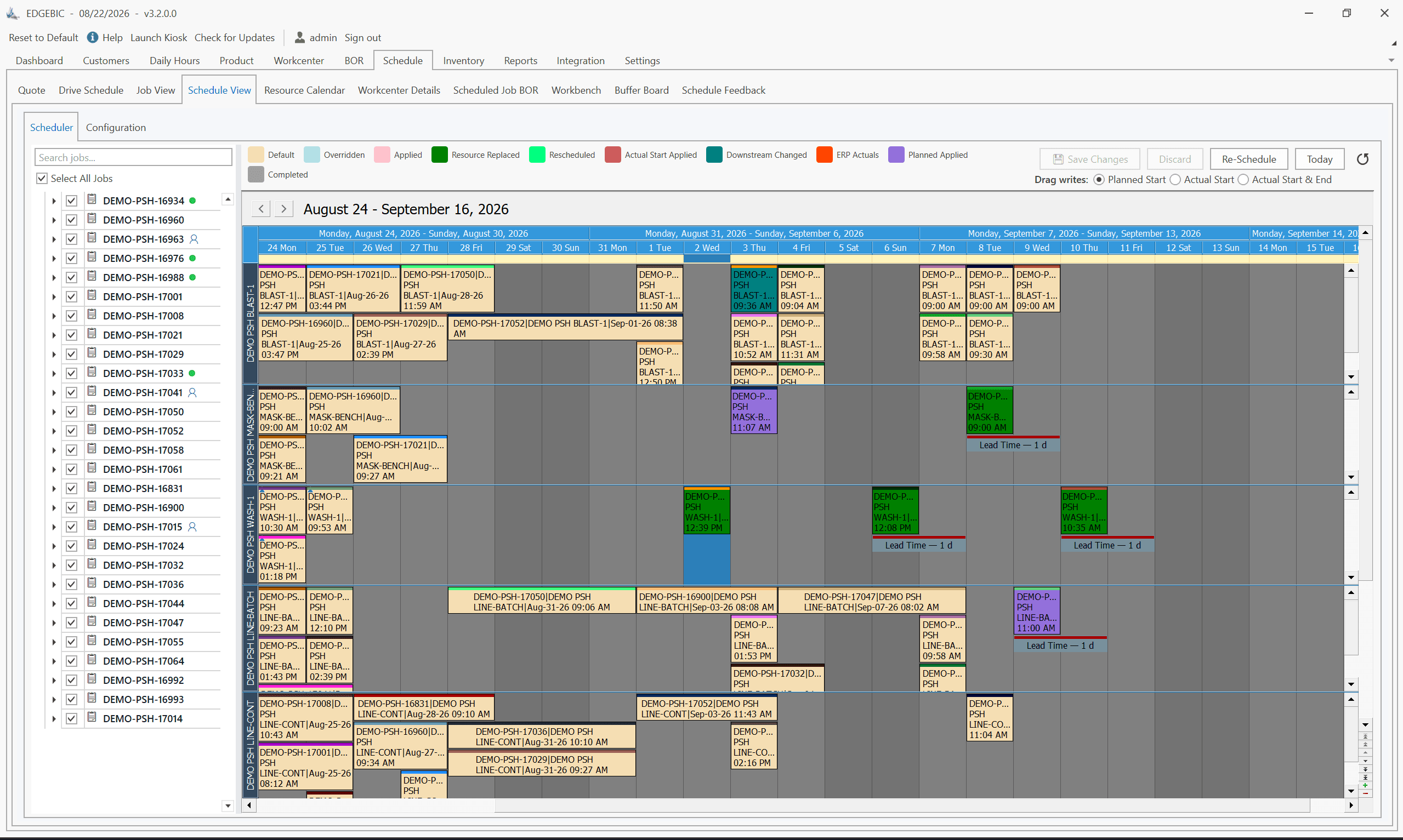
- Finite capacity scheduling with drag-and-drop Gantt charts
- ERP integration with SAP, Oracle, Dynamics, and others
- What-if scenario analysis
- Proven track record with hundreds of manufacturers
Considerations:
- On-premise deployment (not cloud-native, though remote access is supported)
- Best suited for small to mid-size operations (1-500 employees)
- User interface is functional rather than flashy
Ideal for: Job shops, make-to-order, and mixed-mode manufacturers seeking fast ROI without ongoing subscription costs.
PlanetTogether
PlanetTogether is a well-established APS platform with strong visualization and integration capabilities.
Strengths:
- Excellent Gantt chart interface with drag-and-drop
- Strong ERP integration ecosystem
- Cloud and on-premise options
- Good scenario comparison tools
Considerations:
- SaaS pricing can be significant for larger teams
- Implementation typically takes 4-12 weeks
- Can be complex to configure for simpler operations
Ideal for: Mid-size manufacturers wanting a full-featured APS with modern UI.
For a detailed comparison, see our RMDB vs. PlanetTogether analysis.
Siemens Opcenter APS (formerly Preactor)
Siemens Opcenter APS is an enterprise-grade advanced planning and scheduling platform with deep optimization capabilities.
Strengths:
- Powerful optimization algorithms
- Handles extremely complex multi-plant scenarios
- Strong integration with Siemens MES and PLM ecosystem
- Extensive constraint modeling
Considerations:
- High cost ($100,000-$500,000+)
- Long implementation (6-18 months typical)
- Requires dedicated IT support
- Overkill for small to mid-size operations
Ideal for: Large enterprises with complex, multi-site manufacturing operations.
MRPeasy
MRPeasy is a cloud-based manufacturing ERP with integrated scheduling features, popular among small manufacturers.
Strengths:
- Low entry price ($49/user/month starting)
- Easy to get started
- Includes inventory, purchasing, and CRM
- Good for simple manufacturing workflows
Considerations:
- Limited finite capacity scheduling
- Less suitable for complex routing or job shop environments
- Recurring monthly costs add up over time
- Performance can lag with large datasets
Ideal for: Very small manufacturers (under 20 employees) with straightforward production.
For a detailed comparison, see our RMDB vs. MRPeasy analysis.
Asprova
Asprova is a Japanese APS platform known for its powerful scheduling engine and use in high-volume manufacturing.
Strengths:
- Extremely fast scheduling engine (can schedule millions of operations)
- Strong in high-volume, repetitive manufacturing
- Detailed constraint modeling
- Well-established in automotive and electronics
Considerations:
- Higher learning curve
- Implementation often requires vendor consultants
- Pricing is not transparent (quote-based)
- North American support is more limited than Asian/European
Ideal for: High-volume manufacturers, especially in automotive or electronics.
Delmia Ortems (Dassault Systemes)
Delmia Ortems is an enterprise APS solution now part of the Dassault Systemes 3DEXPERIENCE platform.
Strengths:
- Strong integration with Dassault PLM/CAD ecosystem
- Powerful finite capacity scheduling
- Good multi-plant planning capabilities
- Solid what-if analysis
Considerations:
- Enterprise pricing ($150,000+)
- Requires Dassault ecosystem for best value
- Implementation can take 6-12 months
- Steep learning curve
Ideal for: Manufacturers already using Dassault Systemes products (CATIA, ENOVIA, etc.).
Katana
Katana is a cloud-native manufacturing ERP designed for small manufacturers and D2C brands.
Strengths:
- Modern, intuitive interface
- Quick setup (days, not weeks)
- Good for inventory and order management
- Integrates with Shopify, QuickBooks, and other SMB tools
Considerations:
- Basic scheduling capabilities
- Not designed for complex job shop routing
- SaaS pricing ($199+/month)
- Limited for manufacturers with 50+ employees
Ideal for: Small D2C manufacturers and maker businesses.
JobBOSS2
JobBOSS2 (by ECI Software) is a job shop management system with scheduling features built specifically for custom and make-to-order manufacturers.
Strengths:
- Designed specifically for job shops
- Includes quoting, scheduling, and shop floor tracking
- Good integration with accounting systems
- Established brand with large user base
Considerations:
- Scheduling module is less sophisticated than dedicated APS
- Interface can feel dated
- SaaS pricing model
- Better for management than for detailed production scheduling
Ideal for: Small to mid-size job shops wanting an all-in-one management platform.
Infor CloudSuite Industrial (SyteLine)
Infor SyteLine is a mid-market ERP with built-in APS capabilities.
Strengths:
- Integrated ERP + APS in one platform
- Strong in discrete and mixed-mode manufacturing
- Good multi-site capabilities
- Cloud and on-premise options
Considerations:
- Mid-to-high pricing range
- Implementation typically 3-9 months
- APS module is an add-on cost
- Can be complex to configure
Ideal for: Mid-size manufacturers wanting ERP and scheduling in a single platform.
Feature-by-Feature Comparison Matrix
The following table compares the key scheduling features across all nine platforms. This is based on published specifications, vendor documentation, and verified user feedback as of early 2026.
| Software | Pricing Model | Finite Capacity | ERP Integration | Gantt Charts | Implementation Time | Best For |
|---|---|---|---|---|---|---|
| RMDB | One-time license | Yes | SAP, Oracle, Dynamics, others | Yes (drag-and-drop) | 5 days | Small/mid job shops |
| PlanetTogether | SaaS subscription | Yes | 50+ ERP connectors | Yes (advanced) | 4-12 weeks | Mid-size manufacturers |
| Siemens Opcenter APS | Enterprise license + maintenance | Yes (advanced) | Siemens ecosystem + SAP | Yes | 6-18 months | Large enterprises |
| MRPeasy | SaaS ($49+/user/mo) | Limited | Built-in ERP | Basic | 2-4 weeks | Very small manufacturers |
| Asprova | Quote-based license | Yes (high-speed) | Major ERPs via API | Yes | 2-6 months | High-volume manufacturing |
| Delmia Ortems | Enterprise license | Yes | Dassault + major ERPs | Yes | 6-12 months | Dassault ecosystem users |
| Katana | SaaS ($199+/mo) | Basic | Shopify, QuickBooks, Xero | Basic | 1-2 weeks | Small D2C manufacturers |
| JobBOSS2 | SaaS subscription | Limited | Accounting integrations | Basic | 2-6 weeks | Job shop management |
| Infor SyteLine | SaaS or license | Yes (add-on) | Built-in ERP | Yes | 3-9 months | Mid-size discrete mfg |
Additional Feature Comparison
| Software | What-If Scenarios | Material Constraints | Labor Scheduling | Multi-Plant | AI/ML Features |
|---|---|---|---|---|---|
| RMDB | Yes | Yes | Yes | Limited | No |
| PlanetTogether | Yes | Yes | Yes | Yes | Emerging |
| Siemens Opcenter APS | Yes (advanced) | Yes | Yes | Yes (advanced) | Yes |
| MRPeasy | No | Basic | Basic | No | No |
| Asprova | Yes | Yes | Yes | Yes | Emerging |
| Delmia Ortems | Yes | Yes | Yes | Yes | Yes |
| Katana | No | Basic | No | No | No |
| JobBOSS2 | Limited | Basic | Basic | No | No |
| Infor SyteLine | Yes | Yes | Yes | Yes | Emerging |
Pricing Models: One-Time License vs. SaaS Subscription
Pricing is one of the most misunderstood aspects of scheduling software selection. The sticker price rarely tells the full story. Here is a realistic breakdown of total cost of ownership (TCO) over 5 years.
One-Time License Model
Products like RMDB use a perpetual license model. You pay once and own the software indefinitely.
Typical 5-year TCO for RMDB:
- License: $25,000 (EDGEBIC APS) or $35,000 (EDGEBIC Complete), sold today as EDGEBIC (RMDB 2.0) by User Solutions
- Updates: included, no per-seat annual fee
- Implementation: typically 5 days
- 5-year total: $25,000-$35,000
SaaS Subscription Model
Cloud platforms charge monthly or annually per user.
Typical 5-year TCO for a mid-range SaaS platform (5 users):
- Monthly subscription: $150-$500/user/month
- Implementation/onboarding: $5,000-$25,000
- No capital expense, but costs never stop
- 5-year total: $50,000-$175,000
Enterprise License Model
Large platforms like Siemens Opcenter use enterprise licensing with annual maintenance.
Typical 5-year TCO:
- License: $100,000-$500,000
- Annual maintenance: 18-22% of license cost
- Implementation consulting: $50,000-$200,000
- 5-year total: $250,000-$1,000,000+
Bottom line: For small to mid-size manufacturers, the one-time license model often delivers the lowest TCO. Over 5 years, a $25,000 perpetual license such as EDGEBIC APS costs less than half of the $60,000 a 5-user SaaS plan at $200/user/month accumulates to. Run the numbers for your specific situation before deciding. Our pricing page provides transparent pricing for EDGEBIC, the current generation of RMDB.
Implementation Timelines Compared
Implementation speed directly impacts your time-to-value. A system that takes 12 months to deploy means 12 months of continued scheduling pain.
| Software | Typical Implementation | What Is Included |
|---|---|---|
| RMDB | 5 business days | Data import, configuration, training, go-live support |
| Katana | 1-2 weeks | Self-service setup with guided onboarding |
| MRPeasy | 2-4 weeks | Online onboarding, data migration assistance |
| JobBOSS2 | 2-6 weeks | Configuration, training, data migration |
| PlanetTogether | 4-12 weeks | ERP integration, model building, training |
| Infor SyteLine | 3-9 months | Full ERP implementation if new to Infor |
| Asprova | 2-6 months | Model configuration, constraint setup, testing |
| Delmia Ortems | 6-12 months | Enterprise deployment, custom integration |
| Siemens Opcenter APS | 6-18 months | Multi-phase enterprise rollout |
Why Implementation Speed Matters
Every week of implementation delay costs your operation in continued inefficiency. If your current scheduling problems cost $5,000/week in overtime, expedited shipping, and missed deliveries, a 6-month implementation gap represents $130,000 in lost opportunity versus a 1-week deployment.
This is one of the reasons we designed RMDB for 5-day implementation. Our customers typically see measurable scheduling improvements within the first two weeks of operation.
Best Scheduling Software by Factory Size
Small Manufacturers (1-50 Employees)
Small manufacturers need affordable, fast-to-deploy solutions that do not require dedicated IT staff.
Top picks:
- RMDB - Best overall value with one-time license and 5-day implementation
- Katana - Best cloud option for simple manufacturing or D2C
- MRPeasy - Budget-friendly option for very basic scheduling needs
Avoid: Enterprise platforms (Siemens, Delmia, Infor) are overkill and cost-prohibitive for this segment.
Mid-Size Manufacturers (50-500 Employees)
Mid-size manufacturers typically have more complex routing, multiple work centers, and need robust finite capacity scheduling.
Top picks:
- RMDB - Excellent for mid-size job shops and make-to-order operations
- PlanetTogether - Strong APS with good ERP integration
- Infor SyteLine - Good if you also need ERP replacement
Consider carefully: Asprova (if high-volume), JobBOSS2 (if job shop management is the priority)
Enterprise Manufacturers (500+ Employees)
Enterprise operations typically require multi-plant scheduling, deep ERP integration, and advanced optimization.
Top picks:
- Siemens Opcenter APS - Most powerful enterprise scheduling
- Delmia Ortems - Strong if in Dassault ecosystem
- PlanetTogether - Good mid-point between complexity and usability
Best Scheduling Software by Industry
Different manufacturing industries have unique scheduling requirements. Here are our recommendations based on industry fit:
| Industry | Recommended Software | Why |
|---|---|---|
| Job Shops | RMDB, JobBOSS2 | Designed for high-mix, low-volume with complex routing |
| Food & Beverage | Infor SyteLine, MRPeasy | Shelf life tracking, batch management, compliance |
| Aerospace & Defense | Siemens Opcenter, Delmia Ortems | Traceability, compliance, complex BOM |
| Automotive | Asprova, Siemens Opcenter | High-volume, JIT requirements, Kanban |
| Medical Devices | Siemens Opcenter, Infor SyteLine | FDA compliance, validation, traceability |
| Metal Fabrication | RMDB, PlanetTogether | Finite capacity for cutting, welding, finishing |
| Plastics & Injection Molding | RMDB, PlanetTogether | Mold scheduling, setup optimization |
| Electronics | Asprova, PlanetTogether | High-volume, component-level scheduling |
| Custom Manufacturing | RMDB, PlanetTogether | Make-to-order flexibility, what-if analysis |
How to Evaluate Scheduling Software: A Scoring Framework
Use this framework to objectively compare your shortlisted options. Rate each criterion on a 1-5 scale, then weight by importance to your operation.
Evaluation Criteria
| Criterion | Weight (Example) | Description |
|---|---|---|
| Scheduling Capability | 25% | Finite capacity, constraint handling, optimization quality |
| Ease of Use | 20% | Learning curve, daily usability, planner adoption likelihood |
| ERP Integration | 15% | Depth and reliability of integration with your current ERP |
| Implementation Speed | 15% | Time from purchase to productive use |
| Total Cost of Ownership | 15% | 5-year TCO including license, subscription, maintenance, consulting |
| Vendor Support | 10% | Responsiveness, expertise, long-term viability |
How to Use This Framework
- Define your weights. Adjust the percentages above to match your priorities. If integration is critical, increase that weight.
- Request live demos. Use your actual production data, not the vendor's demo data. This reveals real capability.
- Score each vendor. Have 3-5 stakeholders (planners, IT, management) independently score each option.
- Calculate weighted scores. Multiply each score by its weight and sum the results.
- Check references. Contact 2-3 existing customers in your industry for each finalist.
Sample Scoring (Hypothetical Small Job Shop)
| Criterion | Weight | RMDB | PlanetTogether | MRPeasy |
|---|---|---|---|---|
| Scheduling Capability | 25% | 4.5 | 4.8 | 2.5 |
| Ease of Use | 20% | 4.5 | 3.8 | 4.2 |
| ERP Integration | 15% | 4.0 | 4.5 | 3.5 |
| Implementation Speed | 15% | 5.0 | 3.0 | 4.0 |
| Total Cost (5-yr) | 15% | 5.0 | 2.5 | 3.5 |
| Vendor Support | 10% | 4.5 | 4.0 | 3.5 |
| Weighted Total | 100% | 4.45 | 3.82 | 3.40 |
This is a hypothetical example. Your scores will differ based on your specific requirements, factory size, and industry.
Expert Q&A: Deep Dive
After 35 years of working with manufacturers, we recommend starting with a clear list of your top 5 scheduling pain points. Then request live demos from 3-4 vendors using your actual production data, not canned demos. Evaluate total cost of ownership over 5 years, not just the sticker price. Finally, talk to reference customers in your specific industry. The best software is the one your planners will actually use every day.
The most common mistake is over-buying. A plant with 20 machines and 3 planners does not need a $500,000 enterprise APS system. We have seen manufacturers spend 18 months implementing software that is far more complex than their operations require. Start with a solution that matches your current complexity, and scale up only when your processes demand it.
The biggest shift has been toward AI-assisted scheduling and cloud delivery. However, the core challenge remains the same: accurately modeling finite capacity constraints and material availability. What has genuinely improved is the user interface quality, integration capabilities, and the speed of implementation. Solutions that took 12 months to deploy in 2020 can now be running in weeks.
Usually it comes down to perceived complexity and cost. Many planners have built elaborate Excel systems over years and fear losing that flexibility. The key is showing them that modern scheduling software like RMDB does not replace their expertise; it amplifies it. When a planner can see the impact of a change instantly on a Gantt chart instead of updating 15 spreadsheet tabs, the value becomes obvious within the first week.
Frequently Asked Questions
For small manufacturers with 1-50 employees, RMDB and Katana offer the strongest value. RMDB stands out with its one-time license fee (no recurring costs) and 5-day implementation, while Katana provides a lightweight cloud option for simpler workflows.
Pricing ranges widely. SaaS platforms like MRPeasy start around $49/user/month, while enterprise solutions like Siemens Opcenter can exceed $250,000. RMDB, now EDGEBIC (RMDB 2.0) by User Solutions, is a one-time perpetual license at $25,000 (APS) or $35,000 (Complete), eliminating ongoing subscription costs.
APS (Advanced Planning and Scheduling) focuses on optimizing production schedules using finite capacity logic and constraint-based algorithms. MES (Manufacturing Execution System) manages real-time shop floor operations including work order tracking, quality control, and machine data collection. Many manufacturers use both together.
Implementation timelines vary from 1 week to over 12 months. RMDB can be fully operational in 5 business days. Cloud tools like Katana or MRPeasy typically take 2-6 weeks. Enterprise platforms like Siemens Opcenter or Delmia Ortems often require 6-18 months.
Most modern scheduling tools offer ERP integration. RMDB, now EDGEBIC (RMDB 2.0) by User Solutions, integrates with major ERP systems including SAP, Oracle, and Microsoft Dynamics through Excel, CSV and database import-export, with no custom API project required. Cloud platforms typically offer pre-built connectors for popular ERPs.
Cloud-based software offers lower upfront costs and easier updates but involves recurring fees and internet dependency. On-premise solutions like RMDB provide full data control, no subscription costs, and work without internet. The best choice depends on your IT infrastructure and budget preferences.
Prioritize finite capacity scheduling, visual Gantt charts, ERP integration, what-if scenario analysis, and constraint management. For job shops, also look for drag-and-drop rescheduling and real-time shop floor visibility. Implementation speed and total cost of ownership are equally important.
Making Your Decision
Selecting production scheduling software is one of the most impactful technology decisions a manufacturer can make. The right choice delivers measurable improvements in on-time delivery, throughput, and planner productivity. The wrong choice wastes budget and creates frustration.
Here is a summary of our recommendations:
- Smallest budget, fastest deployment: RMDB (one-time license, 5-day implementation)
- Best cloud APS for mid-size: PlanetTogether (strong features, good ecosystem)
- Enterprise power: Siemens Opcenter APS (unmatched optimization for large operations)
- Simplest operations: Katana or MRPeasy (lightweight, easy to start)
Next Steps
- Download our scheduling evaluation template to score your shortlisted vendors
- Request a live demo of RMDB using your production data - contact us to schedule
- Explore our analytics platform EDGEBI for production visibility that complements any scheduling tool
- Read our head-to-head comparisons:
- Check our pricing for transparent RMDB cost details
User Solutions Inc. has been helping manufacturers optimize production scheduling since 1991. Our team brings 35+ years of real-world manufacturing scheduling experience. View our customer success stories or contact us to discuss your scheduling challenges.
Continue exploring this cluster
Dive deeper into specific aspects of manufacturing software comparisons with these related guides from our content library:
- 10 Best APS Software for Manufacturers in 2026
- Free vs Paid Production Scheduling Software: What Manufacturers Need to Know
- One-Time License vs SaaS Scheduling Software: Total Cost Comparison
- RMDB vs Asprova: Production Scheduling Software Compared (2026)
- RMDB vs DELMIA Ortems: APS Software Comparison for Manufacturers
- RMDB vs Epicor Advanced Planning and Scheduling (2026)
- RMDB vs Infor APS: Scheduling Software Comparison (2026)
- RMDB vs JobBOSS2: Scheduling Comparison for Job Shops (2026)
- RMDB vs Katana: Manufacturing Software Comparison (2026)
- RMDB vs MRPeasy: Honest Comparison for Manufacturers (2026)
- RMDB vs PlanetTogether: APS Software Comparison (2026)
- RMDB vs Siemens Opcenter APS: Manufacturing Scheduling Comparison
Expert Q&A: Deep Dive
Q: How do you recommend manufacturers approach the software evaluation process?
A: After 35 years of working with manufacturers, we recommend starting with a clear list of your top 5 scheduling pain points. Then request live demos from 3-4 vendors using your actual production data, not canned demos. Evaluate total cost of ownership over 5 years, not just the sticker price. Finally, talk to reference customers in your specific industry. The best software is the one your planners will actually use every day.
Q: What is the biggest mistake manufacturers make when choosing scheduling software?
A: The most common mistake is over-buying. A plant with 20 machines and 3 planners does not need a $500,000 enterprise APS system. We have seen manufacturers spend 18 months implementing software that is far more complex than their operations require. Start with a solution that matches your current complexity, and scale up only when your processes demand it.
Q: How has scheduling software changed in the last 5 years?
A: The biggest shift has been toward AI-assisted scheduling and cloud delivery. However, the core challenge remains the same: accurately modeling finite capacity constraints and material availability. What has genuinely improved is the user interface quality, integration capabilities, and the speed of implementation. Solutions that took 12 months to deploy in 2020 can now be running in weeks.
Q: Why do some manufacturers still use spreadsheets instead of scheduling software?
A: Usually it comes down to perceived complexity and cost. Many planners have built elaborate Excel systems over years and fear losing that flexibility. The key is showing them that modern scheduling software like RMDB does not replace their expertise; it amplifies it. When a planner can see the impact of a change instantly on a Gantt chart instead of updating 15 spreadsheet tabs, the value becomes obvious within the first week.
Frequently Asked Questions
Ready to Transform Your Production Scheduling?
User Solutions has been helping manufacturers optimize their production schedules for over 35 years. One-time license, 5-day implementation.

User Solutions Team
Manufacturing Software Experts
User Solutions has been developing production planning and scheduling software for manufacturers since 1991. Our team combines 35+ years of manufacturing software expertise with deep industry knowledge to help factories optimize their operations.
Share this article
Related Articles
10 Best APS Software for Manufacturers in 2026
Compare the 10 best Advanced Planning and Scheduling (APS) software solutions, from EDGEBIC (RMDB 2.0) to PlanetTogether, Siemens Opcenter and SAP. Features, pricing, implementation timelines, and recommendations by manufacturer size.

Free vs Paid Production Scheduling Software: What Manufacturers Need to Know
Compare free and paid production scheduling software for manufacturers. Real costs, hidden limitations, and when to invest in a paid scheduling solution.

One-Time License vs SaaS Scheduling Software: Total Cost Comparison
Compare perpetual license and SaaS subscription pricing for manufacturing scheduling software. 5-year TCO analysis, pros, cons, and which model fits your shop.