
RMDB vs JobBOSS2: Scheduling Comparison for Job Shops (2026)
 User Solutions Team
RMDB vs JobBOSS2 is a comparison many job shop owners and production managers wrestle with - though the real question is not either/or. JobBOSS2 is a job shop ERP system with basic scheduling features. RMDB is a dedicated finite capacity scheduling tool that works alongside your ERP. For most job shops, the winning combination is both: JobBOSS for ERP and RMDB for scheduling. This guide explains why, and helps you understand what each tool does best.
For the broader scheduling tool landscape, see our production scheduling software comparison guide.
Company Background
JobBOSS2 by ECI Software Solutions
JobBOSS has been a staple of the North American job shop market for decades. Now owned by ECI Software Solutions, JobBOSS2 is a cloud-based ERP designed specifically for small to mid-size job shops. It covers quoting, order management, job costing, inventory, purchasing, shop floor data collection, and basic scheduling. JobBOSS has a loyal customer base among machine shops, fabricators, and contract manufacturers, with an estimated installed base of thousands of shops across North America.
RMDB by User Solutions
RMDB is developed by User Solutions, founded in 1991 with 35+ years of manufacturing scheduling expertise. RMDB is a dedicated finite capacity scheduling and planning system that integrates with any ERP - including JobBOSS. The software serves manufacturers across aerospace, defense, automotive, electronics, heavy equipment, and precision machining.
Feature Comparison
| Feature | RMDB | JobBOSS2 |
|---|---|---|
| Finite capacity scheduling | Advanced multi-constraint | Basic dispatch board |
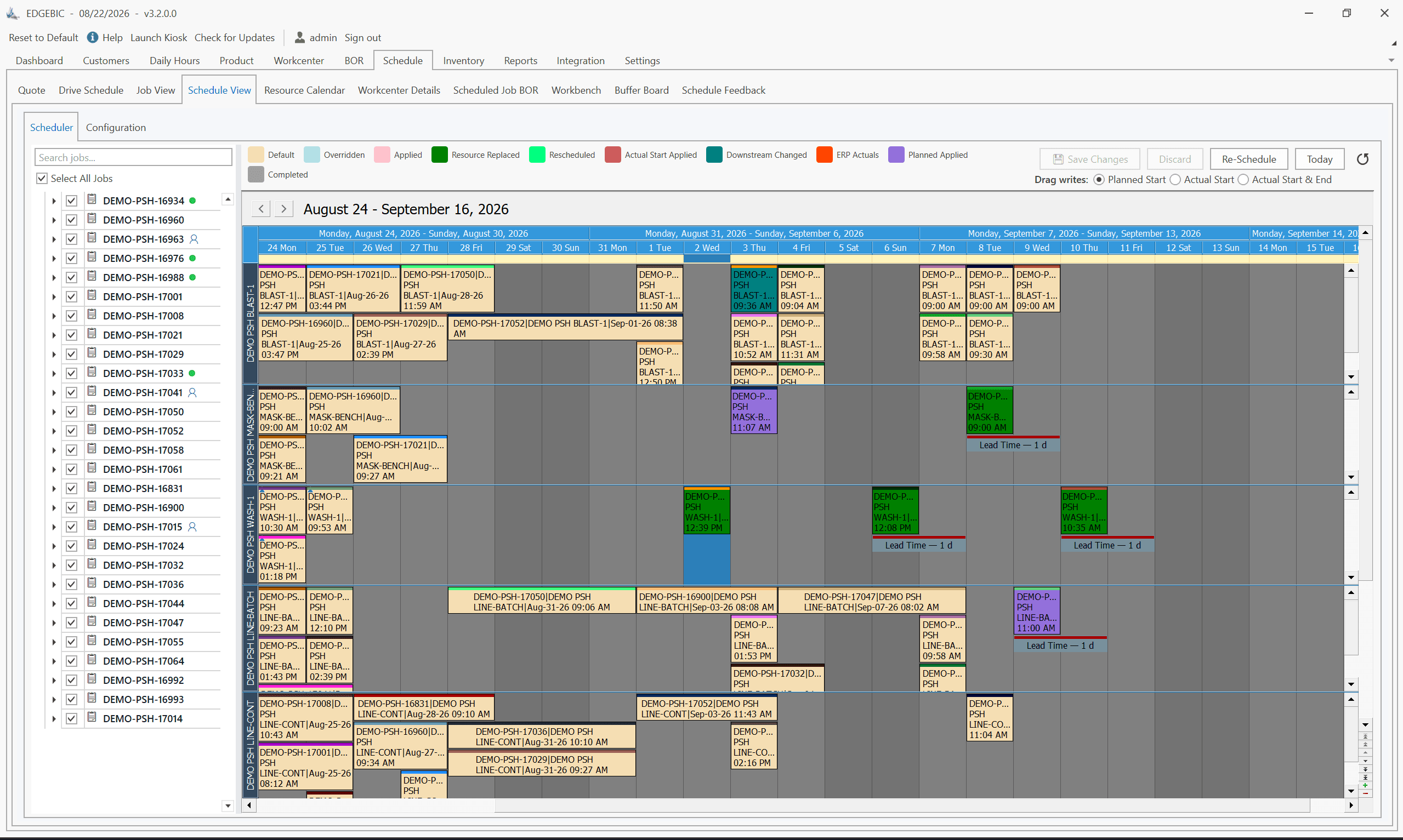
| Gantt visualization | EDGEBI interactive Gantt | Basic scheduling board |
| What-if scenarios | Yes | No |
| Drag-and-drop scheduling | Yes | Limited |
| Multi-constraint optimization | Yes | No |
| Sequence-dependent setups | Yes | No |
| Quoting and estimating | No | Built-in |
| Job costing | No | Built-in |
| Inventory management | No | Built-in |
| Shop floor data collection | Via EDGEBI | Built-in |
| Purchasing/POs | No | Built-in |
| Accounts receivable | No | Built-in |
| ERP integration | Any ERP (including JobBOSS) | Is the ERP |
| Deployment | On-premise | Cloud |
| Pricing | One-time perpetual license | Monthly subscription |
| Implementation | 5 business days | 4-8 weeks |
Why This Is Not Really a Head-to-Head
The comparison table makes it clear: RMDB and JobBOSS2 do fundamentally different things. JobBOSS2 is an ERP that runs your job shop's business operations - quoting, job tracking, costing, inventory, purchasing, and accounting. RMDB is a scheduling system that optimizes when jobs run, on which machines, and in what sequence.
Comparing them head-to-head is like comparing a lathe and a CMM. They serve different functions in the same shop. The real question is whether JobBOSS2's built-in scheduling is sufficient for your needs, or whether adding RMDB's scheduling depth delivers meaningful value.
JobBOSS2 Scheduling: What It Does Well
JobBOSS2 provides scheduling features that work for basic production planning:
- Dispatch board: Visual representation of jobs by work center, allowing planners to see loading and make basic sequencing decisions.
- Capacity views: See which work centers are overloaded or underutilized.
- Priority sequencing: Arrange jobs by due date or priority on each work center.
- Job tracking: Monitor progress of jobs through the shop with time and attendance integration.
For a 10-person shop with a dozen active orders and predictable work flow, these features provide adequate scheduling visibility. The strength is integration - scheduling data flows naturally from JobBOSS's orders, routings, and work centers.
Where JobBOSS2 Scheduling Falls Short
As shops grow and scheduling complexity increases, JobBOSS2's scheduling limitations become apparent:
- No true finite capacity logic: The scheduling board shows loading but does not automatically resolve overloads across multiple constraints.
- No what-if analysis: You cannot test "what happens if we accept this rush order?" without actually changing the schedule.
- No multi-constraint optimization: Labor, tooling, and machine constraints are not resolved simultaneously.
- No sequence-dependent setup awareness: The scheduler does not minimize changeover time by sequencing similar jobs together.
- Limited cascading impact visibility: Moving one job does not automatically show the ripple effects on other orders.
These limitations matter when your shop has 200+ active orders, 15+ machines, multiple bottleneck work centers, and customers who need accurate delivery dates.
RMDB: Scheduling Depth for Job Shops
RMDB was specifically designed for the scheduling challenges job shops face daily:
Finite Capacity Intelligence
RMDB's scheduling engine simultaneously considers machine capacity, labor availability, tooling constraints, and material availability. When a rush order arrives, the scheduler shows exactly what can move, what cannot, and which delivery promises are affected. This is the difference between a scheduling tool and a list-sorting tool.
Visual Planning with EDGEBI
The EDGEBI Gantt interface shows every operation on every resource across your scheduling horizon. Planners can drag and drop operations, see instant visual feedback on cascading effects, and compare scenarios side by side. This visual intelligence transforms how planners make decisions.
What-If Scenario Analysis
Before committing to any schedule change, RMDB lets you test alternatives. "What if we run overtime on the CNC mill? What if we move Job 4521 to the alternate lathe? What if we push the Smith order back two days?" Each scenario is evaluated against all constraints and shows the full impact before you commit.
Sequence-Dependent Setup Optimization
For shops where changeover time varies based on what ran previously - common in machining, coating, and finishing operations - RMDB sequences jobs to minimize total setup time. This can recover 10-20% of available capacity that is currently lost to unnecessary changeovers.
The Integration Story
How RMDB and JobBOSS Work Together
RMDB pulls data from JobBOSS:
- Work orders and operations from active jobs
- Routing information and standard times
- Work center definitions and capacity
- Material availability dates
- Due dates and customer priorities
RMDB generates optimized finite capacity schedules and pushes scheduled start/completion dates back to JobBOSS. The integration is set up during the 5-day implementation and typically takes one day of the five.
The result: JobBOSS remains your system of record for job tracking, costing, and business operations. RMDB handles the scheduling intelligence that JobBOSS's built-in features cannot provide.
Pricing Perspective
JobBOSS2 Pricing
JobBOSS2 subscription pricing typically runs $100-$200+ per user per month. For a 5-user shop, that is $6,000-$12,000 annually for the ERP platform.
Adding RMDB to JobBOSS
RMDB, now EDGEBIC (RMDB 2.0) by User Solutions, is a one-time $25,000 (APS) or $35,000 (Complete) license with updates included and no per-seat annual fee. Over five years that is far less than the alternative of switching to a more expensive ERP with better built-in scheduling or purchasing an enterprise APS system.
Cost of Not Having Good Scheduling
The real cost comparison is RMDB's price vs the cost of poor scheduling: late deliveries, lost customers, excessive overtime, expediting costs, and missed revenue. Most job shops find that RMDB pays for itself within the first 3-6 months through improved on-time delivery and reduced expediting.
When JobBOSS2 Scheduling Is Sufficient
JobBOSS2's built-in scheduling works when:
- Your shop is small (under 15 machines, under 50 active orders)
- Production flow is relatively predictable
- You rarely deal with complex scheduling conflicts
- Your planner can manage scheduling mentally with some visual support
- On-time delivery is not a significant competitive issue
When You Need RMDB on Top of JobBOSS2
Add RMDB when:
- Scheduling complexity has outgrown the dispatch board
- You have 15+ machines, 100+ active orders, and multiple bottleneck work centers
- Late deliveries are costing you customers
- Your planner spends more time firefighting than planning
- You need to answer "when can we deliver?" with confidence and accuracy
- Setup time waste is significant and you want sequence optimization
- Rush orders routinely disrupt the entire schedule
The Bottom Line
JobBOSS2 is an excellent job shop ERP. Its scheduling features provide basic planning capability that works for simpler operations. But scheduling is not JobBOSS2's core strength - quoting, job costing, and shop floor tracking are.
RMDB is a scheduling specialist. It does one thing - production scheduling - and does it exceptionally well. For job shops where scheduling accuracy and responsiveness are competitive differentiators, adding RMDB to JobBOSS2 is one of the highest-ROI investments you can make.
Frequently Asked Questions
JobBOSS2 includes basic scheduling features such as a dispatch board, capacity loading views, and job sequencing. However, it does not provide the advanced finite capacity scheduling, what-if analysis, or multi-constraint optimization found in dedicated APS tools like RMDB.
Yes. RMDB integrates with JobBOSS through data import/export, pulling job data, routings, and work center information from JobBOSS to create optimized finite capacity schedules. Many job shops use both: JobBOSS for ERP functions and RMDB for advanced scheduling.
JobBOSS2 is a solid job shop ERP that handles quoting, order management, job tracking, and shop floor data collection well. Its built-in scheduling is adequate for basic planning but falls short for shops with complex multi-constraint scheduling needs, bottleneck management, or the need for what-if scenario analysis.
JobBOSS2 is offered as a cloud subscription, typically ranging from $100-$200+ per user per month. For a 5-user shop, that is $6,000-$12,000 annually for the ERP. Adding RMDB's one-time license, now EDGEBIC (RMDB 2.0) by User Solutions at $25,000 (APS) or $35,000 (Complete), for scheduling is often more cost-effective than paying for a separate enterprise APS.
No - RMDB is not an ERP replacement. RMDB is a scheduling add-on that works alongside JobBOSS. Keep JobBOSS for quoting, job costing, order management, and shop floor tracking. Add RMDB for the finite capacity scheduling, Gantt visualization, and what-if analysis that JobBOSS's built-in scheduler cannot provide.
See RMDB and JobBOSS Working Together
Already running JobBOSS? See how RMDB adds scheduling intelligence to your existing setup. Contact User Solutions for a demo using your actual jobs and work centers. Our 5-day implementation includes the JobBOSS integration - you will be scheduling with real data by Friday. Request a demo today.
Frequently Asked Questions
Ready to Transform Your Production Scheduling?
User Solutions has been helping manufacturers optimize their production schedules for over 35 years. One-time license, 5-day implementation.

User Solutions Team
Manufacturing Software Experts
User Solutions has been developing production planning and scheduling software for manufacturers since 1991. Our team combines 35+ years of manufacturing software expertise with deep industry knowledge to help factories optimize their operations.
Share this article
Related Articles
10 Best APS Software for Manufacturers in 2026
Compare the 10 best Advanced Planning and Scheduling (APS) software solutions, from EDGEBIC (RMDB 2.0) to PlanetTogether, Siemens Opcenter and SAP. Features, pricing, implementation timelines, and recommendations by manufacturer size.

Free vs Paid Production Scheduling Software: What Manufacturers Need to Know
Compare free and paid production scheduling software for manufacturers. Real costs, hidden limitations, and when to invest in a paid scheduling solution.

One-Time License vs SaaS Scheduling Software: Total Cost Comparison
Compare perpetual license and SaaS subscription pricing for manufacturing scheduling software. 5-year TCO analysis, pros, cons, and which model fits your shop.