
RMDB vs Epicor Advanced Planning and Scheduling (2026)
 User Solutions Team
RMDB vs Epicor APS represents a common decision for manufacturers who already use Epicor ERP or are evaluating Epicor as part of a larger technology purchase. Should you use Epicor's built-in scheduling modules, or add a dedicated APS tool like RMDB on top of your ERP? This comparison explores both approaches honestly, covering capabilities, costs, and the practical implications for your shop floor.
For a broader view of how scheduling tools compare across the market, see our production scheduling software comparison guide.
The Fundamental Question: ERP-Embedded vs Standalone APS
Before comparing specific features, it helps to understand the architectural difference. This is the core of the ERP scheduling add-on decision.
Epicor APS is a scheduling module embedded within the Epicor Kinetic ERP platform. It schedules using data that already lives in Epicor - work orders, BOMs, routings, inventory, and resource definitions. The advantage is tight integration. The tradeoff is that scheduling capability is bounded by what the ERP vendor has built.
RMDB is a standalone APS that sits alongside any ERP - including Epicor. It pulls data from your ERP, applies advanced finite capacity scheduling logic, and pushes scheduled dates back. The advantage is scheduling depth without ERP dependency. The tradeoff is that integration requires some data mapping.
Feature Comparison
| Feature | RMDB | Epicor APS |
|---|---|---|
| Finite capacity scheduling | Advanced multi-constraint | Finite capacity with constraints |
| Gantt visualization | EDGEBI interactive Gantt | Built-in scheduling board |
| What-if scenario analysis | Yes, multiple scenarios | Limited scenario capability |
| Drag-and-drop rescheduling | Full drag-and-drop | Available in scheduling board |
| Sequence-dependent setups | Yes | Basic support |
| Multi-constraint optimization | Yes | Yes, within ERP data model |
| Material-aware scheduling | Via ERP integration | Native (uses ERP inventory) |
| ERP integration | Any ERP system | Native Epicor integration |
| Standalone capability | Yes | Requires Epicor ERP |
| Deployment | On-premise | Cloud or on-premise |
| Pricing | One-time license | Add-on to Epicor subscription |
| Implementation | 5 business days | Part of Epicor deployment |
Scheduling Depth Comparison
Epicor APS Capabilities
Epicor's scheduling modules provide solid finite capacity scheduling that leverages the ERP's data model. Key capabilities include:
- Forward and backward scheduling with finite capacity
- Resource loading visualization and scheduling boards
- Integration with Epicor MRP for material-constrained scheduling
- Basic what-if capability through schedule simulation
- Job sequencing with priority rules
For many Epicor customers, the built-in scheduling provides a meaningful step up from manual planning. The tight integration means work orders, inventory levels, and resource definitions flow seamlessly without any data mapping.
RMDB Capabilities
RMDB provides advanced finite capacity scheduling designed over 35+ years of manufacturing scheduling expertise:
- Multi-constraint optimization across machines, labor, tooling, and materials simultaneously
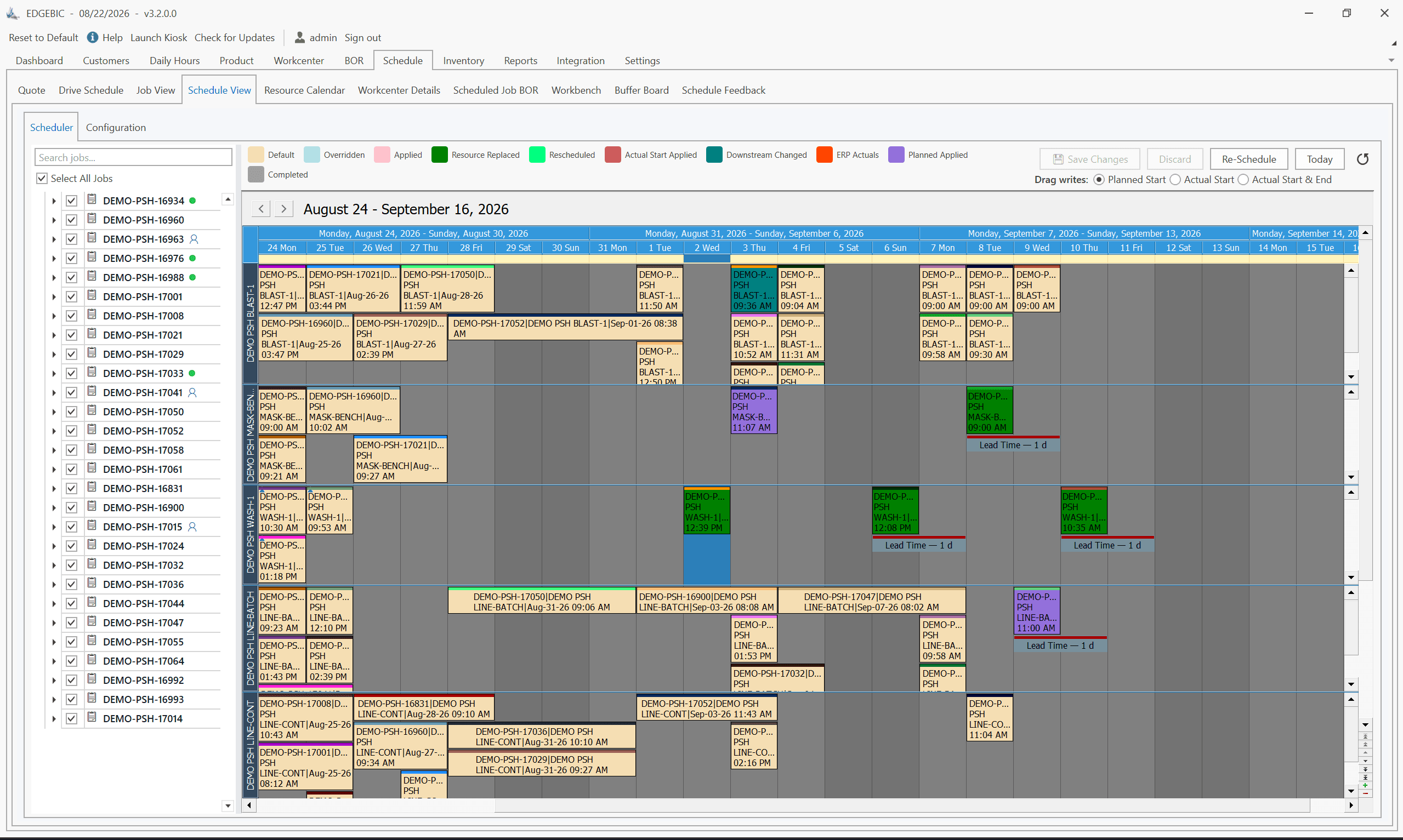
- EDGEBI visual Gantt charts with full drag-and-drop capability
- What-if scenario analysis - test multiple scheduling approaches before committing
- Sophisticated sequence-dependent setup optimization
- Alternate routing logic for flexible manufacturing
- Forward and backward scheduling with multiple dispatching strategies
The depth difference becomes apparent when scheduling problems get complex. If your shop deals with competing priorities across bottleneck work centers, frequent rescheduling due to rush orders or breakdowns, and sequence-dependent setups that significantly affect throughput, RMDB's scheduling engine handles these scenarios with more sophistication.
The Integration Reality
Already an Epicor Customer
If you already run Epicor, adding RMDB creates a two-system workflow: Epicor manages orders, inventory, and financials while RMDB handles scheduling. Data flows between the systems through import/export or API connections. Many manufacturers run this configuration successfully - it takes about a day of the 5-day implementation to set up the integration.
The alternative - adding Epicor's APS modules - keeps everything in one system. If your scheduling needs are straightforward, this simplicity has genuine value.
Not Yet on Epicor
If you are evaluating Epicor and APS simultaneously, consider whether Epicor's built-in scheduling meets your needs before committing. Some manufacturers buy Epicor assuming the scheduling will be sufficient, then discover limitations months into deployment. Understanding your scheduling requirements before committing to any ERP avoids this costly mismatch.
Pricing Considerations
Epicor Cost Structure
Epicor Kinetic uses subscription pricing, typically $150-$300+ per user per month for the base ERP. APS modules add additional cost on top. For a manufacturer with 10 ERP users, base Epicor costs alone can reach $18,000-$36,000 annually, before APS add-ons.
The total cost of Epicor (ERP + APS) for a mid-size manufacturer often reaches $100,000-$300,000+ annually, though this covers far more than just scheduling.
RMDB Cost Structure
RMDB continues as EDGEBIC (RMDB 2.0) by User Solutions, a one-time perpetual license at $25,000 (APS) or $35,000 (Complete) with updates included. If you are already running Epicor for ERP, adding RMDB for scheduling is a fraction of your existing Epicor investment - and it provides significantly deeper scheduling capability than adding Epicor's APS modules.
Cost Comparison: Epicor APS Add-On vs RMDB
| Element | RMDB (add to existing Epicor) | Epicor APS Module |
|---|---|---|
| Initial cost | $25,000-$35,000 one-time | Bundled in subscription increase |
| Annual cost | $0 (updates included, no per-seat fee) | $5,000-$20,000+ annual add-on |
| 5-year scheduling cost | $25,000-$35,000 | $25,000-$100,000+ |
| Implementation | 5 days | Part of Epicor rollout |
When Epicor APS Is the Better Choice
Epicor's built-in scheduling makes sense when:
- Your scheduling needs are moderate. If you have a relatively linear production flow without complex setup dependencies or frequent what-if analysis needs, Epicor's scheduler handles the basics well.
- You strongly prefer a single vendor. Keeping everything in Epicor simplifies vendor management, support escalation, and data flow.
- You are implementing Epicor from scratch and want to minimize the number of systems to deploy simultaneously.
- Your planners are not power users. If your planning team prefers simplicity over depth, Epicor's integrated approach requires less training.
When RMDB Is the Better Choice
RMDB is the stronger fit when:
- Scheduling is your biggest pain point. If late deliveries, bottleneck confusion, and reactive scheduling are what hurt most, RMDB's deeper scheduling engine addresses these directly.
- You already run Epicor and want to enhance scheduling without changing your ERP. RMDB adds scheduling intelligence on top of Epicor as an ERP scheduling add-on.
- You deal with scheduling complexity. Job shop environments, sequence-dependent setups, alternate routings, and multi-constraint bottlenecks are where RMDB excels beyond ERP schedulers.
- You want the best scheduling tool regardless of ERP vendor. RMDB works with Epicor, SAP, Oracle, JobBOSS, Sage, and any other ERP - giving you flexibility if your ERP ever changes.
- You need rapid results. RMDB's 5-day implementation means you can have advanced scheduling running while Epicor APS is still being configured.
- You want to own your scheduling software. RMDB's perpetual license means no recurring scheduling software costs.
Real-World Scenario: Epicor Customer Adding APS
Consider a 60-person job shop running Epicor Kinetic. They have 25 machines, 400+ active orders, and chronically miss delivery dates. The production planner uses Epicor's standard scheduling board but finds it insufficient for their complex, high-mix environment.
Option A: Add Epicor APS modules. Gains better capacity visualization and basic finite scheduling within Epicor. Implementation happens as an Epicor project, potentially 2-4 months. Cost increases on the Epicor subscription.
Option B: Add RMDB alongside Epicor. Gains advanced multi-constraint scheduling, visual EDGEBI Gantt charts, what-if analysis, and drag-and-drop rescheduling. Implementation takes 5 days with real production data. One-time license cost.
Both options improve scheduling. The question is whether moderate improvement within Epicor or significant scheduling advancement with a dedicated tool better serves the manufacturer's needs.
The Bottom Line
Epicor's scheduling modules are a competent step up from manual planning and work well for manufacturers with moderate scheduling complexity. The tight ERP integration is a genuine convenience.
RMDB delivers deeper scheduling capability that makes a measurable difference for manufacturers where scheduling complexity, on-time delivery, and bottleneck management are critical competitive factors. At a fraction of the cost and with dramatically faster implementation, RMDB is the stronger choice for manufacturers who need their scheduling tool to be a competitive weapon, not just an ERP checkbox.
Frequently Asked Questions
Yes, Epicor Kinetic includes advanced scheduling modules with finite capacity scheduling, Gantt chart visualization, and resource optimization. However, Epicor's scheduling modules are add-ons to the ERP and cost extra beyond the base Epicor license.
Yes. RMDB integrates with Epicor through Excel, CSV and database import-export masks, and EDGEBIC (RMDB 2.0) by User Solutions works the same way. Many manufacturers use RMDB as a scheduling add-on to Epicor, gaining deeper scheduling capability while keeping Epicor for ERP functions like order management, inventory, and financials.
Epicor APS module pricing is not published separately - it is bundled as an add-on to the Epicor Kinetic platform. The base Epicor subscription typically runs $150-$300+ per user per month, with APS modules adding additional cost. Total Epicor costs for a mid-size manufacturer can reach $100,000-$300,000+ annually.
Epicor's scheduling is tightly integrated with its ERP data, which is convenient if you are already an Epicor customer. However, RMDB provides deeper finite capacity scheduling, more sophisticated what-if analysis, and interactive Gantt planning through EDGEBI. For scheduling depth, RMDB is typically stronger.
If your scheduling needs are moderate and you prioritize tight ERP integration over scheduling sophistication, Epicor's built-in scheduling may suffice. If scheduling is your primary pain point and you need advanced finite capacity logic, what-if scenarios, and visual drag-and-drop planning, a standalone APS like RMDB will deliver significantly better results.
See What Deeper Scheduling Looks Like
Whether you run Epicor or any other ERP, contact User Solutions to see RMDB in action with your data. Our 5-day implementation gets you live with real schedules in a single week. Request a demo today.
Frequently Asked Questions
Ready to Transform Your Production Scheduling?
User Solutions has been helping manufacturers optimize their production schedules for over 35 years. One-time license, 5-day implementation.

User Solutions Team
Manufacturing Software Experts
User Solutions has been developing production planning and scheduling software for manufacturers since 1991. Our team combines 35+ years of manufacturing software expertise with deep industry knowledge to help factories optimize their operations.
Share this article
Related Articles
10 Best APS Software for Manufacturers in 2026
Compare the 10 best Advanced Planning and Scheduling (APS) software solutions, from EDGEBIC (RMDB 2.0) to PlanetTogether, Siemens Opcenter and SAP. Features, pricing, implementation timelines, and recommendations by manufacturer size.

Free vs Paid Production Scheduling Software: What Manufacturers Need to Know
Compare free and paid production scheduling software for manufacturers. Real costs, hidden limitations, and when to invest in a paid scheduling solution.

One-Time License vs SaaS Scheduling Software: Total Cost Comparison
Compare perpetual license and SaaS subscription pricing for manufacturing scheduling software. 5-year TCO analysis, pros, cons, and which model fits your shop.