
RMDB vs Siemens Opcenter APS: Manufacturing Scheduling Comparison
 User Solutions Team
Comparing RMDB and Siemens Opcenter APS is really a comparison between two different approaches to solving the same problem. Siemens Opcenter APS (formerly Preactor) is an enterprise-grade scheduling platform backed by one of the world's largest industrial technology companies. RMDB is a focused finite capacity scheduling tool built over 35 years by User Solutions specifically for small to mid-size manufacturers. Both deliver genuine scheduling intelligence - but at dramatically different price points, implementation timelines, and complexity levels.
This comparison is not about which software is "better" in absolute terms. It is about which fits your operation. For the full landscape of scheduling tools, see our production scheduling software comparison guide.
Company Background
Siemens Opcenter APS
Siemens Opcenter APS has its roots in Preactor, a UK-based APS company founded in 1992 that became one of the most widely deployed scheduling solutions globally. Siemens acquired Preactor in 2013 and integrated it into the Opcenter portfolio, which also includes MES (Opcenter Execution), quality management, and manufacturing intelligence. With Siemens' resources behind it, Opcenter APS is now positioned as part of a comprehensive digital manufacturing platform.
Opcenter APS comes in multiple tiers - Express, Standard, and Advanced - each adding scheduling sophistication and optimization capabilities.
RMDB by User Solutions
RMDB is developed by User Solutions, founded in 1991 with over 35 years of experience in manufacturing scheduling. RMDB is a dedicated finite capacity scheduling and planning system designed to work alongside any ERP. The software serves manufacturers across aerospace, defense, automotive, electronics, heavy equipment, and job shop machining.
Feature Comparison
| Feature | RMDB | Siemens Opcenter APS |
|---|---|---|
| Finite capacity scheduling | Advanced multi-constraint | Advanced multi-constraint |
| Gantt chart visualization | EDGEBI interactive Gantt | Built-in Gantt views |
| What-if scenario analysis | Yes | Yes |
| Drag-and-drop rescheduling | Yes | Yes |
| Multi-plant scheduling | Single plant | Multi-plant capable |
| MES integration | Via ERP | Native Opcenter MES |
| Digital twin connection | No | Siemens Xcelerator ecosystem |
| Sequence-dependent setups | Yes | Yes |
| Optimization algorithms | Rule-based, multi-constraint | Advanced heuristic + LP |
| ERP integration | Any ERP system | Major ERPs + Siemens ecosystem |
| Deployment | On-premise | On-premise and cloud |
| Pricing model | One-time perpetual license | Annual license + maintenance |
| Implementation time | 5 business days | 6-18 months |
| Target company size | 10-500 employees | 200-10,000+ employees |
Scheduling Engine Comparison
Both RMDB and Opcenter APS are genuine APS systems with finite capacity scheduling engines. The differences lie in optimization depth, scalability, and ecosystem integration.
Opcenter APS Scheduling Capabilities
Opcenter APS offers a tiered capability model:
- Express: Basic forward/backward scheduling with capacity visualization. Suitable for simple scheduling needs.
- Standard: Adds multi-constraint scheduling, what-if scenarios, and more sophisticated dispatching rules.
- Advanced: Full optimization with heuristic algorithms, linear programming, and the ability to optimize across multiple objectives simultaneously (due date adherence, setup minimization, resource utilization).
The Advanced tier represents one of the most sophisticated scheduling engines on the market. It can handle thousands of operations across hundreds of resources with complex constraint networks. For very large manufacturers, this level of optimization translates into measurable throughput improvements.
RMDB Scheduling Capabilities
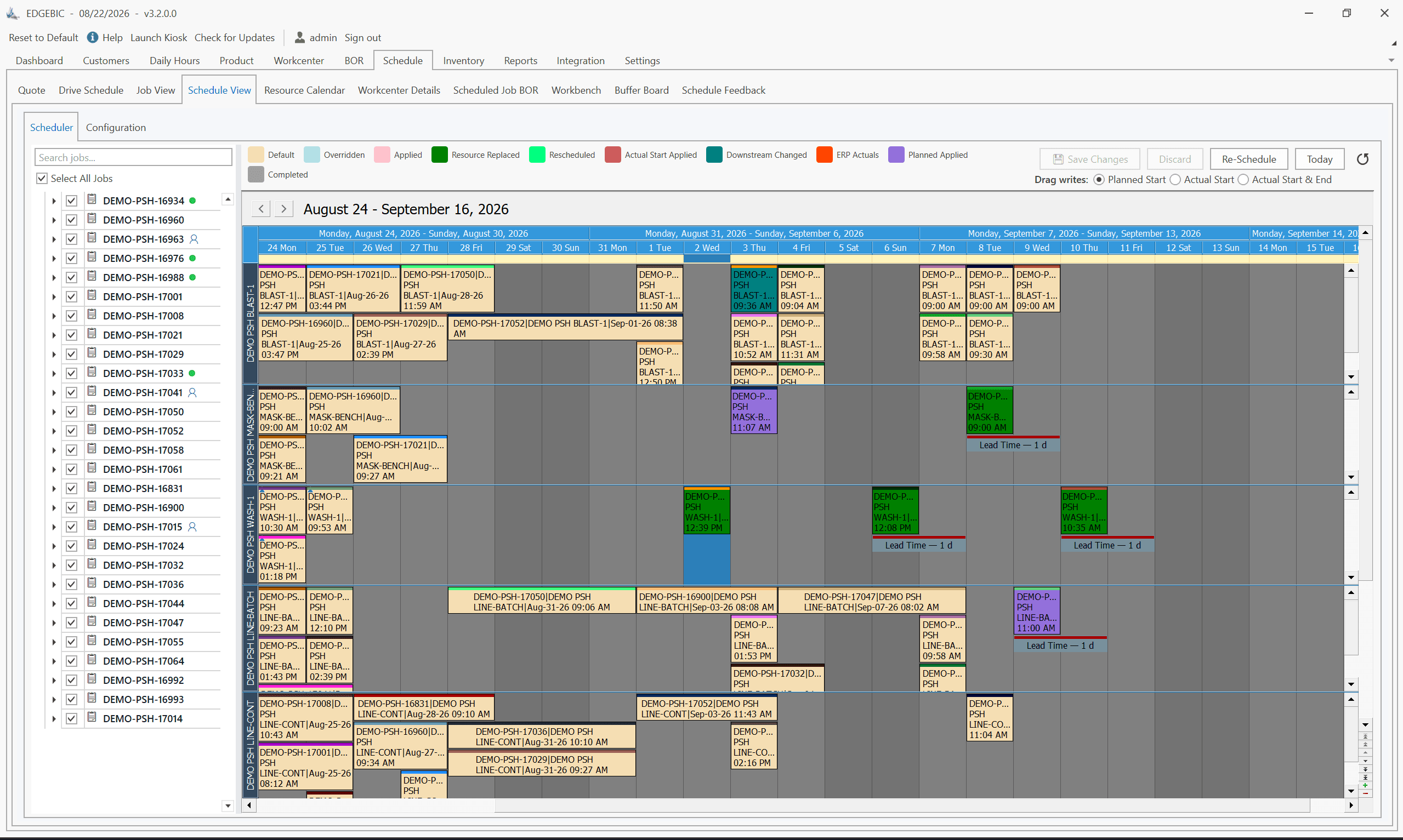
RMDB provides advanced finite capacity scheduling with multi-constraint optimization, what-if scenario analysis, sequence-dependent setup handling, and interactive Gantt-based planning through EDGEBI. The scheduling engine considers machine capacity, labor skills and availability, tooling constraints, and material availability simultaneously.
For the scheduling scenarios that small to mid-size manufacturers encounter - 10 to 100 machines, hundreds to thousands of active orders, multiple constraints, and frequent rescheduling - RMDB's scheduling engine delivers results comparable to the mid-tier Opcenter offerings. The difference emerges primarily in very large-scale optimization problems with thousands of resources.
The Ecosystem Factor
The most significant difference between RMDB and Opcenter APS extends beyond the scheduling engine itself.
Siemens Digital Enterprise Ecosystem
Opcenter APS is part of Siemens' broader Xcelerator portfolio, which includes:
- Opcenter Execution (MES): Shop floor execution and work-in-process tracking
- Opcenter Quality: Quality management and SPC
- Opcenter Intelligence: Manufacturing analytics and reporting
- Teamcenter PLM: Product lifecycle management
- NX/Tecnomatix: Digital twin and simulation
For manufacturers already invested in the Siemens ecosystem - or planning to adopt it - Opcenter APS provides seamless integration across the entire digital manufacturing stack. This integration is a genuine differentiator for large enterprises pursuing comprehensive digital transformation.
RMDB: Focused and Flexible
RMDB takes the opposite approach: do one thing exceptionally well and integrate with everything else. Rather than locking you into a single vendor's ecosystem, RMDB connects to whatever ERP, MES, or quality system you already use. This flexibility means you can adopt best-in-class tools for each function rather than compromising on an all-Siemens stack.
For manufacturers who are not Siemens shops - and most small to mid-size manufacturers are not - RMDB's vendor-agnostic approach is a significant practical advantage.
Pricing: An Order of Magnitude Apart
The cost difference between RMDB and Siemens Opcenter APS is not incremental. It is an order of magnitude.
Siemens Opcenter APS Pricing
Opcenter APS pricing is not publicly listed and varies based on tier, modules, users, and negotiation. Based on industry data:
- Opcenter APS Express: $15,000-$40,000 (limited scheduling)
- Opcenter APS Standard: $75,000-$150,000
- Opcenter APS Advanced: $150,000-$500,000+
- Implementation services: $50,000-$250,000
- Annual maintenance: 18-22% of license cost
- Typical total first-year cost: $150,000-$750,000
RMDB Pricing
- One-time perpetual license: $25,000 (EDGEBIC APS) or $35,000 (EDGEBIC Complete), sold today as EDGEBIC (RMDB 2.0) by User Solutions
- Implementation: typically 5 days
- Updates: Included, with no per-seat annual fee
- Typical total first-year cost: $25,000-$35,000
5-Year Total Cost of Ownership
| Cost Element | RMDB | Opcenter APS Standard |
|---|---|---|
| Year 1 | $25,000-$35,000 | $150,000-$300,000 |
| Years 2-5 maintenance | $0 (updates included) | $60,000-$120,000 |
| 5-Year Total | $25,000-$35,000 | $210,000-$420,000 |
For a 75-person job shop, that cost difference funds significant capital equipment purchases, additional hires, or other operational improvements.
Implementation: A Week vs a Year
RMDB: 5 Business Days
User Solutions' 5-day implementation loads your actual production data and has planners scheduling live jobs by end of week one. The narrow focus on scheduling - without MES, quality, or PLM dependencies - makes this rapid deployment possible.
Opcenter APS: 6-18 Months
Enterprise APS implementations follow a methodical process: requirements gathering, data mapping, integration development, configuration, testing, training, and phased rollout. With Opcenter, the integration requirements with existing ERP and potentially MES systems add significant complexity. Implementations of 6-12 months are standard, and 18-24 month timelines are not unusual for multi-module deployments.
This is not a shortcoming of Siemens or its implementation partners. Enterprise software deployments are inherently complex. The question is whether your operation requires enterprise-scale implementation or whether a focused scheduling tool can solve your problems in a week.
When Siemens Opcenter APS Is the Better Choice
Opcenter APS makes sense when:
- You are a large enterprise (500+ employees) with the budget and IT resources for enterprise software.
- You are already invested in the Siemens ecosystem (Teamcenter, NX, Opcenter MES) and want native integration across the digital thread.
- You need multi-plant scheduling with complex inter-facility dependencies and supply chain synchronization.
- You require advanced optimization for very large scheduling problems with thousands of resources and operations.
- You are pursuing comprehensive Industry 4.0 digital transformation and want a single vendor for your manufacturing operations stack.
When RMDB Is the Better Choice
RMDB is the stronger fit when:
- You are a small to mid-size manufacturer (10-500 employees) who needs scheduling intelligence without enterprise overhead.
- Budget is a real consideration. At 90%+ lower cost than Opcenter APS, RMDB makes advanced scheduling accessible to manufacturers who could never justify enterprise APS pricing.
- You need results fast. If late deliveries are costing you customers today, waiting 6-18 months for an APS implementation is not viable. RMDB's 5-day implementation addresses urgency.
- You are not a Siemens shop. If your ERP is Epicor, SAP Business One, JobBOSS, Sage, or any other non-Siemens platform, RMDB's vendor-agnostic approach provides cleaner integration.
- You run a job shop where scheduling complexity is high but the scale does not justify enterprise APS.
- You want to own your software with a one-time license rather than perpetual subscription or maintenance obligations.
Honest Bottom Line
Siemens Opcenter APS is a world-class scheduling platform with deep optimization capabilities and unmatched ecosystem integration within the Siemens stack. For large manufacturers pursuing Siemens-centered digital transformation, it is a logical choice.
For the vast majority of small to mid-size manufacturers, Opcenter APS is like buying a Formula 1 car to commute to work. The capability is there, but the cost, complexity, and maintenance requirements are wildly disproportionate to the need. RMDB delivers the finite capacity scheduling, visual Gantt planning, what-if analysis, and constraint management that most manufacturers need - in a week, at a fraction of the cost, without locking you into any ecosystem.
Both are good tools. The right one depends on your scale, budget, and strategic technology direction.
Frequently Asked Questions
Siemens acquired Preactor in 2013 and has since rebranded it as Siemens Opcenter APS. The core scheduling engine has Preactor DNA, but Siemens has integrated it into their broader Opcenter manufacturing operations platform which includes MES, quality, and intelligence modules.
Siemens Opcenter APS pricing varies significantly by configuration, typically ranging from $75,000 to $500,000+ for the software alone. Implementation services add $50,000-$250,000. Annual maintenance runs 18-22% of the license cost. Total first-year costs of $150,000-$750,000 are common for mid-to-large deployments.
Technically yes, but it is rarely practical. The cost, implementation complexity, and IT requirements make Opcenter APS a poor fit for manufacturers under 200 employees. RMDB provides comparable finite capacity scheduling for small to mid-size manufacturers at 90%+ lower cost.
For single-plant scheduling with finite capacity, multi-constraint optimization, sequence-dependent setups, and what-if analysis, RMDB delivers comparable scheduling quality. Opcenter APS adds value for multi-plant enterprises needing integration with Siemens' broader MES, PLM, and digital twin ecosystem.
Opcenter APS implementations typically take 6-18 months. Complex multi-plant deployments with MES integration can extend to 24+ months. RMDB implementations take 5 business days.
Compare RMDB Against Enterprise APS With Your Data
Enterprise APS vendors show impressive demos with sample data. We show results with your data - in five days. Contact User Solutions to schedule a demo using your actual jobs and constraints. See what your schedule looks like when finite capacity intelligence is applied to your real-world complexity. Request your demo today.
Frequently Asked Questions
Ready to Transform Your Production Scheduling?
User Solutions has been helping manufacturers optimize their production schedules for over 35 years. One-time license, 5-day implementation.

User Solutions Team
Manufacturing Software Experts
User Solutions has been developing production planning and scheduling software for manufacturers since 1991. Our team combines 35+ years of manufacturing software expertise with deep industry knowledge to help factories optimize their operations.
Share this article
Related Articles
10 Best APS Software for Manufacturers in 2026
Compare the 10 best Advanced Planning and Scheduling (APS) software solutions, from EDGEBIC (RMDB 2.0) to PlanetTogether, Siemens Opcenter and SAP. Features, pricing, implementation timelines, and recommendations by manufacturer size.

Free vs Paid Production Scheduling Software: What Manufacturers Need to Know
Compare free and paid production scheduling software for manufacturers. Real costs, hidden limitations, and when to invest in a paid scheduling solution.

One-Time License vs SaaS Scheduling Software: Total Cost Comparison
Compare perpetual license and SaaS subscription pricing for manufacturing scheduling software. 5-year TCO analysis, pros, cons, and which model fits your shop.