
RMDB vs Made2Manage: Finite Capacity Scheduling Compared (2026)
 User Solutions Team
RMDB vs Made2Manage is a comparison that comes up constantly among job shop production managers who are already running Made2Manage as their ERP and are hitting the ceiling of what its built-in scheduling can do. This is not a question of which system to buy - it is a question of what to add. Made2Manage handles your business operations well. The gap is in finite capacity scheduling: the ability to answer "when can we actually deliver this?" across 15 machines, 200 active jobs, and a dozen competing priorities - accurately and in minutes.
This guide is written for plant managers and production supervisors who know Made2Manage, are frustrated with its scheduling limitations, and want to understand whether a dedicated scheduling tool is worth the investment. For a broader view of how scheduling tools compare, see our production scheduling software comparison guide.
What Is Made2Manage?
Made2Manage is a job shop ERP system that has been in the market since the early 1990s. Originally developed as a purpose-built system for custom manufacturers and job shops, it was acquired by Aptean in 2019 and now sits within Aptean's manufacturing ERP portfolio alongside other mid-market platforms.
Made2Manage covers the core business functions a job shop needs: quoting and estimating, sales order management, job costing, bill of materials, work orders, inventory control, purchasing, accounts payable and receivable, and shop floor data collection. It is widely used in small to mid-size job shops, contract manufacturers, and custom fabricators - particularly in North America - because it was designed from the ground up for the make-to-order environment rather than adapted from a process manufacturing or distribution ERP.
That job-shop-first heritage is a genuine strength. Made2Manage understands routings, operations, work centers, and the quoting logic of custom work in a way that generic mid-market ERPs do not. For many shops with 20 to 150 employees, it is a well-fitted ERP platform. The scheduling module, however, reflects the era it was designed in rather than the demands shops face today.
Made2Manage Scheduling: What It Can and Cannot Do
Made2Manage's scheduling module provides forward and backward scheduling from demand due dates, a visual dispatch list for work center supervisors, and basic capacity loading views. For a shop with modest scheduling complexity, these features are a workable starting point.
Where the module runs out of road is in the situations that actually cause scheduling pain:
No true finite capacity optimization. Made2Manage can show you that a work center is overloaded, but it does not automatically resolve that overload by redistributing work across available capacity while respecting all constraints simultaneously. A planner still has to manually move jobs around and mentally track the cascade effects.
No what-if scenario analysis. When a customer calls with a rush order on Thursday afternoon, a planner using Made2Manage cannot model "what happens to all current due-date commitments if we accept this?" without actually editing the live schedule. There is no scenario sandbox, no parallel what-if copy, no impact preview before committing.
Limited sequencing rules. Made2Manage does not support sequence-dependent setup time minimization. If your grinding or coating or CNC turning work has variable changeover times based on what ran before, Made2Manage's scheduler has no mechanism to group similar jobs together to recover that lost capacity.
No multi-constraint optimization. Real shop floor scheduling involves machines, operators, tooling, and material availability interacting simultaneously. Made2Manage's scheduling module handles machine loading but does not resolve conflicts across all of these constraint types at once.
Limited alternate routing support. When a primary machine is down or overloaded, evaluating and assigning work to an alternate routing is a manual process in Made2Manage. A dedicated APS can evaluate alternate routings automatically as part of the scheduling run.
None of this is a criticism of Made2Manage's design intent. These gaps are common to ERP-embedded scheduling modules across the industry - they are the reason dedicated Advanced Planning and Scheduling systems exist as a separate category.
What Finite Capacity Scheduling Actually Requires
Before comparing the two tools on a feature level, it is worth being precise about what genuine finite capacity scheduling entails. The term gets used loosely, and "capacity planning" features in an ERP are not the same thing as a finite capacity scheduling engine.
A true finite capacity scheduling system must be able to:
- Schedule against real resource calendars. Machines are not available 24/7. Shifts, maintenance windows, holidays, and operator availability all define when work can actually run. The scheduler must respect these calendars in every scheduling calculation.
- Resolve multi-constraint conflicts automatically. When machine A is available but the operator certified on machine A is on the afternoon shift and the material for Job 1042 does not arrive until Tuesday, the scheduler needs to find the feasible slot that satisfies all three constraints - not just one.
- Support setup families and sequence-dependent changeovers. For operations where setup time depends on what ran previously (material changes, diameter families, color sequences, heat treat cycles), the scheduler needs to minimize total setup by sequencing intelligently - not just sorting by due date.
- Enable drag-and-drop Gantt rescheduling with instant feedback. Visual planning is not optional. Planners need to see the full schedule horizon, drag an operation to a different slot, and see instantly which other jobs are affected and whether any constraint is violated.
- Run what-if scenarios in a sandbox. The ability to test schedule alternatives before committing is what separates planning from guessing. Rush order impact, machine downtime response, and delivery promise verification all depend on scenario modeling.
- Handle alternate routings. When a bottleneck machine is unavailable, the system should evaluate whether an alternate routing exists and what the capacity and lead time implications are.
These are the benchmarks against which both Made2Manage and RMDB should be measured.
Feature Comparison
| Feature | RMDB | Made2Manage |
|---|---|---|
| Finite capacity scheduling | Advanced multi-constraint engine | Forward/backward scheduling only |
| What-if scenario analysis | Yes - full scenario sandbox | No |
| Gantt chart visualization | Interactive Gantt via EDGEBI | Basic dispatch list |
| Drag-and-drop rescheduling | Yes - with instant cascade preview | No |
| Multi-constraint optimization | Machine + labor + material simultaneously | Machine loading only |
| Sequence-dependent setup optimization | Yes - setup family sequencing | No |
| Alternate routing support | Automatic evaluation | Manual only |
| Resource calendar support | Full shift/calendar modeling | Basic |
| ERP integration | Any ERP including Made2Manage | Built-in ERP functions |
| Quoting and estimating | No (uses Made2Manage) | Yes - built-in |
| Job costing | No (uses Made2Manage) | Yes - built-in |
| Inventory and purchasing | No (uses Made2Manage) | Yes - built-in |
| Shop floor data collection | Via EDGEBI integration | Yes - built-in |
| Deployment model | On-premise | On-premise / cloud |
| Pricing model | One-time perpetual license | Subscription per user |
| Implementation time | 5 business days | 6–12 weeks (ERP full rollout) |
When Made2Manage Scheduling Is Enough
Made2Manage's scheduling module is genuinely adequate for a segment of its user base. It works well when:
- Your shop has fewer than 12 active machines and fewer than 75 concurrent jobs.
- Production flow is relatively predictable - you do similar work repeatedly with few surprise constraint interactions.
- Your planner has enough mental model of the shop to manage exceptions manually without a scenario tool.
- Rush orders are infrequent and your customers understand that delivery commitments take a day to nail down.
- Changeover time is not a significant percentage of your available capacity.
For these shops, Made2Manage's dispatch list and capacity loading views provide sufficient visibility. The scheduling module was not designed for complexity - but not all shops are complex. Knowing you are below the threshold matters.
When You Need a Dedicated APS Like RMDB
The threshold is crossed when scheduling errors have real financial consequences. Add RMDB when:
- You have 15 or more machines and regularly run 150+ concurrent work orders.
- Late deliveries are costing you customer relationships or triggering expediting costs that erode job margins.
- Your scheduler spends more time reacting to yesterday's problems than planning next week's schedule.
- You cannot confidently quote a delivery date for a new order without doing a manual capacity check.
- Rush orders routinely break the schedule and the downstream impact takes hours to untangle.
- Changeover time losses are visible - you know setups are taking too long but the schedule does not account for sequence.
- Your planner is the single point of failure: if they are out for a day, scheduling stops.
These are the signals that the ERP's built-in scheduling has become the bottleneck. At this point, the cost of poor scheduling - in overtime, expediting, late fees, and lost repeat business - exceeds the cost of a dedicated scheduling tool by a wide margin.
Using RMDB Alongside Made2Manage
RMDB is not a replacement for Made2Manage. It is a scheduling add-on that works with Made2Manage the same way a high-precision CMM works alongside a machining center - each does what it does best.
The Integration Model
RMDB connects to Made2Manage through a data integration layer that runs on your local network. During the 5-day implementation, the integration is configured to pull the data RMDB needs:
- Open work orders and operation sequences from Made2Manage
- Routing definitions with standard times and work center assignments
- Work center capacities and shift calendars
- Material availability and promised delivery dates
- Customer priorities and due dates
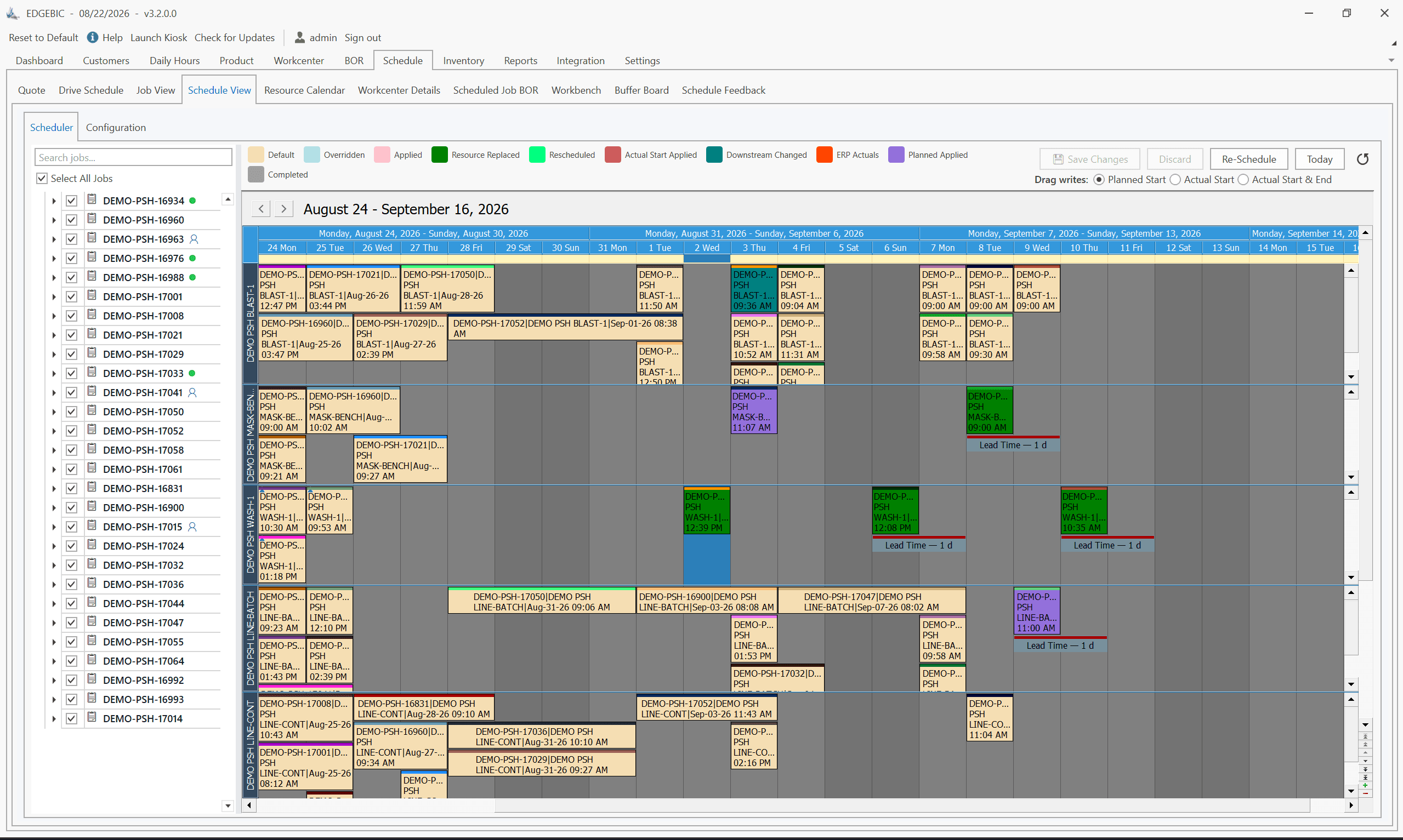
RMDB generates optimized finite capacity schedules from this data, resolving constraint conflicts automatically and presenting the full schedule horizon in an interactive Gantt view via EDGEBI. Scheduled start and completion dates flow back to Made2Manage, keeping the ERP's job tracking in sync with the actual schedule.
What Each System Owns
Made2Manage remains the system of record for everything it does well: customer quoting, sales order entry, job costing, inventory control, purchasing, and financial reporting. RMDB owns the scheduling intelligence: finite capacity sequencing, what-if analysis, Gantt-level visibility, and delivery promise verification.
Your planner's workflow shifts from "open the dispatch list and figure out what to do" to "open the Gantt, see the optimized schedule, test scenarios for any exceptions, confirm the plan." The change is meaningful from day one.
Cost Comparison
Made2Manage (Aptean) Pricing
Aptean's pricing for Made2Manage is not published publicly and is quoted on a per-engagement basis. Based on market observations, the full ERP subscription typically runs $100–$200+ per user per month for a job shop of 5–25 concurrent users. For a 10-user shop at $150/user, that is $18,000 per year - not including implementation services, which typically run $15,000–$40,000 for a full rollout. Shops already running Made2Manage have already absorbed this cost.
The scheduling module is included within the Made2Manage platform, so there is no separate add-on fee for the basic scheduling features. What you are evaluating is whether those features are sufficient, not whether they are affordable.
RMDB Pricing
RMDB uses a one-time perpetual license model, which is unusual in today's subscription-heavy software market and materially changes the total cost of ownership calculation. Today that license is EDGEBIC (RMDB 2.0) by User Solutions at $25,000 (APS) or $35,000 (Complete), with updates included and no per-seat annual fee. There is no per-user monthly fee that compounds indefinitely.
Over a five-year horizon, a 10-user Made2Manage shop running the full ERP at $1,500/month already spends $90,000 in subscription fees. Adding RMDB-engine scheduling as a one-time $25,000 EDGEBIC APS license is a single purchase, not a second subscription that compounds on top of it.
The Real Cost Comparison
The more useful cost question is not "what does RMDB cost?" but "what is poor scheduling costing us now?" A shop running 200 jobs per year with an average margin of $8,000 per job that loses 3–4 customers per year due to late delivery is forgoing $24,000–$32,000 in annual margin - before counting expediting costs, overtime, and the time the scheduler spends firefighting instead of planning. RMDB pays for itself in under a year in nearly every shop where scheduling accuracy is a demonstrated problem.
Real Customer Scenario: A 15-Machine Job Shop Outgrows Made2Manage Scheduling
Consider a precision machining shop with 15 CNC machines, 8 manual operations, and typically 175 open work orders at any time. The shop runs Made2Manage for quoting, job costing, and inventory - it works well for those functions. The scheduling module, however, creates a weekly bottleneck.
Every Monday morning, the production scheduler prints the dispatch list, reviews it for two to three hours, manually adjusts job sequences based on knowledge of which operators are in and what setups are pending, and produces a weekly schedule in a spreadsheet alongside Made2Manage. When a rush order arrives mid-week or a machine goes down, the entire process restarts. Delivery promises to customers take 24–36 hours to confirm because there is no way to quickly model the impact.
With RMDB integrated into Made2Manage:
- Work orders and routings load automatically from Made2Manage each morning.
- RMDB's engine generates a finite capacity schedule in minutes, accounting for machine availability, operator shifts, and material dates.
- The scheduler opens the EDGEBI Gantt and reviews the plan rather than building it from scratch.
- When a rush order arrives, the what-if scenario takes 10 minutes: model the job, see which existing orders are affected, confirm the delivery date, accept or negotiate.
- Sequence-dependent setups on the CNC mills are grouped automatically, recovering an estimated 2–3 hours of capacity per week that was previously lost to avoidable changeovers.
The Monday planning session drops from three hours to 45 minutes. Delivery promise accuracy improves from roughly 72% on-time to above 90% within the first quarter. The planner shifts from reactive firefighting to proactive scheduling management.
This pattern repeats across job shops and custom manufacturers where Made2Manage ERP functions are solid but scheduling complexity has outgrown the built-in module.
Frequently Asked Questions
Made2Manage includes basic forward and backward scheduling and a visual dispatch list, but it does not provide true finite capacity optimization. It cannot simultaneously resolve machine, labor, and material constraints, run what-if scenarios, or optimize job sequences to minimize changeover time - capabilities that dedicated APS tools like RMDB are built around.
Yes. RMDB integrates with Made2Manage through data import and export, pulling work orders, routings, work center definitions, and due dates from Made2Manage to generate optimized finite capacity schedules. The two systems complement each other: Made2Manage handles ERP functions and RMDB handles advanced scheduling.
Made2Manage (Aptean) is sold as a subscription with per-user pricing that typically ranges from $100 to $200+ per user per month for the full ERP suite. RMDB, now EDGEBIC (RMDB 2.0) by User Solutions, uses a one-time perpetual license at $25,000 (APS) or $35,000 (Complete) with updates included. Over a five-year horizon, RMDB typically costs 50–70% less than adding an enterprise APS on top of your existing ERP.
RMDB by User Solutions is purpose-built for job shops that need finite capacity scheduling beyond what their ERP provides. It integrates with Made2Manage, deploys in five business days, and provides multi-constraint scheduling, interactive Gantt charts, and what-if scenario analysis - the three capabilities most commonly missing from Made2Manage's built-in scheduler.
Extend Made2Manage with Real Finite Capacity Scheduling
Already running Made2Manage? See how RMDB adds the scheduling intelligence that Made2Manage's built-in module cannot provide. Our 5-day implementation includes the Made2Manage integration - you will have a live finite capacity schedule built on your actual jobs and work centers by the end of the week. We also have dedicated experience with the ERP scheduling add-on approach for shops that want better scheduling without replacing their existing system.
Contact User Solutions to request a demo using your actual Made2Manage data. See the Gantt, run a what-if, confirm a delivery date - in the same session.
Frequently Asked Questions
Ready to Transform Your Production Scheduling?
User Solutions has been helping manufacturers optimize their production schedules for over 35 years. One-time license, 5-day implementation.

User Solutions Team
Manufacturing Software Experts
User Solutions has been developing production planning and scheduling software for manufacturers since 1991. Our team combines 35+ years of manufacturing software expertise with deep industry knowledge to help factories optimize their operations.
Share this article
Related Articles
10 Best APS Software for Manufacturers in 2026
Compare the 10 best Advanced Planning and Scheduling (APS) software solutions, from EDGEBIC (RMDB 2.0) to PlanetTogether, Siemens Opcenter and SAP. Features, pricing, implementation timelines, and recommendations by manufacturer size.

Free vs Paid Production Scheduling Software: What Manufacturers Need to Know
Compare free and paid production scheduling software for manufacturers. Real costs, hidden limitations, and when to invest in a paid scheduling solution.

One-Time License vs SaaS Scheduling Software: Total Cost Comparison
Compare perpetual license and SaaS subscription pricing for manufacturing scheduling software. 5-year TCO analysis, pros, cons, and which model fits your shop.