


For a small manufacturer the best MRP software is the narrowest tool that solves your actual constraint. If that constraint is scheduling and capacity, a purpose-built planner on a one-time licence wins. If it is cloud inventory and purchasing across a simple product, a subscription MRP wins. Shops under 100 employees almost never need a full ERP. The five options below are compared on that basis.
Pricing is the fastest filter, so here it is up front: EDGEBIC (RMDB 2.0) by User Solutions is a one-time perpetual licence at $25,000 for EDGEBIC APS and $35,000 for EDGEBIC Complete, with no subscription and no trial clock, while the cloud alternatives run roughly $49 to $199 per user per month for as long as you use them. Our material planning platform for small and mid-size shops sets out exactly what the licence includes, and the full price list carries the current figures.
For foundational concepts on how MRP works, start with our complete MRP guide. If you are still deciding whether you need MRP, MRP II, or ERP, read our MRP vs MRP II vs ERP comparison.
What Small Manufacturers Actually Need from MRP
Before diving into specific products, let us define what small manufacturers (under 100 employees) actually need versus what they get sold:
Must-Have Features
| Feature | Why It Matters |
|---|---|
| Bill of Materials management | Cannot do MRP without accurate BOMs |
| Inventory tracking | Real-time visibility of on-hand stock |
| Purchase order generation | Automated procurement based on MRP calculations |
| Net requirements calculation | Core MRP engine that determines what to order and when |
| Production order management | Track work orders through the shop floor |
| Basic reporting | Inventory status, order status, material shortages |
High-Value Features
| Feature | Why It Matters |
|---|---|
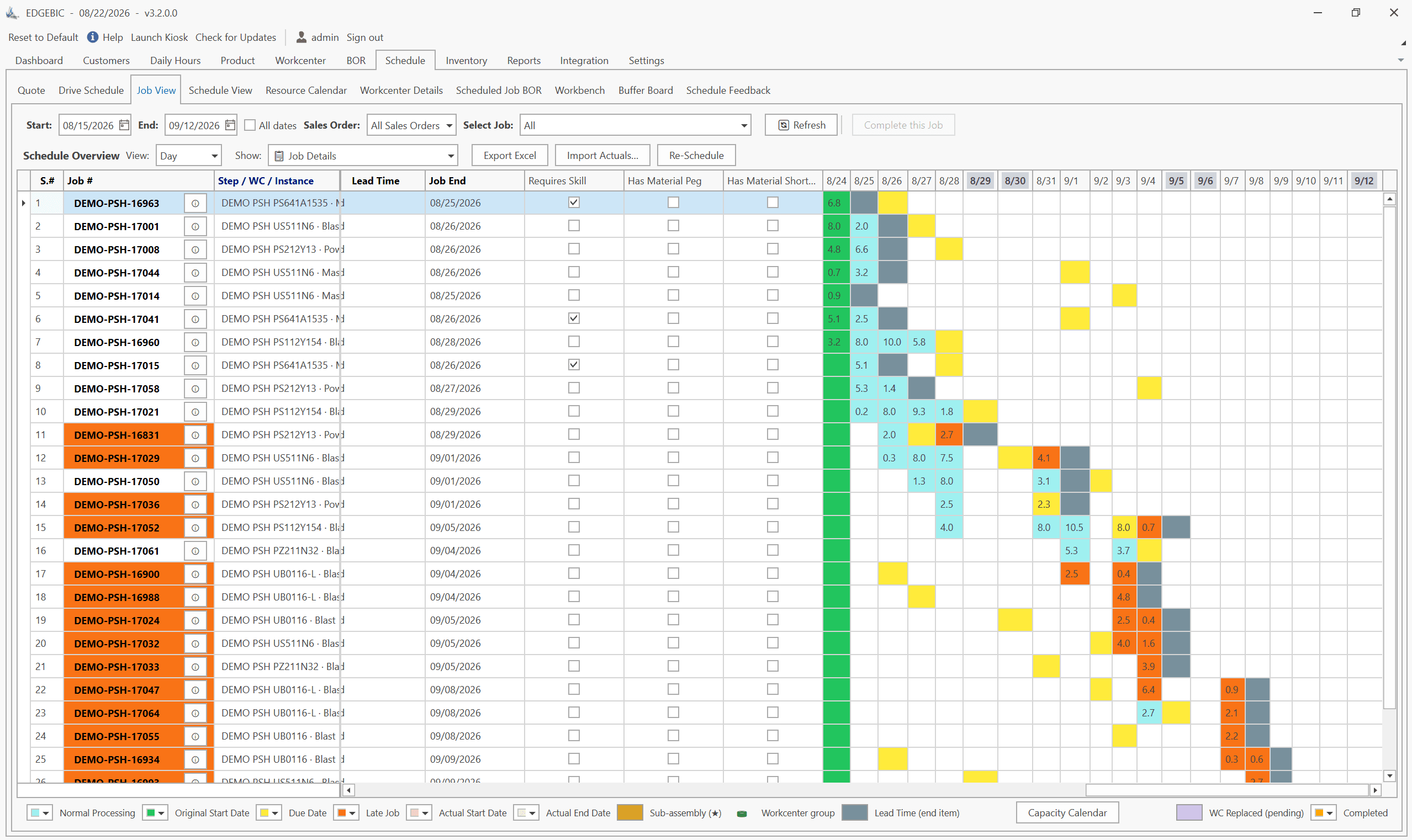
| Finite capacity scheduling | Plans production against real capacity constraints |
| Visual Gantt charts | Intuitive view of production schedule |
| Lot sizing options | Optimizes order quantities beyond lot-for-lot |
| Safety stock management | Prevents stockouts for critical items |
| What-if scenario planning | Test impact of changes before committing |
| ERP integration | Connects to your existing business systems |
Features Most Small Manufacturers Do NOT Need
- Multi-currency and multi-language support
- Global supply chain management
- Advanced HR and payroll
- CRM with marketing automation
- Compliance modules for industries you are not in
Paying for these features increases cost and complexity without delivering value. Focus on tools built for manufacturing planning, not enterprise everything.
Top MRP Software for Small Manufacturers: Detailed Reviews
1. RMDB by User Solutions
Best for: Job shops and make-to-order manufacturers who need finite capacity scheduling with material planning
RMDB (Resource Manager DB) is a production scheduling and planning tool built by User Solutions, a company with over 35 years of experience serving manufacturers like GE, Cummins, BAE Systems, and the US Navy.
Key Strengths:
- Finite capacity scheduling with drag-and-drop Gantt charts via EDGEBI
- One-time license model eliminates recurring subscription costs
- 5-day implementation compared to months for enterprise alternatives
- ERP add-on capability integrates with SAP, Oracle, Epicor, Sage, and others
- Multi-constraint scheduling across machines, labor, tooling, and materials
- What-if scenario planning for delivery date promises
- Built specifically for small to mid-size manufacturers
Pricing: One-time perpetual licence. EDGEBIC APS is $25,000 and EDGEBIC Complete is $35,000. No monthly subscription, and no free trial, because this is a licensed product rather than a SaaS seat.
Implementation: As few as 5 days with User Solutions' guided setup. Plastilite went from raw ERP data to an optimized schedule in 5 days; BAE Systems discontinued its ERP scheduling module in favour of RMDB.
Best For: Manufacturers who need serious scheduling capability and material planning without the overhead of full ERP. Particularly strong in job shops, custom manufacturing, aerospace, defense, and make-to-order environments.
Limitations: Focused on production planning and scheduling rather than full business management. Not designed to replace your accounting or CRM system (which is a strength for most buyers).
2. MRPeasy
Best for: Small manufacturers wanting simple cloud-based MRP
MRPeasy is a cloud-based MRP system designed for small manufacturers with 10-200 employees. It covers basic MRP, production planning, CRM, and procurement in a single platform.
Key Strengths:
- Easy to learn, clean interface
- Covers MRP basics: BOM, inventory, purchasing, production
- Includes light CRM and quoting features
- Affordable entry-level pricing
Pricing: Starts at approximately $49/user/month for the basic plan. Higher tiers add features like advanced reporting and multi-warehouse support.
Implementation: 2-4 weeks for basic setup. Self-service with support resources.
Best For: Small manufacturers with relatively simple products and straightforward production processes who want an all-in-one cloud solution.
Limitations: Limited finite capacity scheduling. No drag-and-drop Gantt charts. May struggle with complex multi-level BOMs. Subscription costs accumulate over time. Fewer integration options with existing ERP systems.
3. Katana Cloud Manufacturing
Best for: Small batch manufacturers and D2C brands
Katana provides cloud-based inventory and manufacturing management with a focus on real-time inventory tracking and production scheduling.
Key Strengths:
- Real-time inventory tracking across locations
- Visual production scheduling
- Strong integration with e-commerce platforms (Shopify, WooCommerce)
- Clean, modern interface
Pricing: Starts at approximately $99/month. Higher tiers for more users and features.
Implementation: 1-3 weeks for basic setup.
Best For: Consumer goods manufacturers selling direct-to-consumer or through e-commerce channels. Batch production environments with relatively simple BOMs.
Limitations: Not built for complex job shop environments. Limited finite capacity planning. E-commerce focus may not suit traditional B2B manufacturers.
4. Fishbowl Manufacturing
Best for: QuickBooks users who need manufacturing capabilities
Fishbowl is an inventory management and light manufacturing solution designed to integrate with QuickBooks.
Key Strengths:
- Deep QuickBooks integration
- Inventory management with barcode scanning
- Work order management
- Multi-location warehouse tracking
Pricing: One-time license starting around $4,395 for the base module, plus per-user fees.
Implementation: 2-6 weeks depending on complexity.
Best For: Small manufacturers who rely on QuickBooks for accounting and need manufacturing planning capabilities without replacing their financial system.
Limitations: MRP capabilities are basic compared to purpose-built tools. Limited scheduling depth. The QuickBooks dependency is a strength and a limitation.
5. DELMIAworks (formerly IQMS)
Best for: Growing manufacturers ready for more comprehensive ERP with strong manufacturing
DELMIAworks is a full ERP system with deep manufacturing capabilities including MRP, scheduling, quality management, and shop floor control.
Key Strengths:
- Comprehensive manufacturing ERP
- Strong MRP II capabilities including capacity planning
- Quality management and SPC built in
- Shop floor data collection
Pricing: Enterprise pricing, typically $50,000-$200,000+ depending on scope.
Implementation: 3-9 months for full implementation.
Best For: Manufacturers with 50-500 employees ready for a full ERP system with strong manufacturing focus.
Limitations: Higher cost and longer implementation than focused MRP tools. More complexity than many small manufacturers need.
Head-to-Head Comparison
| Factor | RMDB | MRPeasy | Katana | Fishbowl | DELMIAworks |
|---|---|---|---|---|---|
| Target size | 10-500 emp. | 10-200 emp. | 10-100 emp. | 10-100 emp. | 50-500 emp. |
| Finite capacity scheduling | Advanced | Basic | Basic | No | Moderate |
| Gantt charts | Drag-and-drop | View only | Basic | No | Yes |
| BOM management | Multi-level | Multi-level | Basic | Basic | Multi-level |
| ERP integration | SAP, Oracle, Epicor, Sage | Limited | Shopify, Xero | QuickBooks | Self-contained |
| Pricing model | One-time license | Subscription | Subscription | One-time license | Enterprise license |
| Implementation | 5 days | 2-4 weeks | 1-3 weeks | 2-6 weeks | 3-9 months |
| What-if planning | Yes | No | No | No | Limited |
| Custom mfg. focus | Strong | Moderate | Weak | Weak | Moderate |
How to Evaluate MRP Software: A Practical Framework
Step 1: Define Your Requirements
Before contacting vendors, document your specific needs:
- How many active BOMs do you manage?
- What is your production model? (Make-to-order, make-to-stock, engineer-to-order, mixed)
- How many work centers or machines do you schedule across?
- What existing systems must the MRP tool integrate with?
- What is your biggest current pain? (Material shortages, late deliveries, capacity bottlenecks, inventory excess)
Step 2: Calculate Total Cost of Ownership
Do not compare sticker prices. Compare 5-year total cost of ownership:
| Cost Component | Subscription Model (Example) | One-Time Licence (EDGEBIC APS) |
|---|---|---|
| Year 1 license/subscription | $12,000 ($100/user/mo x 10 users) | $25,000 one-time |
| Year 1 implementation | $5,000 | $5,000 |
| Years 2-5 subscription | $48,000 ($12,000/yr x 4) | $0 |
| Years 2-5 maintenance | Included | $5,000 ($1,250/yr) |
| 5-Year Total | $65,000 | $35,000 |
Check the arithmetic: $12,000 + $5,000 + $48,000 = $65,000 on the subscription, against $25,000 + $5,000 + $5,000 = $35,000 on the licence. The subscription column passes the licence total in year 3 and keeps climbing; the licence column stops. The crossover moves earlier every time you add a seat, because the licence does not charge per user. The one-time model, which RMDB and EDGEBIC both use, is the reason a 10-seat shop pays $30,000 less across five years.
Step 3: Test with Your Actual Data
Never buy MRP software based on a demo with sample data. Provide vendors with your actual BOMs, inventory data, and a realistic set of production orders. Watch how the system handles your complexity, not a simplified demonstration.
Step 4: Evaluate Implementation Support
Ask specific questions about implementation:
- Who does the data migration?
- How much training is included?
- What happens if we need help after go-live?
- What is the typical time from purchase to productive use?
Refer to our MRP implementation checklist for a complete list of evaluation criteria and go-live requirements.
Step 5: Check References in Your Industry
Ask for references from manufacturers similar to your size, industry, and production model. A tool that works brilliantly for a consumer goods batch manufacturer may struggle in a high-mix job shop.
Common Mistakes in MRP Software Selection
Based on 35 years of experience helping manufacturers choose and implement planning tools, these are the most frequent selection mistakes:
1. Buying for features you will never use. Enterprise ERP modules bundled with MRP sound impressive but add cost and complexity without value for small operations.
2. Ignoring data readiness. No MRP software can compensate for inaccurate BOMs or unreliable inventory counts. Budget time and resources for data preparation.
3. Choosing based on price alone. The cheapest option may lack critical features like finite capacity scheduling or multi-level BOM support that you will need as you grow.
4. Not involving shop floor users. Planners and shop floor supervisors must find the tool usable. Include them in the evaluation process.
5. Underestimating the spreadsheet to MRP transition. Moving from Excel to MRP requires process changes, not just new software. Plan for change management.
Our Recommendation
For small to mid-size manufacturers, especially job shops and make-to-order operations, we recommend evaluating RMDB from User Solutions and EDGEBIC (RMDB 2.0) alongside one or two cloud-based alternatives. The combination of finite capacity scheduling, material planning, visual Gantt charts, and one-time licensing delivers the best value for manufacturers whose primary challenge is production planning.
If you need a light all-in-one system that includes CRM and basic accounting, a cloud MRP tool may suit your needs. But if your pain is scheduling, capacity planning, and material management, a purpose-built tool will deliver significantly better results. Technical Glass Products took on 4% more business with the same workforce after moving to capacity-aware scheduling, and Homestead Furniture moved its basic weekly schedule from a 40-hour scheduler task to a 2-hour clerk task. Neither outcome comes from the inventory module; both come from scheduling against real capacity.
Two practical next steps before you talk to any vendor. Read what a one-time perpetual licence for material planning actually covers so you can hold the subscription quotes against it, and if your BOMs and routings are not yet in a system, lay them out in our free manufacturing spreadsheets first. Data preparation, not software selection, is what decides how your first month goes.
Frequently Asked Questions
The best MRP software depends on your specific needs. RMDB by User Solutions is ideal for shops that need finite capacity scheduling with material planning and prefer a one-time license. MRPeasy suits basic cloud MRP needs. Katana is strong for small batch manufacturers. The key is matching the tool to your production complexity and budget.
MRP software for small manufacturers ranges from $49-199 per user per month for cloud subscriptions to one-time license fees of $5,000-$50,000 for on-premise solutions. Over 5 years, subscription costs typically exceed one-time license costs. Factor in implementation, training, and data migration costs as well.
Yes. Many small manufacturers use standalone MRP and scheduling software alongside basic accounting software like QuickBooks. You do not need full ERP to benefit from MRP. Tools like RMDB are designed to work independently or integrate with existing systems.
Implementation timelines vary significantly. Cloud MRP tools can be set up in 1-4 weeks. RMDB from User Solutions implements in as few as 5 days. Full ERP systems with MRP modules typically take 6-18 months. The biggest variable is data preparation, not the software itself.
Prioritize BOM management, inventory tracking, purchase order generation, and production scheduling. For job shops and make-to-order operations, also look for finite capacity scheduling, visual Gantt charts, and what-if scenario planning. Avoid paying for enterprise features like multi-currency or global supply chain management that you will not use.
See RMDB in Action
Stop overpaying for enterprise features you do not need. RMDB from User Solutions and EDGEBIC (RMDB 2.0) give small manufacturers the scheduling and material planning power of systems costing 10x more, with a one-time perpetual licence and 5-day implementation. User Solutions has been doing this from South Lyon, Michigan since 1991.
Schedule a free demo to see how RMDB and EDGEBIC handle your specific manufacturing challenges, or compare the editions on the price list.
Expert Q&A: Deep Dive
Q: After 35 years of working with small manufacturers, what is the biggest mistake you see in MRP software selection?
A: The biggest mistake is buying more system than you need. Small manufacturers get sold on full ERP systems with MRP modules by enterprise software sales teams who convince them they need everything. Six months and $200,000 later, they are using maybe 20% of the system and struggling with the complexity. A focused MRP and scheduling tool that solves your specific production planning problems will deliver faster ROI. You can always expand later. We built RMDB specifically because we saw this pattern repeatedly: manufacturers drowning in software they did not need when what they actually needed was a practical scheduling and material planning tool.
Q: What should a small manufacturer have in place before evaluating MRP software?
A: Before you even look at software, make sure you have three things: accurate bills of materials for your top products, a reliable inventory count system, and documented routings with realistic time estimates. If these do not exist, no MRP software will save you. We have had prospects come to us wanting to implement RMDB but their BOMs were in the owner's head and inventory was tracked on sticky notes. We always recommend investing 2-4 weeks in data preparation before software evaluation. That effort pays dividends regardless of which tool you choose.
Q: How do you see cloud versus on-premise MRP evolving for small manufacturers?
A: Cloud MRP has become the default for new implementations, and for good reason. Lower upfront cost, automatic updates, and access from anywhere are real advantages. But there are trade-offs small manufacturers should consider. Cloud subscriptions add up over time and can exceed on-premise costs within 3-5 years. You are also dependent on internet connectivity and the vendor's continued existence. We offer both options with RMDB because we believe manufacturers should choose what fits their situation. Some of our customers in defense manufacturing or remote locations prefer on-premise for security and reliability. Others love the cloud flexibility. The right answer depends on your specific constraints.
Frequently Asked Questions
Ready to Transform Your Production Scheduling?
User Solutions has been helping manufacturers optimize their production schedules for over 35 years. One-time license, 5-day implementation.

User Solutions Team
Manufacturing Software Experts
User Solutions has been developing production planning and scheduling software for manufacturers since 1991. Our team combines 35+ years of manufacturing software expertise with deep industry knowledge to help factories optimize their operations.
Share this article
Related Articles
MRP vs APS: What MRP Assumes and What Finite Scheduling Fixes
MRP vs APS: MRP plans materials assuming infinite capacity and fixed lead times; APS schedules operations against real capacity. One job planned both ways.
Lean-MRP Hybrid: How to Combine Pull Scheduling with MRP for Long-Lead Materials
Lean and MRP appear to conflict - but most lean shops still need MRP for long-lead purchased materials. Here's how to combine pull scheduling and MRP at the right decoupling points.

MRP Data Accuracy: The #1 Reason MRP Implementations Fail (And How to Fix It)
Poor data quality kills MRP before it starts. Learn the three data pillars, how to hit the 98% inventory accuracy target, and a practical implementation checklist.