
10 Best Manufacturing Planning and Scheduling Software (2026)
 User Solutions Team
Picking the best manufacturing planning and scheduling software for your shop is one of the most consequential software decisions you will make. The right manufacturing scheduling software can cut lead times by 20-30%, improve on-time delivery from 70% to 95%, and reduce overtime through smarter capacity utilization. The wrong tool wastes months of implementation effort and gets abandoned inside a year.
This guide compares 10 leading manufacturing planning and scheduling software solutions for 2026. We cover genuine strengths, real weaknesses, honest pricing, and specific recommendations for different shop sizes and manufacturing environments. For a deeper look at what scheduling software does and how finite capacity planning works, see our guide to production scheduling software. Disclosure: User Solutions publishes this comparison and makes RMDB and EDGEBIC, which are included in the list.
Updated for 2026: This guide has been reviewed and updated with the latest software options, pricing, and feature comparisons for manufacturing scheduling.
What to Look for in Manufacturing Scheduling Software
Before comparing tools, it helps to understand the features that separate capable scheduling software from glorified spreadsheets.
1. Finite Capacity Scheduling
The most critical differentiator. Finite capacity scheduling respects your actual machine and labor constraints - it knows that Work Center 3 can only run one job at a time and that your CNC operator works 8 hours a day, not 24. Infinite capacity scheduling ignores these limits and produces schedules that look plausible but are impossible to execute. Any serious scheduling tool must use finite capacity as its foundation.
2. Gantt Chart Visualization with Drag-and-Drop
Schedulers need to see the full production picture at once and make fast manual adjustments when priorities change. A proper Gantt chart shows job sequences across all work centers, flags conflicts visually, and lets schedulers drag jobs to new time slots with the system automatically resolving downstream constraints.
3. ERP Integration
Manufacturing scheduling software should read work orders, BOMs, and routings from your ERP and push finalized schedules back. Shops that manually re-enter data between two systems quickly abandon the scheduling tool. Look for pre-built connectors or flexible import/export that works with your specific ERP without months of custom development.
4. What-If Scenario Analysis
Before committing to a schedule change - a new rush order, a machine breakdown, a late material delivery - schedulers need to model the impact. What-if scenario analysis lets you test changes in a sandbox without affecting the live schedule, then either approve and push or discard without consequence.
5. Pricing Model and Total Cost of Ownership
This is where many evaluations go wrong. A SaaS tool at $150 per user per month sounds affordable until you calculate $9,000 per year for 5 users, or $45,000 over 5 years. Perpetual license tools with a higher upfront cost frequently deliver lower total cost of ownership over any period beyond 2-3 years.
6. Implementation Speed
Implementation timelines directly affect your break-even on the investment. A tool that takes 9 months to go live costs you 9 months of continued scheduling chaos plus the ongoing internal staff time to manage the project. Ask vendors for realistic timelines with reference customers of similar size and complexity.
The 10 Best Manufacturing Scheduling Software Solutions for 2026
1. RMDB by User Solutions (now EDGEBIC) - Best Overall for Job Shops and Make-to-Order Manufacturers
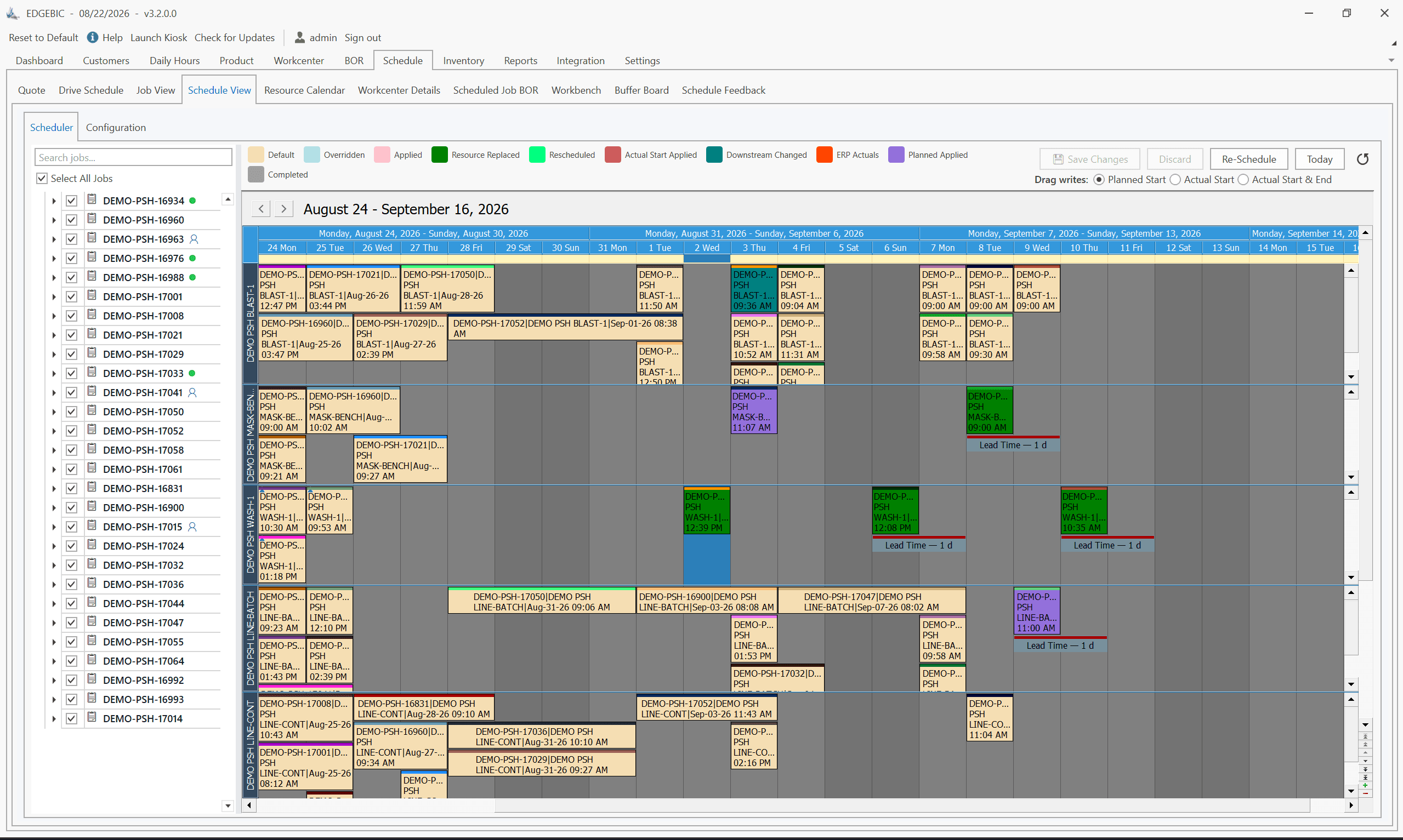
RMDB (Resource Manager DB) is a dedicated finite capacity scheduling and advanced planning system developed by User Solutions over 35+ years of manufacturing scheduling work. It is designed specifically as an add-on to existing ERP systems - you keep your ERP for purchasing, costing, and accounting while RMDB handles the scheduling complexity your ERP cannot manage. Today RMDB is sold as EDGEBIC, its current generation.
What RMDB does well:
True finite capacity scheduling is the core engine. RMDB schedules against real machine capacity, labor availability, tooling constraints, and material availability simultaneously. It handles sequence-dependent setups (where setup time changes based on what ran before), alternate routings, and split lots. The Gantt chart provides drag-and-drop rescheduling with automatic conflict detection and resolution.
What-if scenario analysis lets schedulers model rush orders, breakdowns, or late deliveries without touching the live schedule. Approved scenarios promote to the active schedule with a single click.
The 5-day implementation program is a genuine differentiator. User Solutions runs the implementation with your real jobs, routings, and work centers - not sample data - so you are live and scheduling your actual production within a single business week. This is not a marketing claim; it is a structured methodology tested across hundreds of deployments.
Pricing: RMDB is now sold as EDGEBIC, a published one-time perpetual license: $25,000 for EDGEBIC APS and $35,000 for EDGEBIC Complete (adds MRP, inventory and purchasing). Updates included, no per-seat annual fee. See pricing.
Weaknesses: RMDB (EDGEBIC) is not an ERP: it has no accounting or CRM, so it runs alongside an existing ERP or at minimum structured work order and routing data. The EDGEBIC APS edition does not include MRP or purchasing (EDGEBIC Complete adds them), and it is an installed Windows application rather than browser-based SaaS.
Best for: Job shops, make-to-order manufacturers, aerospace and defense shops, and any manufacturer with 10-500 employees who needs serious scheduling capability without subscription overhead.
2. MRPeasy - Best Cloud ERP for Very Small Manufacturers
MRPeasy is a cloud-based manufacturing ERP targeting companies with 10-200 employees. Founded in Estonia in 2014, it has built a large user base through an approachable interface, generous free trial, and competitive subscription pricing. It covers production, inventory, purchasing, CRM, and basic accounting in a single system.
What MRPeasy does well:
For very small manufacturers who need basic scheduling integrated with purchasing and inventory in one place, MRPeasy delivers a clean experience at an accessible price. The interface is modern and well-organized. Setup takes 2-6 weeks without requiring an IT department. Integration with QuickBooks and Shopify covers the two most common small-business systems.
Pricing: $49-$149 per user per month depending on plan tier. A 5-user shop at the starter tier pays $2,940/year or $14,700 over 5 years.
Weaknesses: Scheduling depth is limited. MRPeasy's capacity planning shows workstation loading and flags overloads, but it lacks the multi-constraint finite capacity optimization, sequence-dependent setups, and advanced sequencing algorithms found in dedicated APS tools. High-mix job shops with complex routings frequently find MRPeasy's scheduling capabilities insufficient as volumes grow.
Best for: Small manufacturers with 5-50 employees, simpler production environments, and a need for an affordable all-in-one ERP with basic scheduling.
3. PlanetTogether - Best APS for Mid-Market Multi-Plant Operations
PlanetTogether is an advanced planning and scheduling system targeting mid-market manufacturers with complex multi-plant, multi-constraint environments. It is one of the few APS tools that offers certified, out-of-the-box integration with SAP, Oracle, Microsoft Dynamics, Infor, and Epicor.
What PlanetTogether does well:
The scheduling engine handles genuine enterprise complexity - global capacity balancing across plants, simultaneous optimization of due dates and resource utilization, advanced what-if modeling, and scenario comparison dashboards. The ERP connectors are a meaningful technical differentiator for SAP and Oracle shops that have struggled with other tools that required extensive custom integration work.
Pricing: Subscription-based; pricing is not published and requires a sales conversation. Typical mid-market implementations run $30,000-$100,000+ annually including maintenance and support. Implementation services add to first-year cost.
Weaknesses: Significant investment of time and budget. Implementation for a single-plant SAP environment typically runs 3-6 months. PlanetTogether is overkill for single-site manufacturers under 200 employees.
Best for: Mid-market manufacturers with 200-2,000 employees, multi-plant operations, and SAP/Oracle ERP environments that need enterprise-grade APS without SAP APO's cost and complexity.
4. Epicor Advanced Planning and Scheduling - Best for Existing Epicor ERP Users
Epicor APS is the advanced scheduling module built into the Epicor ERP platform. For manufacturers already running Epicor, it is the path of least resistance to better scheduling - no integration project required, data is already in the system.
What Epicor APS does well:
Native integration is the primary advantage. Work orders, BOMs, routings, and inventory data flow seamlessly between Epicor's ERP and its scheduling module with no import/export or API configuration. For Epicor shops with moderate scheduling complexity, this saves substantial implementation time.
Pricing: Module pricing on top of existing Epicor licensing. Exact cost depends on the Epicor version and licensing model in use. Discuss with your Epicor account manager.
Weaknesses: Epicor APS is adequate for standard manufacturing environments but can feel constraining for high-mix job shops with complex custom routings. Some manufacturers find that dedicated third-party schedulers like RMDB - even with the integration overhead - deliver better scheduling outcomes than the native module.
Best for: Current Epicor ERP users with moderate scheduling complexity who want to avoid a separate scheduling system and integration project.
5. JobBOSS² - Best All-in-One for Job Shops Under 100 Employees
JobBOSS² (formerly JobBOSS, acquired by ECI Software Solutions) is a job shop ERP that combines quoting, scheduling, shop floor tracking, and costing in a single system. It is designed specifically for custom manufacturers and job shops.
What JobBOSS² does well:
JobBOSS² covers the complete job shop workflow from customer quote to invoice. Scheduling is tightly integrated with the quoting and work order system, so schedulers always have current job status and actual hours vs estimated. Shop floor data collection via mobile apps or terminals feeds real-time actuals back into scheduling.
Pricing: Cloud subscription model; pricing requires a quote based on user count and modules. Typical small job shop configurations run $300-$600 per month.
Weaknesses: Scheduling depth is less than dedicated APS tools. High-complexity environments with tight capacity constraints, sequence-dependent setups, or multi-constraint optimization needs frequently outgrow JobBOSS² scheduling and look for an add-on layer.
Best for: Job shops and custom manufacturers with 10-100 employees who need a complete job shop management system with integrated basic scheduling.
6. Global Shop Solutions - Best Integrated ERP for Mid-Size Manufacturers
Global Shop Solutions is a mature ERP platform with integrated scheduling used by manufacturers with 50-500 employees. The company has been in manufacturing software since 1976 and focuses exclusively on discrete manufacturing.
What Global Shop Solutions does well:
Deep manufacturing ERP functionality - production control, inventory, purchasing, quality, and scheduling in a single integrated database. Long tenure in the market means strong industry-specific configuration for aerospace, automotive, defense, and medical device manufacturers. Dedicated implementation team with manufacturing experience.
Pricing: On-premise perpetual licensing; requires a quote based on user count and modules. Typical mid-size implementations run $25,000-$100,000 for software plus implementation services.
Weaknesses: Heavier implementation footprint than cloud alternatives - 4-9 months is typical for a full deployment. Higher upfront cost. User interface is functional but reflects its age compared to newer cloud-native tools.
Best for: Mid-size discrete manufacturers with 50-500 employees who need a comprehensive on-premise ERP with integrated scheduling and are willing to invest in a proper implementation.
7. Fishbowl Manufacturing - Best for QuickBooks-Heavy Small Manufacturers
Fishbowl Manufacturing is a popular inventory and manufacturing add-on for QuickBooks users. It adds work orders, BOMs, and basic production tracking to QuickBooks without requiring a full ERP migration.
What Fishbowl does well:
If your business runs on QuickBooks and you need basic work order management and production tracking, Fishbowl extends QuickBooks without replacing your accounting system. It is widely used and well-supported. Integration with QuickBooks Online and QuickBooks Desktop is straightforward.
Pricing: One-time license starting at approximately $4,395 plus annual maintenance.
Weaknesses: Fishbowl is an inventory and manufacturing management tool, not a scheduling system. It does not include finite capacity scheduling, Gantt charts, or constraint-based sequencing. Shops that need actual production scheduling will outgrow Fishbowl quickly and need an additional scheduling layer.
Best for: Small manufacturers with 5-30 employees who are embedded in the QuickBooks ecosystem and need structured work order and inventory management rather than advanced scheduling.
8. E2 ShopTech - Best for Small Job Shops Wanting All-in-One Simplicity
E2 ShopTech (also part of ECI Software Solutions) is a job shop management system popular with small precision machining, sheet metal, and fabrication shops. It covers quoting, scheduling, shop floor tracking, and quality.
What E2 ShopTech does well:
E2 is approachable and widely used in the precision machining market. Scheduling is visual with a Gantt-style view that most schedulers can navigate without extensive training. The quoting-to-scheduling workflow is tight, which matters for shops that price and schedule simultaneously.
Pricing: Cloud subscription; requires a quote. Similar in range to JobBOSS².
Weaknesses: Like JobBOSS², E2's scheduling is adequate for simpler environments but limited for shops with complex multi-constraint requirements, tight capacity, or sequence-dependent setups.
Best for: Small precision machining, sheet metal, and fabrication shops with 5-75 employees looking for an approachable all-in-one shop management system.
9. Odoo Manufacturing - Best Open-Source Option for Tech-Savvy Teams
Odoo is an open-source ERP platform with a manufacturing module that covers MRP, work orders, and basic scheduling. It is used by manufacturers who want a fully customizable system and have in-house technical capability to configure and maintain it.
What Odoo does well:
The open-source Community edition is free. The Enterprise edition with hosting runs $24-$36 per user per month. Odoo's broad module ecosystem covers manufacturing, inventory, purchasing, sales, accounting, and CRM in one platform. Highly customizable for teams with development resources.
Pricing: Community edition free and open source. Enterprise edition $24-$36 per user per month.
Weaknesses: Out-of-the-box scheduling capability is basic - Odoo MRP does infinite capacity planning, not finite capacity scheduling. Getting to serious scheduling capability requires third-party modules or custom development. Total cost including implementation and customization can rival commercial tools for teams without strong Odoo expertise.
Best for: Tech-savvy small to mid-size manufacturers with in-house development resources who want a highly customizable platform and are willing to invest in configuration work.
10. Katana MRP - Best for Small Product-Based Businesses
Katana MRP is a cloud-based manufacturing and inventory tool targeting small product-based businesses, craft manufacturers, and consumer goods makers. It focuses on simplicity and e-commerce integration over scheduling depth.
What Katana does well:
Katana integrates well with Shopify, WooCommerce, QuickBooks, and Xero, making it a natural fit for direct-to-consumer manufacturers who sell through online storefronts. The interface is clean and accessible with minimal training. Real-time inventory tracking and basic MRP planning work well for simple production environments.
Pricing: $99-$999 per month depending on order volume and features.
Weaknesses: Katana is not a scheduling system for complex manufacturing. It lacks finite capacity scheduling, Gantt charts, and multi-constraint optimization. Job shops, contract manufacturers, and any shop with variable routings will find Katana's scheduling capability fundamentally insufficient.
Best for: Small product-based businesses, craft manufacturers, and direct-to-consumer brands with simple, repetitive production processes and strong e-commerce operations.
Manufacturing Scheduling Software Comparison Table
| Software | Type | Finite Capacity | Gantt Charts | ERP Integration | Pricing Model | Best For |
|---|---|---|---|---|---|---|
| RMDB / EDGEBIC | Dedicated APS | Yes - advanced | Yes - drag-and-drop | Any ERP | One-time, $25K or $35K | Job shops, MTO, SMB |
| MRPeasy | Cloud ERP | Basic | Basic | QuickBooks, Shopify | $49-$149/user/mo | Very small mfr |
| PlanetTogether | Enterprise APS | Yes - advanced | Yes | SAP, Oracle, Dynamics | $30K-$100K+/yr | Mid-market multi-plant |
| Epicor APS | ERP module | Moderate | Yes | Epicor native | Module add-on | Epicor ERP users |
| JobBOSS² | Job Shop ERP | Basic | Basic | Limited | $300-$600/mo | Job shops under 100 |
| Global Shop | ERP | Moderate | Yes | Native | $25K-$100K+ one-time | Mid-size discrete mfr |
| Fishbowl | Inventory/MFG | No | No | QuickBooks | ~$4,395 one-time | QuickBooks users |
| E2 ShopTech | Job Shop ERP | Basic | Yes | Limited | Subscription | Small machining shops |
| Odoo | Open-source ERP | No (base) | No (base) | Modular | Free / $24-36/user/mo | Tech-savvy teams |
| Katana MRP | Cloud MRP | No | No | Shopify, Xero | $99-$999/mo | DTC/craft mfr |
How to Choose Manufacturing Scheduling Software by Shop Size and Complexity
Small Shops (5-50 Employees)
At this size, your priorities are simplicity and affordability. If you primarily need work order tracking and basic scheduling, MRPeasy or E2 ShopTech covers the basics at a manageable subscription cost. If you have already outgrown those tools - frequent missed deliveries, constant firefighting, overtime every week - RMDB, now EDGEBIC, with implementation in days and a one-time $25,000 license, is the more powerful option without an enterprise subscription. For shops not ready for a full system, our free production schedule Excel template is a no-cost starting point.
Mid-Size Shops (50-250 Employees)
At this scale, scheduling complexity typically justifies a dedicated tool. RMDB handles most single-plant environments in this range. Global Shop Solutions is worth evaluating if you also need to replace your ERP. If you are already on SAP or Oracle, PlanetTogether's certified connectors reduce integration risk significantly.
Larger Operations (250+ Employees, Multi-Plant)
Complexity at this level - multiple facilities, shared resources, supplier-synchronized scheduling - typically requires an enterprise APS. PlanetTogether is the strongest mid-market APS option. SAP IBP and Kinaxis Rapid Response serve the upper end of this range but at enterprise price points well above the tools covered here.
Job Shops vs. Repetitive Manufacturers
Job shops with high-mix, low-volume custom work need scheduling software designed for variable routings, sequence-dependent setups, and job-level due date management. RMDB, JobBOSS², and E2 ShopTech are all designed with job shop dynamics in mind. Repetitive and process manufacturers with standardized production runs can often get by with lighter scheduling tools.
Final Recommendations
For the best overall manufacturing scheduling software for small to mid-size shops: RMDB by User Solutions delivers the deepest finite capacity scheduling in its class at a published one-time price. The one-time pricing model and 5-day implementation distinguish it from every SaaS competitor in its class.
For the best all-in-one cloud ERP for very small manufacturers: MRPeasy offers the best combination of features and approachability for shops that need basic scheduling plus inventory and purchasing in a single system.
For the best enterprise APS for mid-market operations: PlanetTogether leads the mid-market APS category for manufacturers with multi-plant complexity and established ERP investments in SAP, Oracle, or Microsoft Dynamics.
If you want to see how RMDB, now EDGEBIC, would handle your specific scheduling environment, explore the RMDB product details, see EDGEBIC, or download a free production schedule Excel template.
Expert Q&A: Deep Dive
Q: We are a 75-person job shop that uses Epicor as our ERP. We need better scheduling but do not want to rip out Epicor. What are our options?
A: You are in the ideal scenario for a scheduling add-on rather than an ERP replacement. Epicor has its own scheduling module, but many shops find it too rigid for high-mix job shop environments. RMDB by User Solutions is purpose-built for this situation. It connects to Epicor through file-based or database integration, pulls your work orders and routings, applies finite capacity scheduling with your real machine and labor constraints, and lets your schedulers work in a dedicated Gantt environment rather than inside Epicor's planning screens. Your ERP stays in place for everything it does well - purchasing, costing, accounting - while RMDB handles the scheduling complexity. Alternatively, PlanetTogether has a certified Epicor connector and targets larger shops needing multi-plant optimization. It is more expensive and takes longer to implement but is worth evaluating if you have 5+ production facilities.
Q: We have been told we need an APS system but our IT team says the integration will take 6 months. Is that realistic?
A: Six months is on the long end for a modern APS integration, but it is not unrealistic for enterprise tools that require deep ERP data synchronization, custom field mapping, and formal change management processes. The integration timeline usually depends on three things: the quality of your ERP data (missing routings and BOMs are the most common delay), the tool's integration architecture (file-based vs API vs direct database), and your IT team's bandwidth alongside other projects. RMDB typically completes integration in 5 days because the implementation process is structured around your actual data and does the cleansing work as part of setup rather than as a prerequisite. PlanetTogether with an SAP or Oracle integration at a multi-plant site genuinely can take 3-6 months because the data model is more complex. If your team quoted 6 months for a single-site mid-market ERP, that timeline deserves more scrutiny - ask them to break it into specific tasks.
Frequently Asked Questions
Ready to Transform Your Production Scheduling?
User Solutions has been helping manufacturers optimize their production schedules for over 35 years. One-time license, 5-day implementation.

User Solutions Team
Manufacturing Software Experts
User Solutions has been developing production planning and scheduling software for manufacturers since 1991. Our team combines 35+ years of manufacturing software expertise with deep industry knowledge to help factories optimize their operations.
Share this article
Related Articles
10 Best APS Software for Manufacturers in 2026
Compare the 10 best Advanced Planning and Scheduling (APS) software solutions, from EDGEBIC (RMDB 2.0) to PlanetTogether, Siemens Opcenter and SAP. Features, pricing, implementation timelines, and recommendations by manufacturer size.

Free vs Paid Production Scheduling Software: What Manufacturers Need to Know
Compare free and paid production scheduling software for manufacturers. Real costs, hidden limitations, and when to invest in a paid scheduling solution.

One-Time License vs SaaS Scheduling Software: Total Cost Comparison
Compare perpetual license and SaaS subscription pricing for manufacturing scheduling software. 5-year TCO analysis, pros, cons, and which model fits your shop.