


Closed-loop MRP is what separates a planning system that works from one that generates plans nobody trusts. The core idea is simple: MRP should not just create material plans in isolation. It should validate those plans against capacity, track whether execution matches the plan, and feed actual performance back into the next planning cycle. This feedback loop transforms MRP from a one-way plan generator into a continuous improvement engine.
In this guide, we explain how closed-loop MRP works, what components make up the loop, and how to implement effective feedback mechanisms. For MRP fundamentals, see our complete MRP guide.
Open-Loop vs Closed-Loop MRP
Open-Loop MRP (The Problem)
Early MRP systems were open-loop: they calculated material requirements and generated planned orders, but that was the end of the process. There was no mechanism to:
- Check if the plan was achievable given capacity constraints
- Track whether materials arrived on time
- Compare planned vs actual production performance
- Feed execution data back into the planning process
The result was plans that looked mathematically correct but were frequently infeasible or disconnected from shop floor reality. Planners learned to distrust MRP recommendations and started making decisions outside the system, which made the problem worse.
Closed-Loop MRP (The Solution)
Closed-loop MRP adds feedback at every stage, creating a cycle that continuously validates and improves the plan:
Business Planning / S&OP
        |
        v
Master Production Schedule (MPS)
        |
        v
Material Requirements Planning (MRP)
        |
        v
Capacity Requirements Planning (CRP)
        |
    Feasible? --No--> Adjust MPS or Capacity
        |
       Yes
        |
        v
Release Orders (Purchase + Production)
        |
        v
Shop Floor Execution & Vendor Delivery
        |
        v
Performance Feedback (Actual vs Planned)
        |
        v
Update Planning Parameters
        |
        └──────> Back to MPS
The Five Components of Closed-Loop MRP
1. Master Production Schedule Validation
Before MRP runs, the MPS is reviewed against available capacity at a rough-cut level. This rough-cut capacity planning (RCCP) checks whether the overall production plan is feasible before investing time in detailed MRP calculations.
If RCCP shows the MPS exceeds capacity in certain weeks, planners adjust the schedule before MRP runs. This prevents MRP from generating detailed material plans for an impossible production schedule.
2. Material Requirements Planning
The core MRP engine calculates net requirements, applies lot sizing, and generates time-phased planned orders. This step is identical whether the system is open or closed loop.
3. Capacity Requirements Planning (CRP)
CRP loads the planned orders from MRP (plus already-released orders) against available capacity at each work center. It produces a capacity load profile showing:
| Work Center | Available Hours | Planned Load | Over/Under |
|---|---|---|---|
| CNC Mill #1 | 40 hrs/week | 52 hrs | +12 hrs (overload) |
| CNC Mill #2 | 40 hrs/week | 28 hrs | -12 hrs (underload) |
| Welding | 80 hrs/week | 75 hrs | -5 hrs (OK) |
| Assembly | 120 hrs/week | 110 hrs | -10 hrs (OK) |
When CRP identifies overloads, planners have several options:
- Move work to underloaded work centers (CNC Mill #1 to #2)
- Shift orders to different time periods to level the load
- Add overtime or additional shifts
- Subcontract overflow work
- Negotiate customer delivery date changes
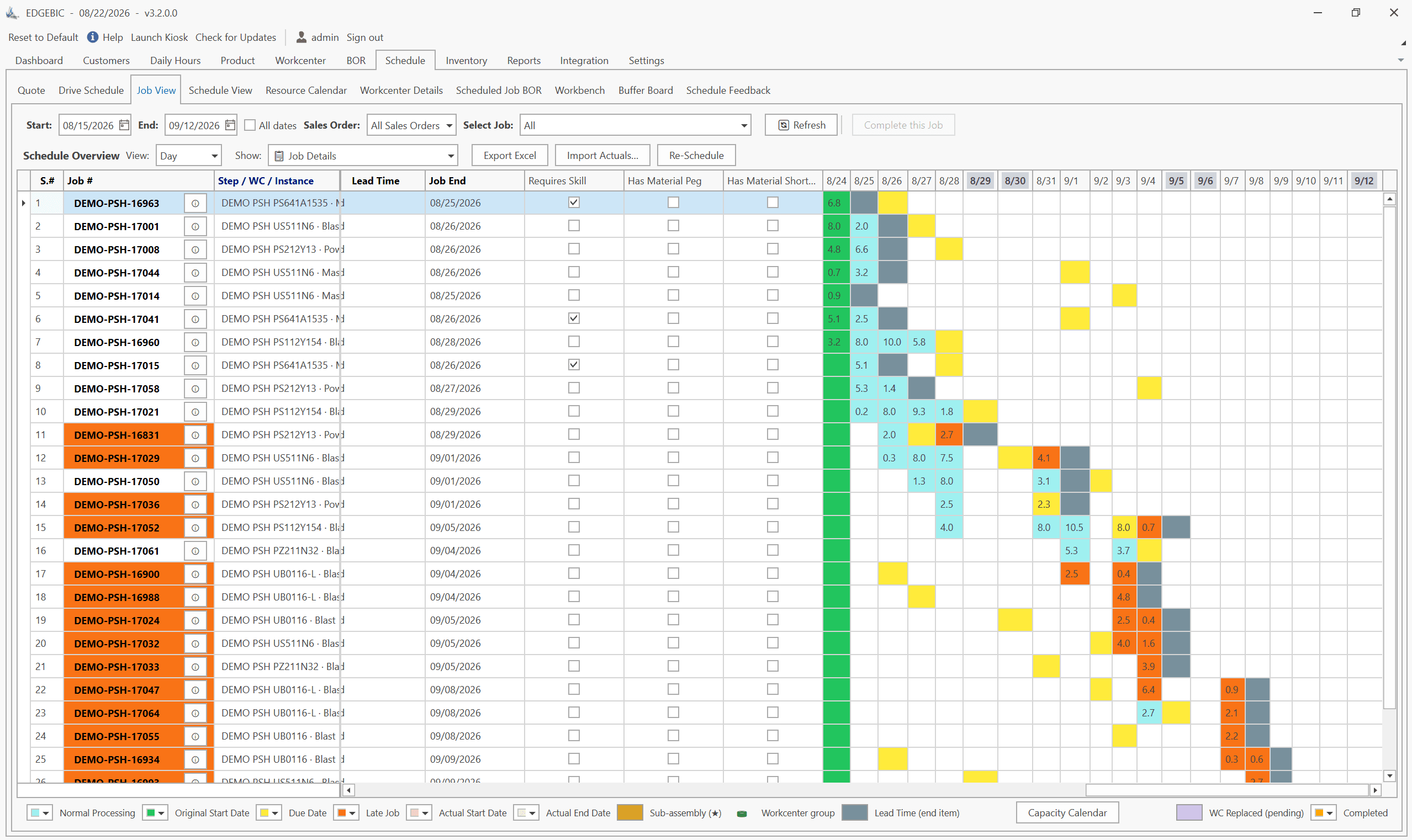
RMDB from User Solutions provides visual capacity loading on the Gantt chart, making it easy to see and resolve capacity conflicts before releasing orders. This is a core advantage of finite capacity planning over basic MRP.
4. Shop Floor Control and Execution
Once the plan is validated and orders are released, shop floor control tracks execution:
- Dispatch lists tell operators which jobs to work on in which order
- Job status tracking records start, completion, and wait times
- Scrap and rework reporting captures quality issues
- Labor and machine time recording tracks actual vs planned production rates
This data is the raw material for the feedback loop.
5. Performance Feedback and Parameter Updates
The closed loop is completed when execution data feeds back into planning:
| Feedback Data | Planning Parameter Updated |
|---|---|
| Actual supplier delivery dates | Lead time accuracy |
| Actual production cycle times | Routing standards |
| Actual scrap rates | Scrap factors in BOM |
| Actual setup times | Setup standards in routings |
| Inventory count variances | Inventory accuracy triggers |
| Order completion rates | Schedule reliability metrics |
Without this feedback, planning parameters become stale and plans drift further from reality over time.
Benefits of Closing the Loop
| Benefit | How Closed-Loop MRP Delivers It |
|---|---|
| Feasible plans | CRP validates capacity before order release |
| Better on-time delivery | Plans are realistic, execution is tracked |
| Reduced expediting | Plans work the first time, less fire-fighting |
| Continuous improvement | Feedback identifies where standards are wrong |
| Planner trust | Plans match reality, planners use the system |
| Lower inventory | Accurate plans reduce need for excessive safety stock |
Implementing Closed-Loop MRP: Practical Steps
Step 1: Get the Basics Right
Before closing the loop, ensure your core MRP inputs are accurate: BOMs, inventory records, and routings. Closing the loop on bad data just gives you faster feedback that the plan was wrong.
Step 2: Add Capacity Validation
Implement CRP or, better, finite capacity scheduling. RMDB's Gantt-based scheduling provides visual capacity management that goes beyond basic CRP load profiles.
Step 3: Establish Shop Floor Reporting
Implement a practical shop floor data collection method. This can range from simple end-of-shift reporting to real-time barcode scanning. The key is timeliness and accuracy, not technology sophistication.
Step 4: Create the Feedback Mechanism
Establish a regular cadence for reviewing actual vs planned performance:
- Daily: Review yesterday's schedule adherence and exception reports
- Weekly: Update planning parameters for items with significant actual vs planned variances
- Monthly: Comprehensive review of lead times, scrap rates, and cycle times
- Quarterly: Full parameter audit and recalibration
Step 5: Build Discipline
The biggest challenge is not technology but discipline. Planners must update parameters when feedback shows they are wrong. Shop floor operators must report accurately and timely. Management must support the process.
Common Pitfalls
- Closing the loop on only some items. Do not just track A items. B and C items can cause production stoppages too.
- Delayed feedback. If shop floor data is a week old, the loop is not really closed. Aim for daily reporting at minimum.
- Ignoring the feedback. Collecting data without acting on it is an open loop with extra steps.
- Over-complicating data collection. Start simple. A daily production completion report is better than a sophisticated MES system that nobody uses. See common MRP mistakes for more pitfalls.
Frequently Asked Questions
Closed-loop MRP is an MRP system that includes feedback from shop floor execution back into the planning process. Unlike open-loop MRP which only generates plans, closed-loop MRP validates plans against capacity, tracks actual production against the plan, and uses performance data to continuously improve planning accuracy.
Open-loop MRP generates material plans but has no mechanism to verify whether the plan is feasible or whether execution matches the plan. Closed-loop MRP adds capacity requirements planning to validate feasibility and shop floor feedback to track execution, creating a continuous improvement cycle.
A closed-loop MRP system includes: demand management and MPS creation, material requirements planning (MRP), capacity requirements planning (CRP), shop floor control and dispatch, vendor scheduling and follow-up, and feedback loops that report actual performance back to planning.
CRP validates whether the material plan generated by MRP is feasible given available production capacity. It loads planned and released orders against available hours at each work center. If capacity is insufficient, planners adjust the MPS or add capacity before releasing orders, preventing infeasible plans.
Closed-loop MRP was the precursor to MRP II. MRP II extended the closed-loop concept further by adding financial planning, business planning, and sales and operations planning to the loop. You can think of closed-loop MRP as the manufacturing planning subset of the full MRP II framework.
Close the Loop on Your Manufacturing Plans
Stop planning in a vacuum. RMDB from User Solutions provides the capacity validation, visual scheduling, and execution tracking you need to close the MRP loop and ensure your plans actually work on the shop floor.
Schedule a free demo to see closed-loop planning in action.
Expert Q&A: Deep Dive
Q: What does a functional closed-loop MRP system look like in practice?
A: In a well-functioning closed loop, the cycle works like this. Monday morning, the planner reviews the MPS based on customer orders and the S&OP plan. MRP runs and generates material requirements. CRP validates that the shop floor can handle the load. If there is an overload on a critical work center, the planner adjusts the schedule in RMDB's Gantt chart to level the load or moves orders to alternate resources. Once the plan is feasible, purchase orders and production orders are released. During the week, shop floor operators report completions, scrap, and delays. By Friday, the planner has actual vs. planned data that feeds back into next week's planning cycle. The key is that the feedback is timely and accurate. If shop floor reporting lags by a week, the loop is not really closed. At User Solutions, we emphasize rapid feedback mechanisms because delayed information is almost as bad as no information.
Q: Many manufacturers say they have closed-loop MRP, but their plans still do not match reality. What is going wrong?
A: The most common failure point is the feedback link, specifically shop floor data collection. Manufacturers install MRP and CRP, generate beautiful plans, release them to the floor, and then have no systematic way to capture what actually happened. Operators finish jobs but do not report completions until end of shift or end of week. Scrap is not recorded. Setup times are not tracked. Without timely, accurate feedback, the loop is open regardless of what software you have. The second failure point is acting on the feedback. Even when data comes back showing that actual cycle times are 30% longer than planned, nobody updates the routing standards. The system keeps planning based on fiction. Closing the loop requires both the technology to capture data and the discipline to update planning parameters when reality diverges from assumptions.
Frequently Asked Questions
Ready to Transform Your Production Scheduling?
User Solutions has been helping manufacturers optimize their production schedules for over 35 years. One-time license, 5-day implementation.

User Solutions Team
Manufacturing Software Experts
User Solutions has been developing production planning and scheduling software for manufacturers since 1991. Our team combines 35+ years of manufacturing software expertise with deep industry knowledge to help factories optimize their operations.
Share this article
Related Articles
MRP vs APS: What MRP Assumes and What Finite Scheduling Fixes
MRP vs APS: MRP plans materials assuming infinite capacity and fixed lead times; APS schedules operations against real capacity. One job planned both ways.

Lean-MRP Hybrid: How to Combine Pull Scheduling with MRP for Long-Lead Materials
Lean and MRP appear to conflict - but most lean shops still need MRP for long-lead purchased materials. Here's how to combine pull scheduling and MRP at the right decoupling points.

MRP Data Accuracy: The #1 Reason MRP Implementations Fail (And How to Fix It)
Poor data quality kills MRP before it starts. Learn the three data pillars, how to hit the 98% inventory accuracy target, and a practical implementation checklist.